
Participant
July 8, 2024
Answered

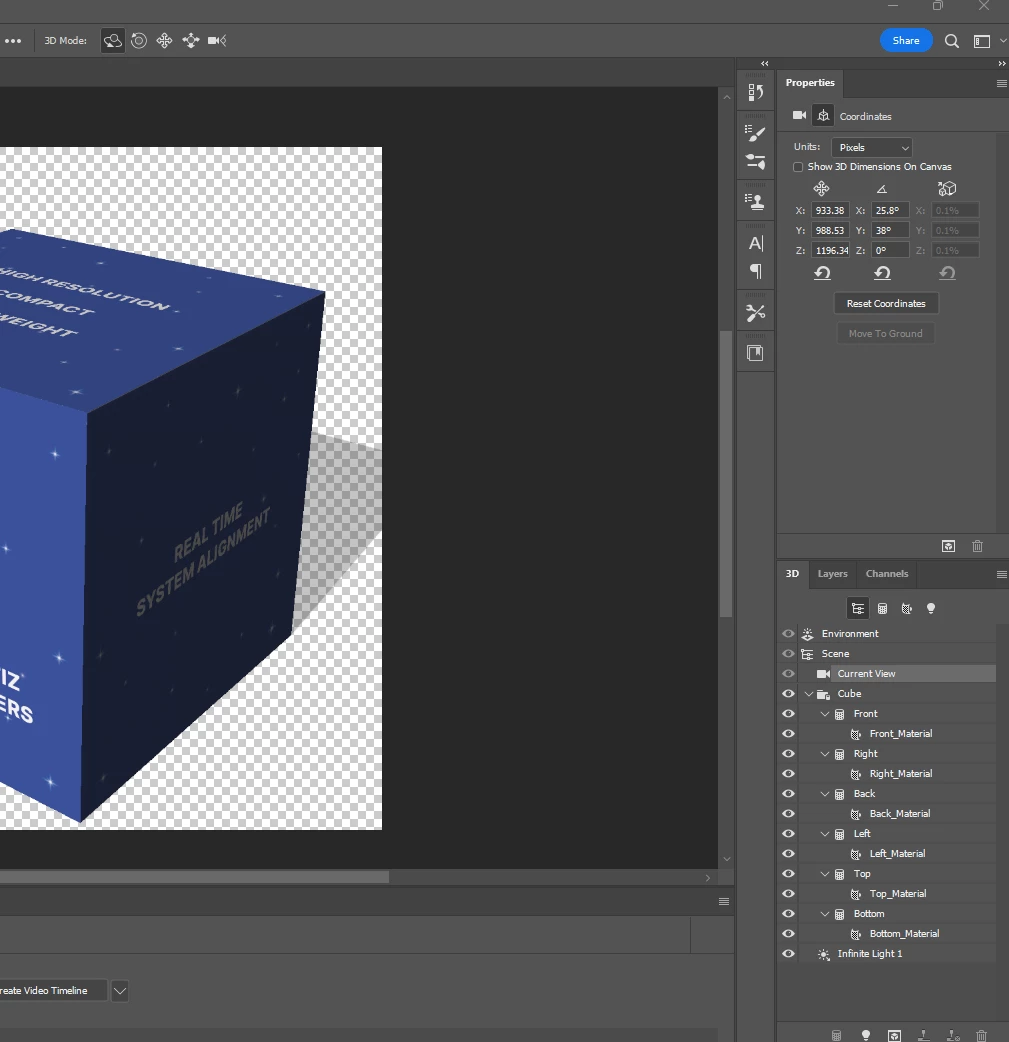
Dimensions/scales X and Y coordinates are greyed out
  • July 8, 2024
  • 1 reply
  • 122 views

I am trying to create a 3D cube that I can animate to spin. A video on YouTube said to change the middle coordinates to -180 degrees halfway through the timeline but my object never moved after playing the video on loop. Does it have something to do with the greyed-out coordinates you can see in the picture?

This topic has been closed for replies.
Correct answer Ged_Traynor

@McKenzie38492592ef6k 3D features are being discontinued in Photoshop, if you want to continue using 3D features you can install version 22.2 which is available from the Creative Cloud app and can be installed alongside the current version
https://helpx.adobe.com/ie/photoshop/kb/3d-faq.html

1 reply

Ged_Traynor
Community Expert
Ged_TraynorCommunity ExpertCorrect answer
Community Expert
July 9, 2024

@McKenzie38492592ef6k 3D features are being discontinued in Photoshop, if you want to continue using 3D features you can install version 22.2 which is available from the Creative Cloud app and can be installed alongside the current version
https://helpx.adobe.com/ie/photoshop/kb/3d-faq.html