
Participant
August 30, 2020
Answered

Disable recent files

  • August 30, 2020
  • 1 reply
  • 1662 views

Hello, in photoshop there are an option when you clic in file, open recent files and here are all my files that I have opened recently. I known that i can delete this clicking on delete recent files, the last option in this menú, but there are a way to disable this completly? I mean, delete the option open recent files in the file menu.


Thanks
This topic has been closed for replies.
Correct answer gener7

You can hide the Recent Files menu item:

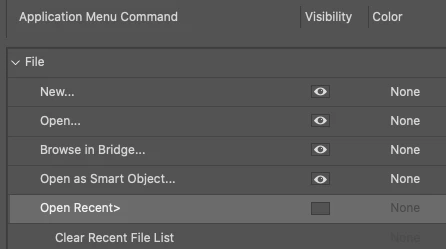
Edit > Menus and toggle off the eyeball next to it.  It won't show up in the File menu until you unhide it.


If you do not want to see any list of Recent Files on your Home screen, go into Photoshop Preferences > File Handling and set Recent File to "0".

1 reply

gener7
Community Expert
gener7Community ExpertCorrect answer
Community Expert
August 30, 2020

You can hide the Recent Files menu item:

Edit > Menus and toggle off the eyeball next to it.  It won't show up in the File menu until you unhide it.


If you do not want to see any list of Recent Files on your Home screen, go into Photoshop Preferences > File Handling and set Recent File to "0".