
Participant
January 21, 2020
Answered

Disk error when moving from Lightroom to Photoshop

  • January 21, 2020
  • 3 replies
  • 4554 views

Hi - I can no longer transfer images from Lightroom to Photoshop. It says 'disk error'.

I doubt it is the scratch disk as the scratch disk on my Mac says there is 500 plus GB of space.

Although my LR catalogue is on my Mac, I have recently moved the original RAW files off my computer on to an external drive. This transtition has been fine when using LR.

Do you think this has anything to do with it??

Thanks in advance.
Correct answer JohanElzenga

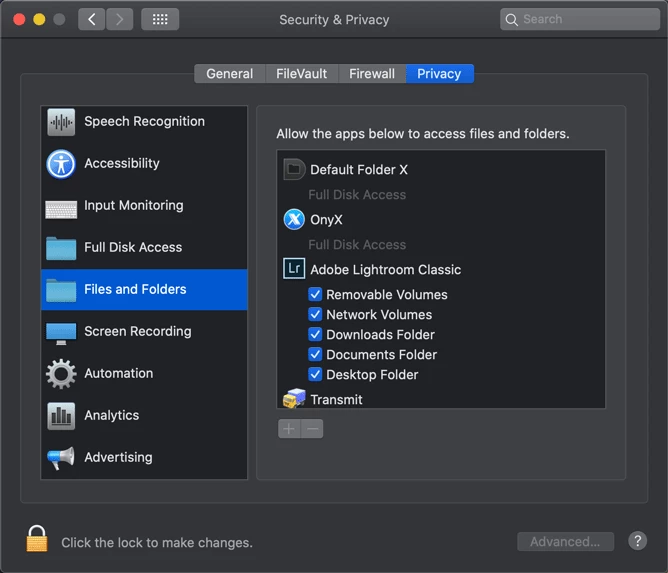
Make sure Lightroom and Photoshop have permissions to access files no matter where they are.


3 replies

Traffik The Photographer
Participating Frequently
March 17, 2025

I'm having the same issue and it's killing my workflow right now. Adobe needs to fix this ASAP!! smh

IV By Traffik
JohanElzenga
Community Expert
JohanElzengaCommunity ExpertCorrect answer
Community Expert
January 21, 2020

Make sure Lightroom and Photoshop have permissions to access files no matter where they are.


-- Johan W. Elzenga
Participant
January 21, 2020

Many thanks for your input. 

I have sorted this now. 

Something to do with DNG and not DNG??! 


Thanks again. 

JohanElzenga
Community Expert
Community Expert
January 22, 2020

No, it has nothing to do with DNG. Images aren't transferred between Lightroom and Photoshop in DNG.

-- Johan W. Elzenga
Legend
January 21, 2020

What version of macOS and what disk format is the external hard drive?

Participant
January 21, 2020

Hi Lumigraphics


The external drive disk format is "Mac OS Extended (Journaled)"

The macOS is MacOS Catalina version 10.15.2

The Mac says I am up to date with software.

Thanks.

Legend
January 21, 2020

Catalina has problems with Adobe software, you'll see lots of posts here about it. Do a web search for "Catalina permissions" and see if some of the fixes work.