
Display artefacts after simple adjusting of images
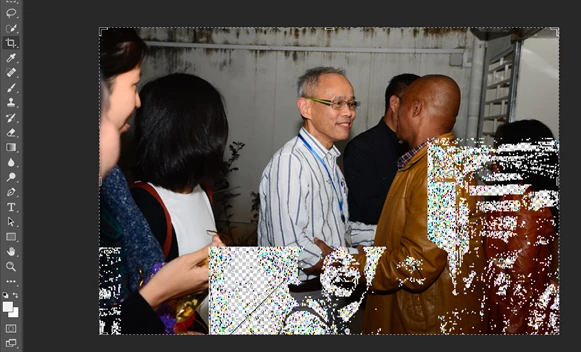
I just bought a new computer and switched to Photoshop a month ago. Just a beginner with Photoshop. After adjusting the contrast, brightness of 10+ photos, subsequent photos will show artefacts. When I click another command, like rotate, adjust etc, the artefacts disappeared. But once the command is finished e.g. adjustment finished, the displayed image again show artefacts. The artefacts show patterns of part of previous images. Sometimes it clearly shows the outline of a person. I have to restart Photoshop. Again after 10+ photos, artefacts appear. It is a new computer with update drivers and so the advice on outdated display cards or drivers should not apply. It is quite frustrating that this widely popular software does not solve these issues and I cannot find it help. Can someone please help? Thanks.
AMD Radeon RX Vega 11 GPU
AMD Ryzen 5 2400G CPU 3.6GHz
16G RAM
Windows 10 Home 64bit
 AdChoices