

Roger Breton
Legend
January 15, 2020
Answered

Display problem

  • January 15, 2020
  • 1 reply
  • 977 views

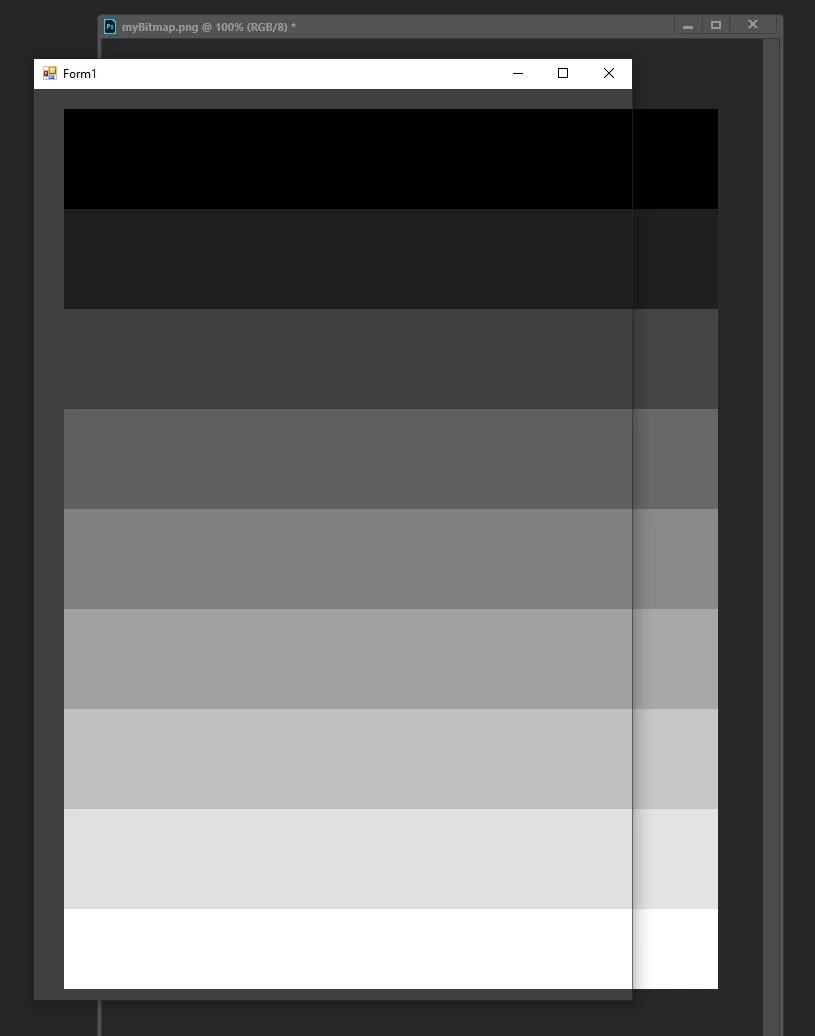
I am on Windows 10 and I stumbled upon a difference in display between Photoshop and other "Image Processing" applications. To better study the problem, I created this 9 step RGB image:

The last step (at the bottom) is white -- sorry if it's not showing. The first step is RGB 0,0,0, next is RGB 32,32,32, then 64,64,64, and 92,92,92, and 128, 128, 128, and 160, 160, 160 and 192, 192, 192 and 224, 224, 224 and 255, 255, 255. So far so good. Now don't get me wrong, I'm a long time user of Adobe's products but I am seeing a measurable difference, on my monitor, between the image viewed in Photoshop and accross a number of other applications, such as MS-Paint, MS-Photos, GIMP and Corel Painter 2020. In each of these cases, I observe NO difference between the "original" image and its display. I made some Luminance (Candela/m2) measurements to document the difference I observe, using a decent colorimeter (Minolta CS-200):


step   Other      Photoshop

----    -------      -------------

0        0.32        0.27

32      1.05        1.00

64      2.91        3.34

92      6.36        7.55

128  11.98      14.02

160  20.22      22.68

192  31.46      34.00

224  46.61      48.24

255  64.48      64.51 


As you can see, by these numbers, the difference is real. I made sure I took the measurements at the same exact place on my monitor. The PNG I created as a Gamma of 2.2. The difference is even more obvious when taking a screen capture. You can take a look at this file :
This topic has been closed for replies.
Correct answer Roger Breton

Hate to say this (I feel like I have "egg on my face"...) but (one) the solution, as far as demonstrating the validity of the transformed (managed) numbers to the screen, out of Photoshop, is simply to convert the image to the monitor profile, using relative colorimetry, through the ConvertToProfile command. Simple. The numbers perfectly match those sent to the screen by Photoshop when displaying the original image. Why didn't I think of that earlier? ...

1 reply

D Fosse
Community Expert
Community Expert
January 15, 2020

This is normal and expected.


Photoshop is color managed. That means the data are converted from the document profile into your monitor profile, and these recalculated numbers are sent to screen. This happens on the fly, as you work.


Applications that don't support color management don't do any of that. They ignore all color profiles and just send the uncorrected numbers directly to the display.


For color management to work as intended, you need to have an accurate monitor profile set up at system level. You normally use a calibrator for that.


The whole point is that the file is correctly represented on screen - corrected for your monitor's many inaccuracies and idiosyncrasies.

Roger Breton
Legend
January 15, 2020

Dera Diane, I (wrongly) assumed Corel Painter and GIMP were using the monitor profile as a Destination? A quick trip to GIMP's Preferences showed me that it wasn't? So, after selecting my monitor profile (in GIMP) and reopening the image back, and making a side by side screen capture (GIMP vs VisualStudio), I got the same numbers as  in Photoshop -- yay! So, thanks you for your help. Now, I am still in need to "prove" Photoshop (and GIMP?) 'managed' RGB numbers to the monitor are correct. I assume they are -- I never questionned this for Display profiles. Have you ever heard of Argyll? They have a nice collection of free ICC tools (www.argyllcms.com) of which, one called "icclu", is designed exactly for the purpose of transforming colors through ICC profiles....


My own web site is here, www.graxx.ca

D Fosse
Community Expert
Community Expert
January 15, 2020

I'm so sorry, I don't know where the name "Diane" comes from, I guess I saw the "D" in your name but I have no clue how that turned into "Diane" -- so sorry. I see you know your color management well. The question of whether Photoshop is correct deserves to be raised, if one has any doubt, it's quite a legitimate question. I'm now satisfied that Photoshop *is* using the monitor profile in my system to manage RGB colors sent to the screen but, beyond that, I agree, it's a matter of the profile itself doing a good job. Thank you for taking the time to remind me about never to use the monitor profile as the "document" profile, in Photopshop, and stick with one of the popular "device independent" RGB profiles, sur as sRGB (my all-time favorite Working RGB space). As far as "calibrator" is concerned, I use a bunch of different instruments in my practice, from the lowly PANTONE Huey (less than $100), to the X-Rite's i1Display, i1Pro, i1Pro2, to the more "accurate" Minolta CS0200 (a 14 grand device) to a Photo-Research spectroradiometer. Thank you very much, dear Mr Fosse, for taking the time to reply, and I'm so confused for calling you "Diane". Have a nice color day 🙂 


🙂