
Display resolution affecting UI, how do I either allow scrolling menus or or fix UI scaling?
 Hi,
Hi,
I am a windows 10 user with a two display set-up. The display that I want to use Photoshop on is 4k, but I have it set to 1920x1080 currently.
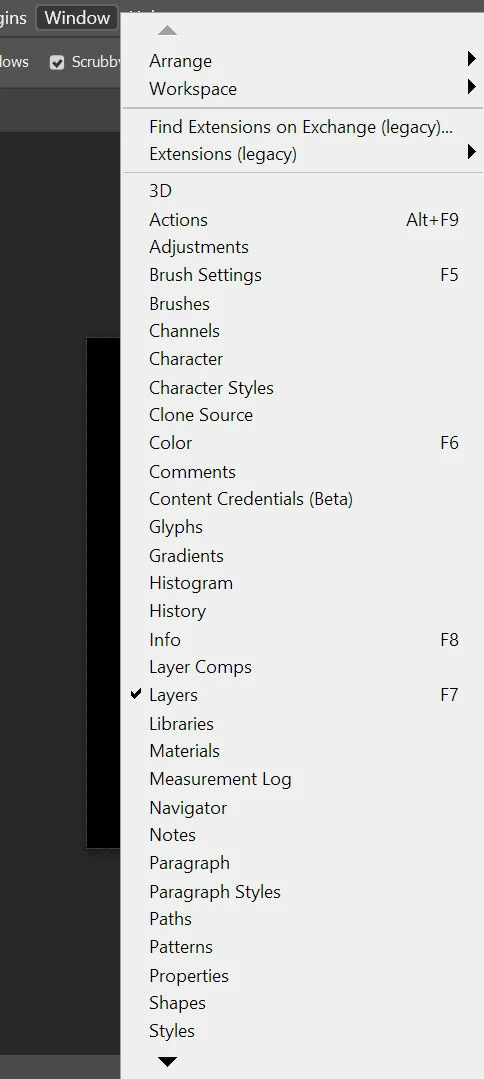
If I set my display's scaling to 150% (my preference), then Photoshop does not scale alongisde it. The issue for me being that the menus don't fit which means I have to click down one menu item at a time, which is very frustrating (is there an option to turn on mouse scrolling here?).
I've tried the different Photoshop preferences/interface scaling options: 100%, 200% and auto.
I've also tried these in combination with using the 'Override high DPI' setting in Photoshop.exe's compatibility tab, with all three options: system, system enhance and application decides.
What do I need to do to have it display the way I want it to? Currently I am just using 125% scaling which works, but I would prefer 150%.
System details:
Adobe Photoshop Version: 24.3.0 20230316.r.376 37b4b38 x64
Operating System: Windows 10 64-bit
Version: 10 10.0.19043.1288
NVIDIA GeForce RTX 3080 Ti
 AdChoices