Participant
June 30, 2018
Question

Displayed Brushes Folders

  • June 30, 2018
  • 1 reply
  • 272 views

I don't have to much of a problem with the current version of PS, but there is one thing that is driving me insane and after days and even weeks of looking around for various solutions I haven't been able to find a solution. It used to be that when you right click on the pic could and get all of your brush folders displayed in a popup menu, click on what you want, and it would appear in the new set up menu. Ever since PS started updating though, all I get is this column when I right click and I have to click on a little arrow at the bottom and spend 2 minutes scrolling over all my brush folders. I want that full page back so I can stop wasting my time and speed up my work flow.

Is this even possible? Been searching everywhere to get the old single page back without the scrolling column to deal with. Here is a pic of the Current Column that I WANT to get rid of:
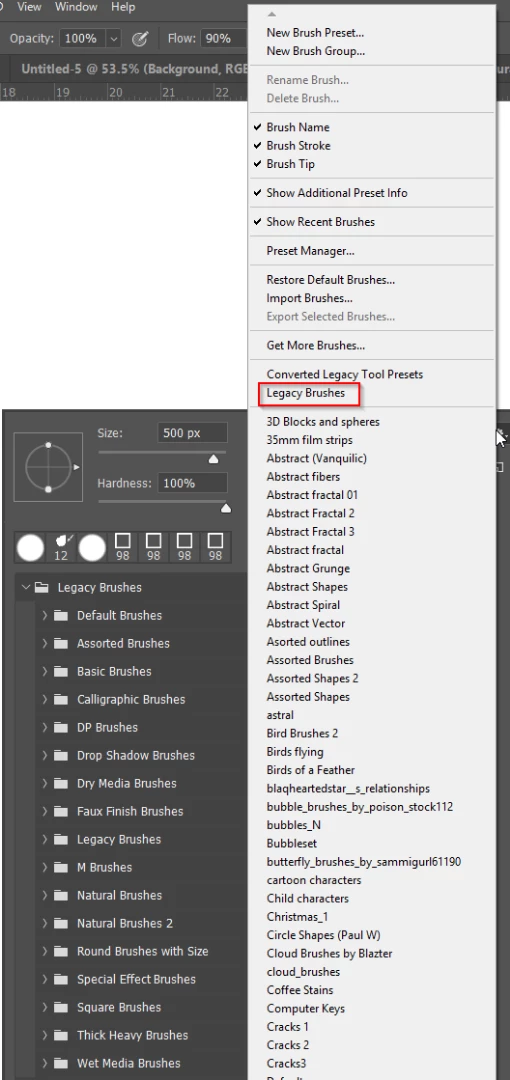
This new set up has made finding and choosing brush sets way harder than it needs to be when you need. Any help would be appreciated, even some kind of PS addon that would give me back what I had before.

Help Please.

    This topic has been closed for replies.

    1 reply

    Trevor.Dennis
    Community Expert
    Community Expert
    July 1, 2018

    I started a thread with the same question after this behaviour was suddenly inflicted on us, and I don't think I got a single reply.

    Here you go...  Just the one reply, and it did not help.

    Additional Brush Sets Now in Single Column

    I never found a solution, but I have changed my workflow a tiny bit.  In stead of using the mouse, use the up and down cursor keys, as they scroll through the list _very_ much faster.  You can also go either way with the cursor keys, where as the mouse won't start again at the start when it reaches the bottom. 

    It would be one heck of a job, but what we could do is rationalise our groups dragging favourite presets between groups to create a master with all cloud brushes, for instance, in the same group, and delete the empty group.  You'd probably have to be at least an eight on the Asperger scale to seriously consider doing this though.

    It feels like I just painted myself into a corner, as what I have done, is rename a lot of groups so they list by function alphabetically.  That's quite a time saver when you have a 100 groups or more.   I try to limit myself to 100, and I now feel even further up the Asperger scale as I just checked and I have _exactly_ 100 brush groups.  You have to laugh.

    If you ever find a better fix for the way groups are now displayed, would you PLEASE let me know.

    ertle2Author
    Participant
    July 1, 2018

    Thanks Trevor, that is what i thought I might have to do. PS claims to have so many ways to adjust panels and set up things the way you want them, but apparently that doesn't apply to brushes. Thanks for the tips, I'll give the a shot.