Participant
April 18, 2021
Question

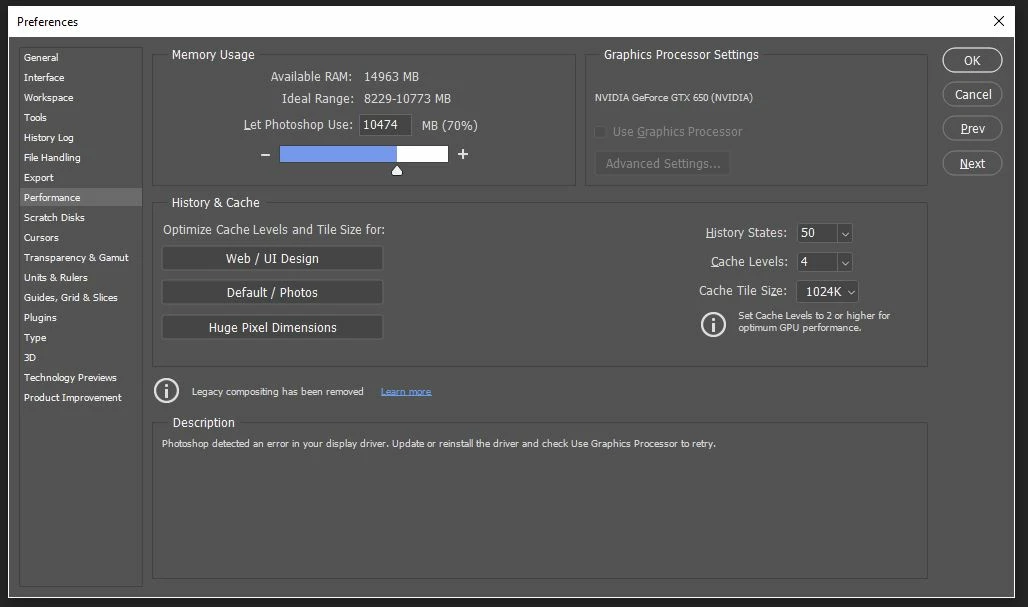
Do not support my GTX 650 after updated to 22.3.1

  • April 18, 2021
  • 3 replies
  • 2296 views

I've updated my display drivers to the newest version.

This topic has been closed for replies.

3 replies

Giosa Studio Web
Participating Frequently
April 21, 2021

With the same graphic card model, the only solution for me has been to rollback to the previous version of Photoshop (22.3.0), and now everything works fine.

To reinstall the previous version: open Creative Cloud Desktop, find Photoshop in the App list, click the 3 dots icon at the right of Photoshop and select Other versions, then click Install on previous version 22.3.

Kevin Stohlmeyer
Community Expert
Community Expert
April 21, 2021

You should run a clean install of the previous version as it may have shared resources with the latest version. I would uninstall the new version first then reinstall the older version.

Other users have reported the same issue with the previous version due to updated system resources.

Giosa Studio Web
Participating Frequently
April 21, 2021

I've the same problem, I'm downgrading Photoshop to the previous version. It's not the right moment for change the graphic card (very high prices, very limited choice)

Kevin Stohlmeyer
Community Expert
Community Expert
April 19, 2021

Your graphics card does not meet the minimum requirements for current Photoshop versions.

You'll have to update the card itself, not the drivers.

https://helpx.adobe.com/photoshop/kb/photoshop-cc-gpu-card-faq.html