Yes it is true. Photoshop is a 'Pixel based' editor. It must have a rendered RGB file to be useful, and raw files need to be rendered either by Lightroom or the Adobe Camera Raw plugin for Photoshop.
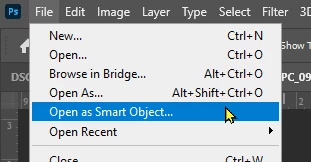
An exception is this- if a raw file can be opened in Photoshop as a 'Smart Object' then the raw is embedded in the Ps document as a smart object layer. [Double-click] a Smart Object Layer and the raw image will again open in Camera Raw.
As in Lightroom-Classic:


In Lightroom (v6.5 Cloud based):
First Export the file as [Original + Settings] to a local folder, then run Photoshop, and in the Ps Menu- [File > Open as Smart Object...]

 AdChoices