raymondh93818467
Inspiring
December 3, 2019
Answered

Does Photoshop have the function of selecting ICC light source?

  • December 3, 2019
  • 2 replies
  • 830 views

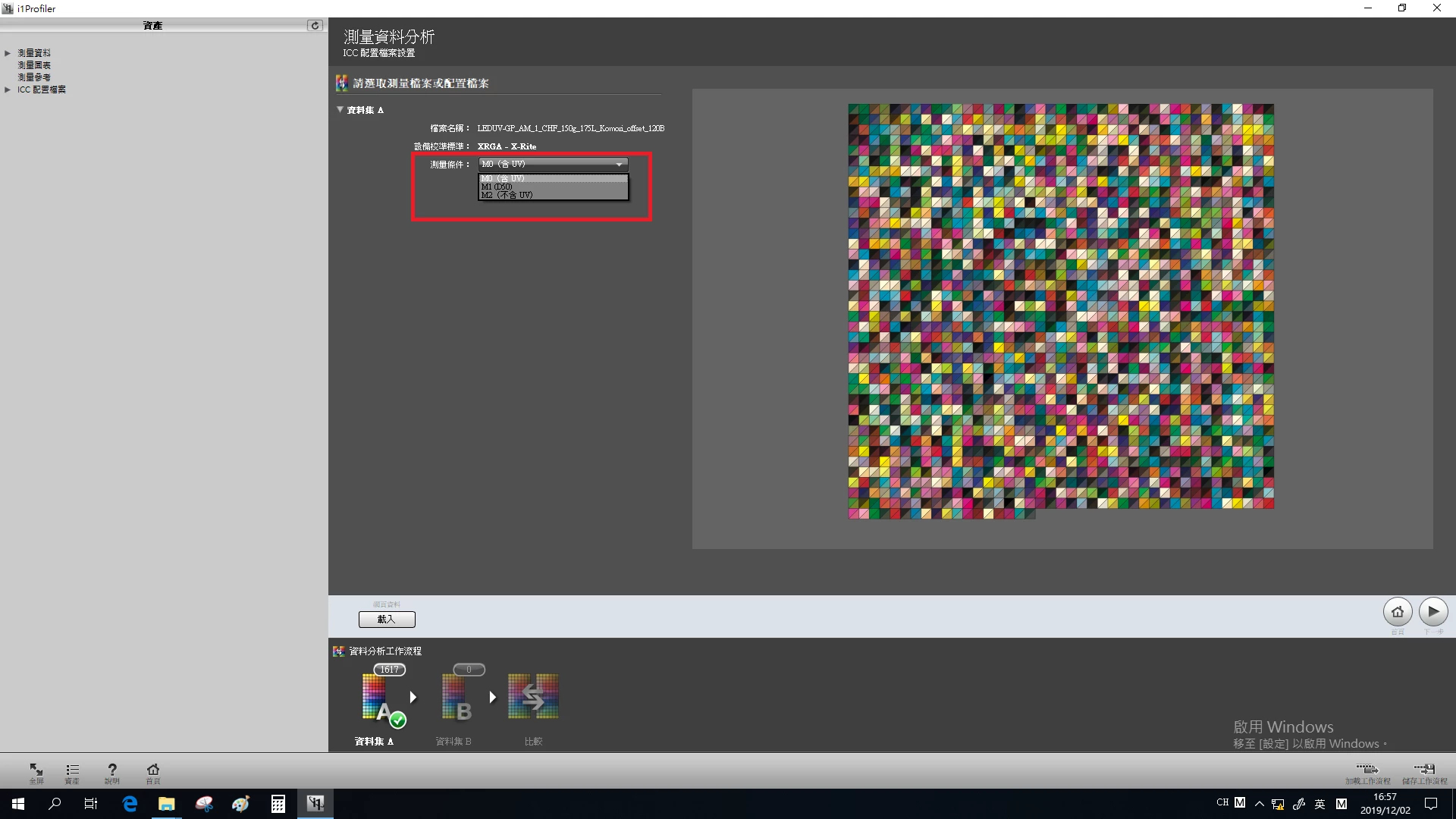
Recently, I was studying color management, and I used the i1 profiler software of X-Rite to make some print ICC files. It is found that the ICC files contains M0, M1 and M2 light source data because it uses a variety of light sources for scanning. Three kinds of data are different, and I only need one of them. In the i1 profiler software of X-Rite, I can choose one of the light sources to see the effect. At present, I need to use Photoshop to call its ICC to preview pictures and change colors. However, I don't know if Photoshop has chosen ICC light source function. I haven't found this function in my preliminary check,, so now I would like to ask experts whether Photoshop really hasn't chosen ICC light source function. If not, will Photoshop add this function later?

    This topic has been closed for replies.
    Correct answer NB, colourmanagement

    Hi,


    Photoshop and i1 Profiler are used industry wide the way they work right now. The way differing lighting conditions are used in profile building is acceoted industry wide. 


    Note: You actually don't have to save multiple text files to make the 3 different profiles in i1Profiler, 

    after measuring the chart to collect the "training data" for multiple conditions, stil in the measurement window you now select the lighting condition you want, then move on step by step to profile creation.

    Later you can go back to the measure window - select a different condition and build another profile 


    Yes, any ICC profile can contain the "training data" for all 3 measurement conditions, but it doesn't contain 3 sets of calculated ICC profile tables. Only one set of tables is created when making the profile.


    Photoshop doesn't have the capability to create ICC profiles from training data, so it cannot use the training data you mention in the way you would like it to. 

    Photoshop simply uses the profile its been given in providing colour managed preview of your image.

    You need to build 3 profiles, each with one of the 3 light sources, to do what you are asking to do.


    We volunteers here who help out users on this forum have no power over Adobe to make them change the way the program works - furthermore you'll probably appreciate that as a good print profiler software has a quite singinificant cost, Adobe are unlikely to duplicate the work of X-Rite et al by licencing and embedding profile building in the program.


    I hope this helps

    if so, please "like" my reply and if you're OK now, please mark it as "correct", so that others who have similar issues can see the solution

    thanks

    neil barstow, colourmanagement.net

    [please do not use the reply button on a message in the thread, only use the one at the top of the page, to maintain chronological order]

    2 replies

    NB, colourmanagement
    Community Expert
    NB, colourmanagementCommunity ExpertCorrect answer
    Community Expert
    December 3, 2019

    Hi,


    Photoshop and i1 Profiler are used industry wide the way they work right now. The way differing lighting conditions are used in profile building is acceoted industry wide. 


    Note: You actually don't have to save multiple text files to make the 3 different profiles in i1Profiler, 

    after measuring the chart to collect the "training data" for multiple conditions, stil in the measurement window you now select the lighting condition you want, then move on step by step to profile creation.

    Later you can go back to the measure window - select a different condition and build another profile 


    Yes, any ICC profile can contain the "training data" for all 3 measurement conditions, but it doesn't contain 3 sets of calculated ICC profile tables. Only one set of tables is created when making the profile.


    Photoshop doesn't have the capability to create ICC profiles from training data, so it cannot use the training data you mention in the way you would like it to. 

    Photoshop simply uses the profile its been given in providing colour managed preview of your image.

    You need to build 3 profiles, each with one of the 3 light sources, to do what you are asking to do.


    We volunteers here who help out users on this forum have no power over Adobe to make them change the way the program works - furthermore you'll probably appreciate that as a good print profiler software has a quite singinificant cost, Adobe are unlikely to duplicate the work of X-Rite et al by licencing and embedding profile building in the program.


    I hope this helps

    if so, please "like" my reply and if you're OK now, please mark it as "correct", so that others who have similar issues can see the solution

    thanks

    neil barstow, colourmanagement.net

    [please do not use the reply button on a message in the thread, only use the one at the top of the page, to maintain chronological order]
    raymondh93818467
    Inspiring
    December 4, 2019

    Hi NB,

    Thank you for your help. Your method is work. I tested it in your way. The three ICC saved have been verified by Photoshop, and they are really different.

    NB, colourmanagement
    Community Expert
    Community Expert
    December 4, 2019

    Hi

    great

    thanks for the feeddback

    that’s the way it's supposed to be done


    neil barstow, colourmanagement.net

    [please do not use the reply button on a message in the thread, only use the one at the top of the page, to maintain chronological order]

    NB, colourmanagement
    Community Expert
    Community Expert
    December 3, 2019

    Hi raymondh,


    When you use i1 Profiler to calculate the printer profile from the captured chart data, you get to choose which data should be used at that time.

    So, the ICC print profile is actually calculated with the one data option you selected.  

    This means that to have the options all available when printing, you'd make 3 x ICC profiles i.e: M0, M1 and M2 and put that info in the profile name [that’s how I do it], that way you can easily switch between them when printing from Photoshop. 

    Next step is to print one good test image 3 ways [ we offer a free one here: CMnet Pixl AdobeRGB testimage ]  each print using one of those 3 profiles, be careful to mark the prints and then compare in good light and decide which option works for you. You'll probably settle on one option for general use.


    I hope this helps

    if so, please "like" my reply and if you're OK now, please mark it as "correct", so that others who have similar issues can see the solution

    thanks

    neil barstow, colourmanagement.net

    [please do not use the reply button on a message in the thread, only use the one at the top of the page, to maintain chronological order]


    raymondh93818467
    Inspiring
    December 3, 2019

    Hi NB__colourmanagement,

    Thank you for your reply. Your method means: after the i1 profiler finishes measuring the test form, there is an option to choose one of the measurement conditions (The light source mentioned above M0, M1, M2), and then go to the next step to complete the ICC? If yes, I know this method. However, no matter which measurement condition I choose (M0, M1, M2), the final ICC file generated contains three measurement conditions (M0, M1, M2). It can be seen through the i1 profiler analysis function. If I use this ICC to use Photoshop to look at pictures, it may not be the measurement conditions I need. Of course, I can also save the measurement data as three txt files, import them separately with i1 profiler, and then make ICC. I propose this Photoshop demand function, mainly because I want to change the comparison results of different measurement conditions more easily.