
Drag and Drop from Lightroom Classic to open document in Photoshop
Hi there,
This article from Julienne Kost:
https://jkost.com/blog/2021/04/moving-photos-between-lightroom-classic-and-photoshop.html
reads:
To open multiple files from Lightroom Classic into Photoshop as Smart Objects and place them into a single document, open a document in Photoshop. Then, with both applications visible, select the images in Lightroom and drag and drop them on top of the open Photoshop document. Each image will be converted to a Smart Object and placed into the open document. Note: the options to “Resize Image During Place” as well as “Place or Drag Raster Images as Smart Object” are controlled in Photoshop’s General Preferences.
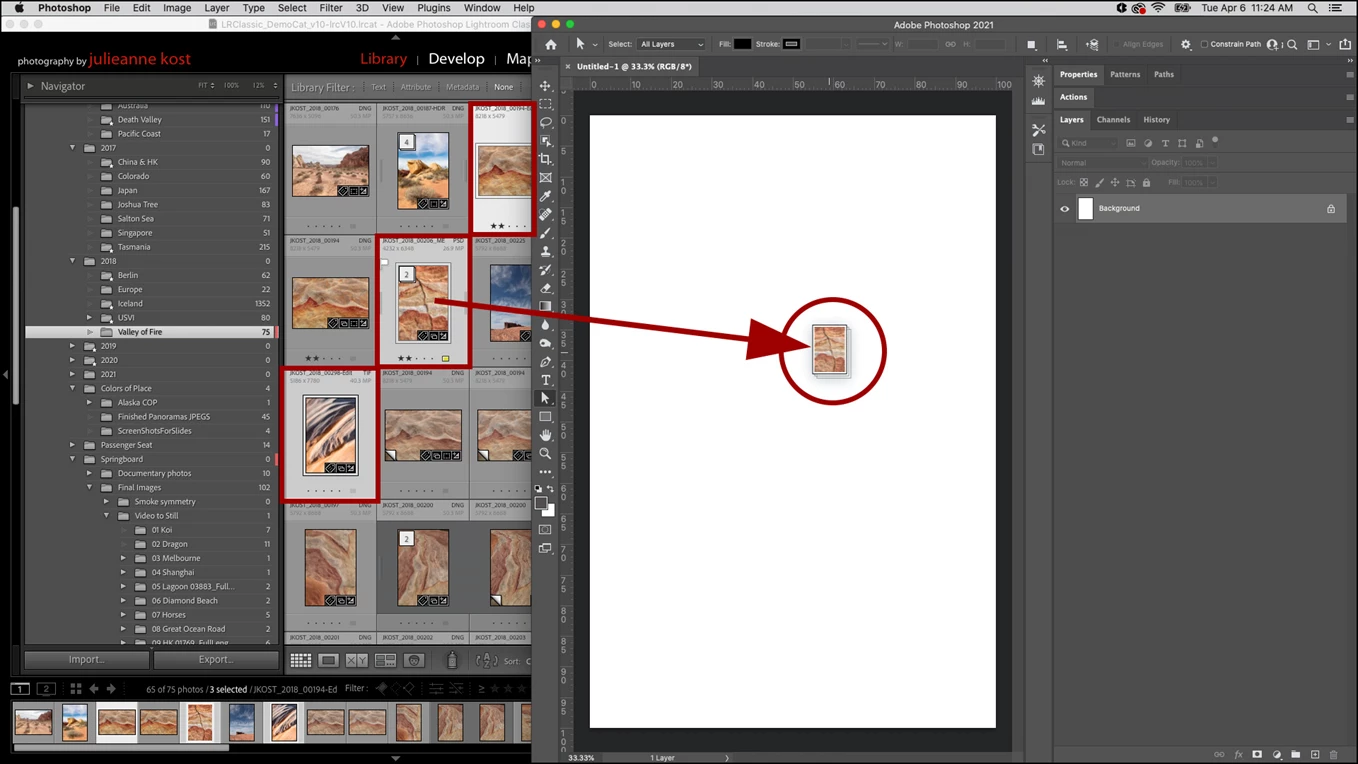
Not sure what is going on but I've tried this numerous times now, dragging onto a blank document, creating frames to drop into, dragging over an existing smart object photo, etc., and nothing works at all.
This is what I'm running on:
omputer: HP Omen 17" Laptop Installed 20210402
System: Windows 10 Home
Processor: Core i7 10750H
Memory: 64 GB DDR 4
Graphics: NVIDIA GeForce RTXT 2070 (8 GB GDDR6 dedicated)
Can anyone advise me as to why this Guru's instruction isn't working at all on my system?
Thanks in advance!
 AdChoices