
Inspiring
July 9, 2024
Answered

Draggin Layermask into the bin does not delete the mask but applies it?

  • July 9, 2024
  • 1 reply
  • 614 views

As the title says, watch also the attached video, which makes the issue clear.

Dragging the Layer mask into the bin does not delete the mask for whatever reason, but applies it.

Is this some sort of weird UX choice or is it broken? Because this was not the normal behavior with my settings before.

This topic has been closed for replies.
Correct answer Ged_Traynor

@wnwka go into the preferences and select "reset all warning dialogs"
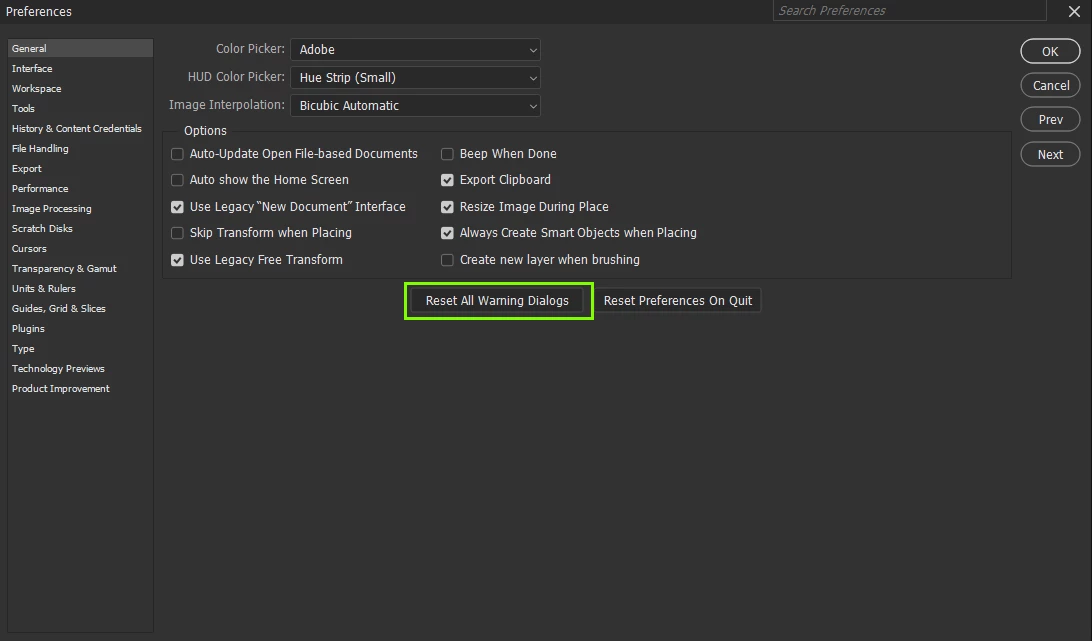
Next time you drag the layer mask to the bin, make sure "don't show this again" is unchecked

1 reply

Ged_Traynor
Community Expert
Ged_TraynorCommunity ExpertCorrect answer
Community Expert
July 9, 2024

@wnwka go into the preferences and select "reset all warning dialogs"

Next time you drag the layer mask to the bin, make sure "don't show this again" is unchecked

wnwkaAuthor
Inspiring
July 9, 2024

Thank you, but is it possible to set it as standard that dragging a layer mask into a bin would delete the mask because this makes more sense than applying it. It's literally a bin...

c.pfaffenbichler
Community Expert
Community Expert
July 9, 2024

As per what @Ged_Traynor explained somebody changed it on your computer (to apply the Mask on dragging it to the bin instead of deleting it) and now you can reset it.