Known Participant
October 24, 2013
Answered

Drop Down Menus in Photoshop CS 6 Goes Blank In Mavericks

  • October 24, 2013
  • 28 replies
  • 114288 views

Hi

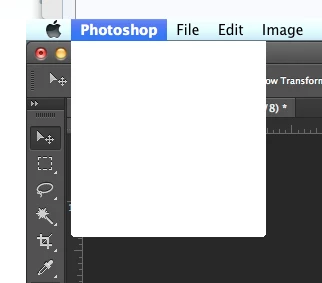
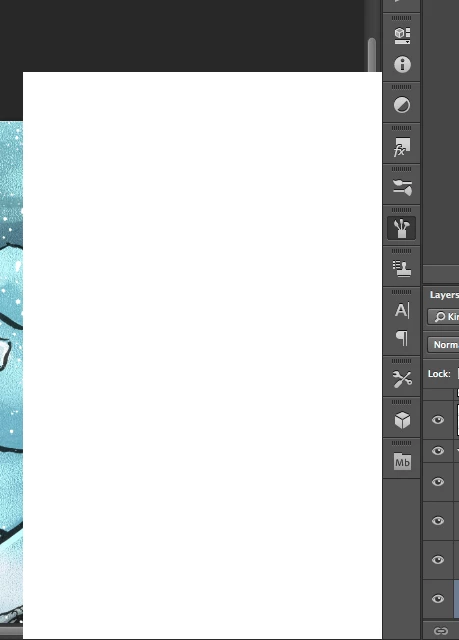
I'm having trouble with Photoshop CS6 in Mavericks. After a working a little while, all pop up/drop down menus goes blank. They still work, but I can't see what's on them. Even the Apple menu bar is afflicted by this, though only when Photoshop is in the front.

Any help is appreciated. Thanks.  PS: I do use a cintiq on a 2012 Macbook Pro 15" with retina display.

This topic has been closed for replies.
Correct answer Jesper Storm Bache

Hi Grenderer,

If the work-around does not work for you, can you perform the following test.

After you install the plug-in and launch Photoshop, then look in:

- the OSX console. You should see a message such as

     WhiteWindowWorkaround Initialized

- From within Photoshop, you can choose "Help > System Info". In the resulting dialog, you should be able to see the WhiteWindowWorkaround plug-in and it should be listed in the "Optional and third party plug-ins" similar to the following:

     "Optional and third party plug-ins:

      WhiteWindowWorkaround 1.0.4, Copyright 2013-2014 - from the file “WhiteWindowWorkaround.plugin”

If both of these tests pass, then something else is going on.

In general, be aware that in the end the right fix will not come from Adobe, as we don't own the code that seems to be inducing the failure. We can therefore not speculate on when the official fix will be available. When I become aware that the right fix is available, then I will update this thread


It looks like the plug-in fails to initialize on certain Photoshop installations. This should be fixed in:

    http://www.bache.name/download/osx/WhiteWindowWorkaround.plugin1_0_5.zip

If the plug-in is properly installed, then you should see something  similar to the following in the OSX console after launching Photoshop:

     Adobe Photoshop CC[14728]: WhiteWindowWorkaround Initialized

You can see the OSX console by going to “Utilities” from Finder, and then running the Console application.

28 replies

Participant
September 17, 2014

I'm getting this error on Windows 7, CC. The plugin posted obviously doesn't work for PC. Fully updated system and high-end GPU. I've tried re-installing multiple times now.

Chris Cox
Legend
September 17, 2014

This topic is about a bug in MacOS, that was worked around in Photoshop CC.

The plugin only works on MacOS because this is only a MacOS issue.

So you have a completely different issue, seeing as your problem is on Windows.

hdkvcsdjfjsdhfhjdf
Participant
September 19, 2014

Windows, no wacom and no right click menus here either.

Participant
May 14, 2014

I am having this same problem about once a week.  I am using WACOM tablet as well and will make sure it is updated.

Chris Cox
Legend
May 16, 2014

Install the workaround plugin, and hope Apple gets the OS bug fixed soon.

Legend
January 14, 2014

Hey guys,


Jesper thinks he knows what the problem is and we have a workaround to avoid this issue that we'd like to test before making it more widely available. Let me know if you'd be willing to install a plug-in and test out this workaround. I will email you with details and instructions. Thanks!

Participant
January 14, 2014

I would be happy to test this on some of my workstations.

Participating Frequently
January 7, 2014

Can anyone confirm if this problem is extremely random at times? Suddenly i have managed to work on a photograph for two and a half hour without any problems. Other times it can take as little as 20 seconds. But now it suddenly seems fine again (even if i'm just waiting for it to fail).

Known Participant
January 7, 2014

yes pretty random here - like you I am waiting for it to happen again...

Mac OS Sonoma, 64 GB RAM 27" 2019 iMac 3.6 GHz 8-Core Intel Core i9
Participating Frequently
January 7, 2014

For me its seesm to be tool based.  The dodge and burn set it off mostly.  The other day I checked my activity monitor and with LR and PS open I was using 29 of32 GB available.  I restarted and reopened my apps and images and was using 6GB.  Not sure if its relevant or not. I have downgraded my driver but am still seeing the issue on my Intous 3. It's interesting that the same issue was showing up on a Monoprice device mentioned earlier.

Participating Frequently
January 5, 2014

Here's a video i recorded just now, that shows how fast the problem can occur after a freshly installed Wacom driver.

https://vimeo.com/83413755

Participating Frequently
January 5, 2014

Thank you KyrreBaker. I cannot believe Wacom cannot reproduce this error, but at least there is video evidence that there is indeed an issue we have all been experiencing.

Participating Frequently
January 5, 2014

The short summary of what very well could be a long post, is that the current Wacom Driver from 15 October 2013 : MacOSX - Driver 6.3.7-3 (10.6x - 10.9x) -- is most definitely at fault for many, if not all, of the Adobe problems.

I just posted a report... and rant... on the Wacom Forums here: http://forum.wacom.eu/viewtopic.php?p=60897#p60897

I have 3 brand new fully loaded 27" iMacs that I have to deliver tomorrow, and at least I'm glad I found a solution for my client.

They're using Intuos 2 tablets with Adobe CC (PS, LR, BR, IL, IN) and only those programs have been installed, along with initially the "current Wacom driver". I found that completely uninstalling the 6.3.x drivers and installing the last Wacom Driver for Intuos 2 tablets: Driver 6.2.0-w4 for Mac OS X v. 10.7, 10.6 & 10.5 (Intel) ... fixed all of the nagging problems I was experiencing, including problems with Mail, Safari, Chrome, TextEdit and even the Finder at times. Keyboard would lock up, the tablet would become unresponsive, even the mouse. After pullingg the Wacom and a restart, everything worked just fine.

Installing the 6.2 driver though worked and after a solid day here with PS and Lightroom along with the normal browsing and mail, no bugs, "stickiness or lagging" and/or lock-ups to report. Smooth as butter!

On to the rant side of my post at Wacom. When I went into the Application -> Wacom Folder to use the usual Wacom Utility to dump the preferences and delete the software... but what should I find there? An ANDROID File Transfer, Wacom Display Settings, and Wacom Desktop Center applications. None of those 3 programs worked... and locked up the computer pronto.

My question to Wacom is/was: what the hell are those for... and especially an ANDROID program, when I have no Android devices here even. Also, even in the eventuality that they may be need for some systems at some point in time, I would like to have the choice whether to install them or not, no matter how small or innocuous, and I would EXPECT that the installation routine would sniff out my tablet and NOT INSTALL anything I don't need to work with their product.

I really have to call into question the policy and/or even the programming ability of a company that allows a driver to languish on a platform with known and shown bugs... this long without a fix... in deference to installing unneeded software and utilities we do not need!

If I didn't know better, I would question my source of a download and think that I have just installed MALWARE on my computers!

Once again... on a Mac: ANDROID FILE TRANSFER APP in a Wacom Driver Install Folder?!?! WTF!

EDIT:

I just found this on the Wacom Forums posted by one of their moderators

http://forum.wacom.eu/viewtopic.php?p=58434#p58434

We need to apologize for the inconvenience here.

It seems that the needed information has not been added to the public FAQ...

Use the Android File Transfer tool in the "Wacom Tablet" folder. It is used similar to the Finder.

By default Android devices cannot be accessed as USB drive from OS X. The manufacturer of the device needs to specifically alter Android to allow this.

Since Wacom uses a mostly unaltered standard Android, it is needed to use the free Android File Transfer software from Google (http://www.android.com/filetransfer/) to access the files on OS X

Since WHEN is Wacom responsible for including an Android File Transfer App in a driver installation??? That's allI want to know!

Nachricht geändert durch DocPixel-BMW

Participant
January 5, 2014

I also have this issue. It is prompted by using the color picker....but not right away, it just starts after a few use of the color picker.

I have both a wacom and a Monoprice but the issue happens regardless which one I use.

I'm on Photoshop CS5.1

Imac mid 2010 with maverick

Participating Frequently
January 4, 2014

After some testing this is the only thing i can manage to reproduce regarding the white menus.

Switching between dodge and burn a couple of times with the pen (Wacom Pro-M, driver v. 6.3.7-3) and the logs get hammered with this message. Using only the mouse, or using the Wacom as a trackpad with my finger; everything is ok.

... So i have to finally come to a rest with the fact that it's Wacom-related. What's strange is that it ony affects Adobe software on the iMac's i'm working with.

donbarrum
Inspiring
January 4, 2014

this recent quote from Wacom is really annoying, they seem to be completely ignorant to all the troubles people are getting with the wacom tablets in Mavericks - and nothing makes them budge.

Wacom:

Tablet driver 6.3.7 has been tested with Photoshop CC on Maverick and found to be fully compatible. Photoshop is often lagging after a system update, because of changes in the memory and graphics driver handling. You may need to reset Photoshop preferences and adjust the memory handling.

Participating Frequently
January 4, 2014

So what is the best alternative to Wacom?  Maybe I need to be trying someting else to see if it makes any difference. I have heard there is a connector/software for the iPad although its smaller than I'd like.

Participating Frequently
January 4, 2014

I'm just wondering. How can this be a Maverics / Wacom issue? I'm using the same combination (Maverics + Wacom Pro-M) extensively with Lightroom 5, Bridge CC, FCPX, Motion 5, Autodesk Sketchbook, and when I'm playing around- with Autodesk Inventor. And none of the applications are having (any kind) of issues or problems. If the problems with the white menus mainly was related to Maverics + Wacom; wouldn't the same problems occur here? So ... Isn't this simply a case of Adobe not been able to make Photoshop compatible with Maverics and/or Wacom?

Chris Cox
Legend
January 4, 2014

Other users have reported the problem in other apps.

And several have reported that updating (or disabling) the wacom driver solves the problem.

So far, all indications are that this is a bug in the Wacom driver.

Participant
January 9, 2014

Setup:

27" iMac i7 3.5ghz (780M graphics) 32GB RAM (OSX 10.9.1)

Creative Cloud (up to date).

I had this bug twice using an Intuos 3 (M) with the standard grip pen.

Issue re-occured once or twice but upgraded to a Intuos Pro (L), wiped the drivers fully, installed fresh from Wacom's site and have not seen it since. I have however noticed a bunch of other minor issues including:

- graphic glitches in Premiere Pro (tab to something else and tab back and they are gone)

- weird/random issues with Photoshop tools not responding as they should

- weird/random issues with Photoshop not responding to keyboard shortcuts.

Participating Frequently
January 3, 2014

After the Photoshop CC update from Adobe the other day I'm also having this problem. Using the latest Wacom drivers (6.3.7-3) on Maverics with the latest updates. My PS CC worked great from the moment i installed it- and untill yesterday; when i updated the software via the "Creative Cloud" app from Adobe. After that the menus go "white" a couple of times every hour.

At work; we have had the problem for a while with three iMac's (one 2011 and two 2012). Also with the latest Wacom drivers on two of the computers and Maverics on all three. One of the iMacs still uses an "older" driver. But the problem happened before the Adobe update.

The problem came after we (both on my work and private) installed Photoshop CC. With Photoshop CS6 this was not an issue at all for us.

Not only is it irritating that there apparently are no way to fix this; but the feedback from Adobe (or lack of) don't help much. I'm keeping CC on my personal computer, but on my work the dessicion makers are already talking about killing the CC subscription and reverting to CS6. Not that the support or feedback from Adobe was better in CS6, but for us; the problems was not there and that's what counts at the moment.

Known Participant
January 3, 2014

I wouldn't be too opptomistic about reverting to psCS6 as thats what Im on and I have the problem

Mac OS Sonoma, 64 GB RAM 27" 2019 iMac 3.6 GHz 8-Core Intel Core i9
Participating Frequently
January 4, 2014

Still having the issue after a few days of no issues. This time I was not using any particular tool when the issue resurfaced.
Upgrading to Mavericks has been a blow to productivity with this issue and continued slow navigation/previews via spacebar for any NEF files.

Known Participant
December 22, 2013

I have the exact same problem
started while I was using the pattern stamp tool I noticed when I went to the opacity slider for the layer  patternstamp tool came up instead of the slider under the percentage box, (didn't get screen grab of that bit) then all the other menues went bokers

Mac OS Sonoma, 64 GB RAM 27" 2019 iMac 3.6 GHz 8-Core Intel Core i9
Participating Frequently
December 24, 2013

I noticed Wacom changed the OS range that the last driver was good for and now includes 10.9.  Wish they'd come out with a new driver and not just keep changing text.

Not sure if this helps any Jepser but when selecting the opacity slider I get a random tool item insted of the slider bar. I think someone else mentioned thios earlier as well.

Known Participant
December 24, 2013

that was me squire, it can up with patch tools instead of the slider....bonkers - I will be mightili unimpressed if they stop updating the perpetual licence version to fix these howlers

Mac OS Sonoma, 64 GB RAM 27" 2019 iMac 3.6 GHz 8-Core Intel Core i9