
Inspiring
October 15, 2018
해결됨

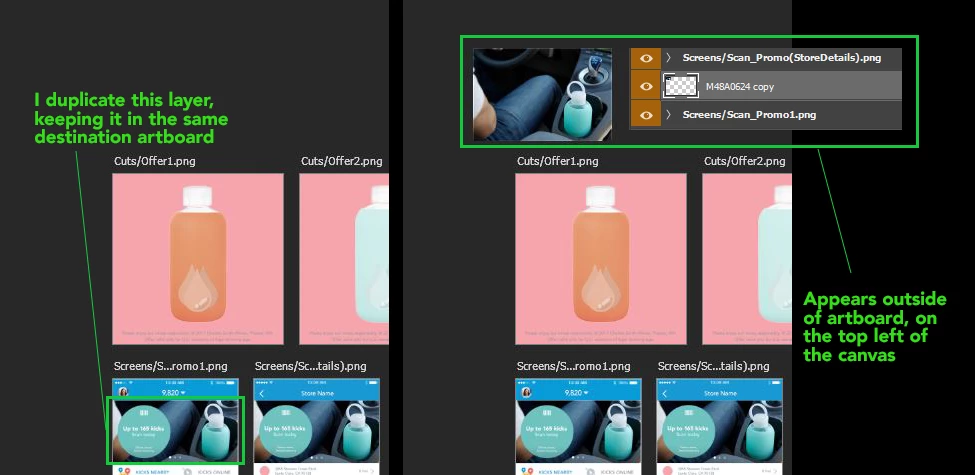
Duplicate layers jumping to top of canvas outside of artboard

  • October 15, 2018
  • 2 답변들
  • 2302 조회

I just installed the latest version of Photoshop (20.0.0 release) and I was working as usual until this happened. If I duplicate any layer or group within an artboard using the right click menu>duplicate layer/group, the duplicated image or group will appear on the top left of the canvas, outside the artboard itself. I read about a similar issue before and I experienced something similar once (layers jumping on top of other layers on the same artboards, but not losing position). This was quickly resolved on the next update. I'm pretty sure I didn't do anything to activate this weird behaviour, but anyone may have a fix for it? It's very annoying and inconvenient, for the moment I'm only able to duplicate single layer (no groups) using the Ctrl+J command (windows) to keep them in the same place as usual.
Any help? I couldn't find the same issue on the forums but maybe this happened before?
Thanks!!
    이 주제는 답변이 닫혔습니다.
    최고의 답변: ChristopherButler

    This is a bug in 20.0.0 which has been fixed in development builds. A fix is in the pipeline for these specific bugs:

    • Layer Panel: Dragging a layer cell to the new layer icon at the bottom of the Layer Panel.
    • Duplicate Layers Dialog: selecting a layer and then using the main menu or context menu. If you duplicate to the same artboard (e.g. Artboard 1 to Artboard 1), the layer may duplicate to (hidden) canvas coordinates instead. Auto-nesting into another artboard may follow.
    • ctrl-J/cmd-J when more than one layer is selected (e.g. a group)

    In the meantime, try Option-Drag to duplicate the layer, either on-canvas or in the Layer Panel.

    2 답변

    ChristopherButler
    Adobe Employee
    Adobe Employee
    October 24, 2018

    This is a bug in 20.0.0 which has been fixed in development builds. A fix is in the pipeline for these specific bugs:

    • Layer Panel: Dragging a layer cell to the new layer icon at the bottom of the Layer Panel.
    • Duplicate Layers Dialog: selecting a layer and then using the main menu or context menu. If you duplicate to the same artboard (e.g. Artboard 1 to Artboard 1), the layer may duplicate to (hidden) canvas coordinates instead. Auto-nesting into another artboard may follow.
    • ctrl-J/cmd-J when more than one layer is selected (e.g. a group)

    In the meantime, try Option-Drag to duplicate the layer, either on-canvas or in the Layer Panel.

    jesslzz작성자
    Inspiring
    October 24, 2018

    Thank you for your answer! Waiting for the next update to resolve this issue

    jesslzz작성자
    Inspiring
    October 16, 2018

    I worked this out by uninstalling and reinstalling the latest update

    Early3
    Participant
    October 23, 2018

    Uninstalling and reinstalling doesn't work. I'm having the same problem. Tried this and it did not fix the issue

    jesslzz작성자
    Inspiring
    October 23, 2018

    Sorry it didn't work! I thought I solved the problem but the issue appeared again today after a few days of working perfectly. I really don't know what causes it. So bad you have the same problem!!