Participant
July 24, 2022
Question

edges look muddy after editing

  • July 24, 2022
  • 2 replies
  • 185 views

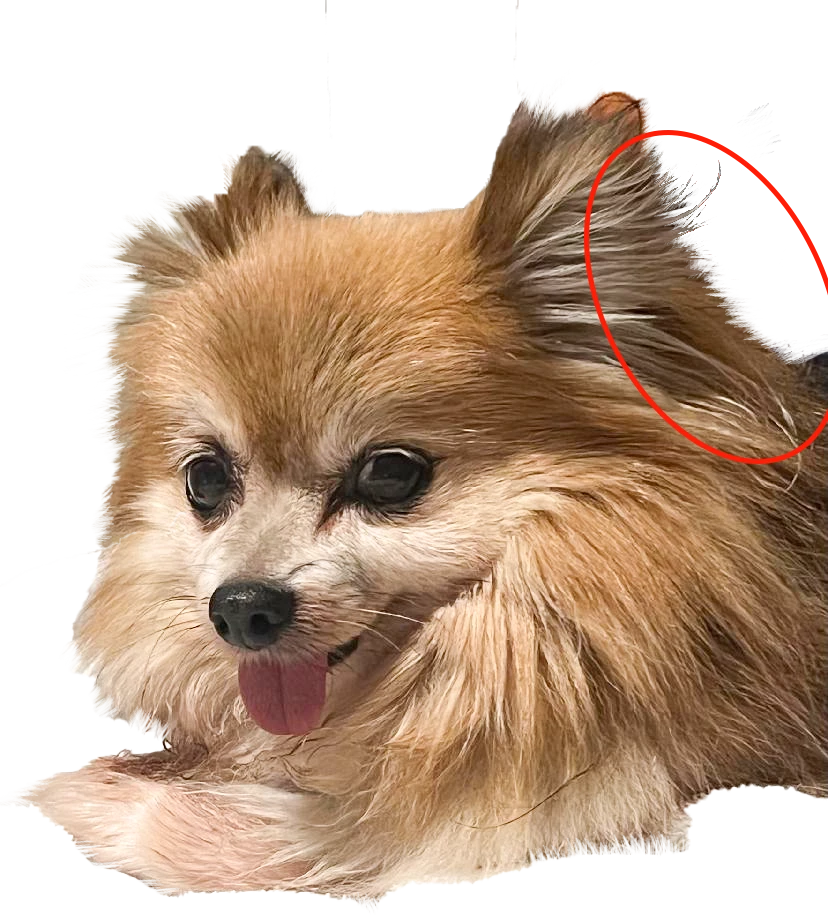
On just some of the photos I edit, the edges look muddy.  I've attached the original photo along with the edited photo to show the difference.

What am I doing wrong?  This doesn't happen  with all images but when it does, it's ugly.

I remove the background by first, using the object selection tool.  Then I create a mask of the selection.  From there I use one of my brushes that help me refine pet hair.

Thanks in advance for all help

 

This topic has been closed for replies.

2 replies

c.pfaffenbichler
Community Expert
Community Expert
July 24, 2022

Could you please post screenshots with the pertinent Panels (Toolbar, Layers, Options Bar, …) visible? 

Did you decontaminate the edges? 

lambiloon
Community Expert
Community Expert
July 24, 2022

Hi, check following video maybe it help you...regards


https://youtu.be/FmxC2ech_rM

Ali Sajjad / Graphic Design Trainer / Freelancer / Adobe Certified Professional