Participant
February 19, 2020
Answered

edges seems not smooth with new photoshop

  • February 19, 2020
  • 2 replies
  • 638 views

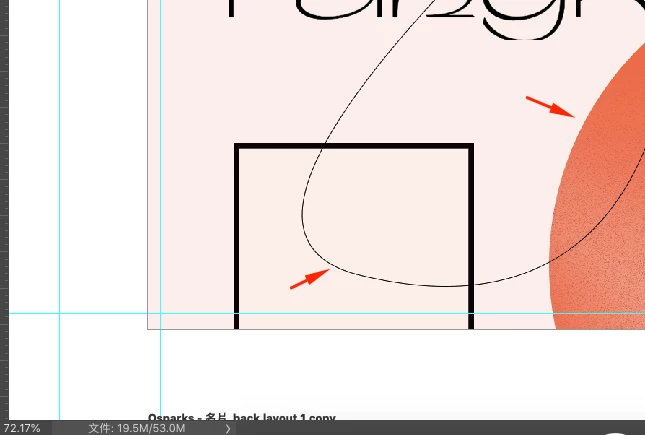
when i zoom out , always see this kind of rough edges.

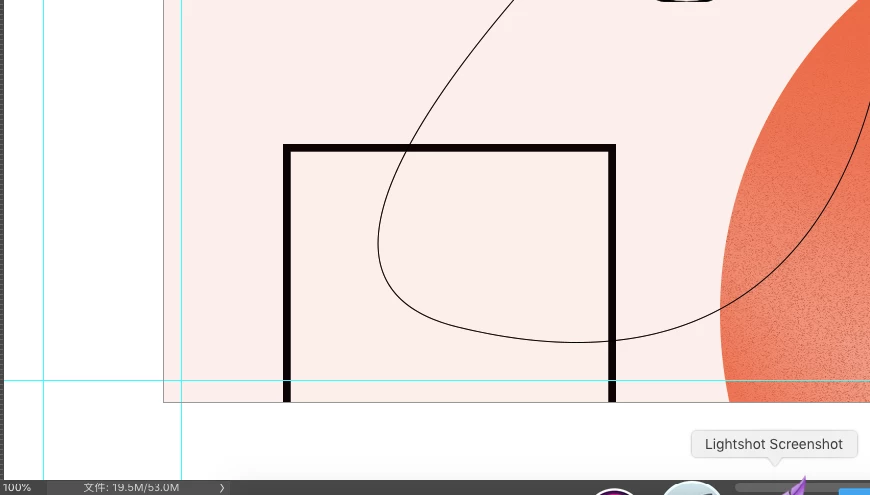
picture below with a 72.17% view is so rough, speically with curve.

but zoom in to 100% is always nothing wrong.


and this doesnt happen before with old version photoshop.

can anyone tell me how to let photshop display smoothly even not in 100% mode?
This topic has been closed for replies.
Correct answer kateh45186111

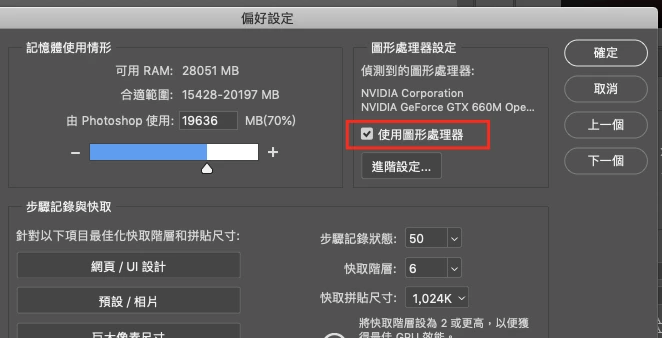
Looks like its a result of unchecking the "Use Graphic processor" under the performance setting

reboot pohtoshop after check it, the problem solve ! now the viewport is smooth

2 replies

kateh45186111AuthorCorrect answer
Participant
April 7, 2020

Looks like its a result of unchecking the "Use Graphic processor" under the performance setting

reboot pohtoshop after check it, the problem solve ! now the viewport is smooth

Grant H
Community Expert
Community Expert
February 19, 2020

Hi, this (how it looks on screen) will depend on how big (px x px) the image is, the thickness* and the zoom. Then: PS sees square pixels, you will find that a zoom % of 25/50/75/100/125/and so on will always look better than a zoom of 72,6 for eg as it has to render extra or fewer squares (pixels) (100 devided by 2 equals 50 but 100 devided by 3 is 33,3333) resulting in very jagged looking edges.