Participant
April 4, 2020
Question

Edited raw images look grainier than jpeg ?

  • April 4, 2020
  • 4 replies
  • 863 views

Hi everyone, and thank you in advance for your help. 

I have been using Photoshop for a long time but just as a hobby and I have learnt on my own and through internet tutorials, so my knowledge is patchy at best. 


I am recently having a problem that I don't recall having before, and I don't know how to fix it. 

Ialways shoot in raw, then play around a little with the settings to make the photo look better exposure and color wise. Nothing fancy. 

But lately, whenever trying to fix underexposed shots, my results are terrible. 

I know that exposure needs to be optimised in camera, and always try to do it, but sometimes it's just not possible because of the light, and I used to be able to get better results in the past. 

I don't know if I accidentally changed something in my settings 😞


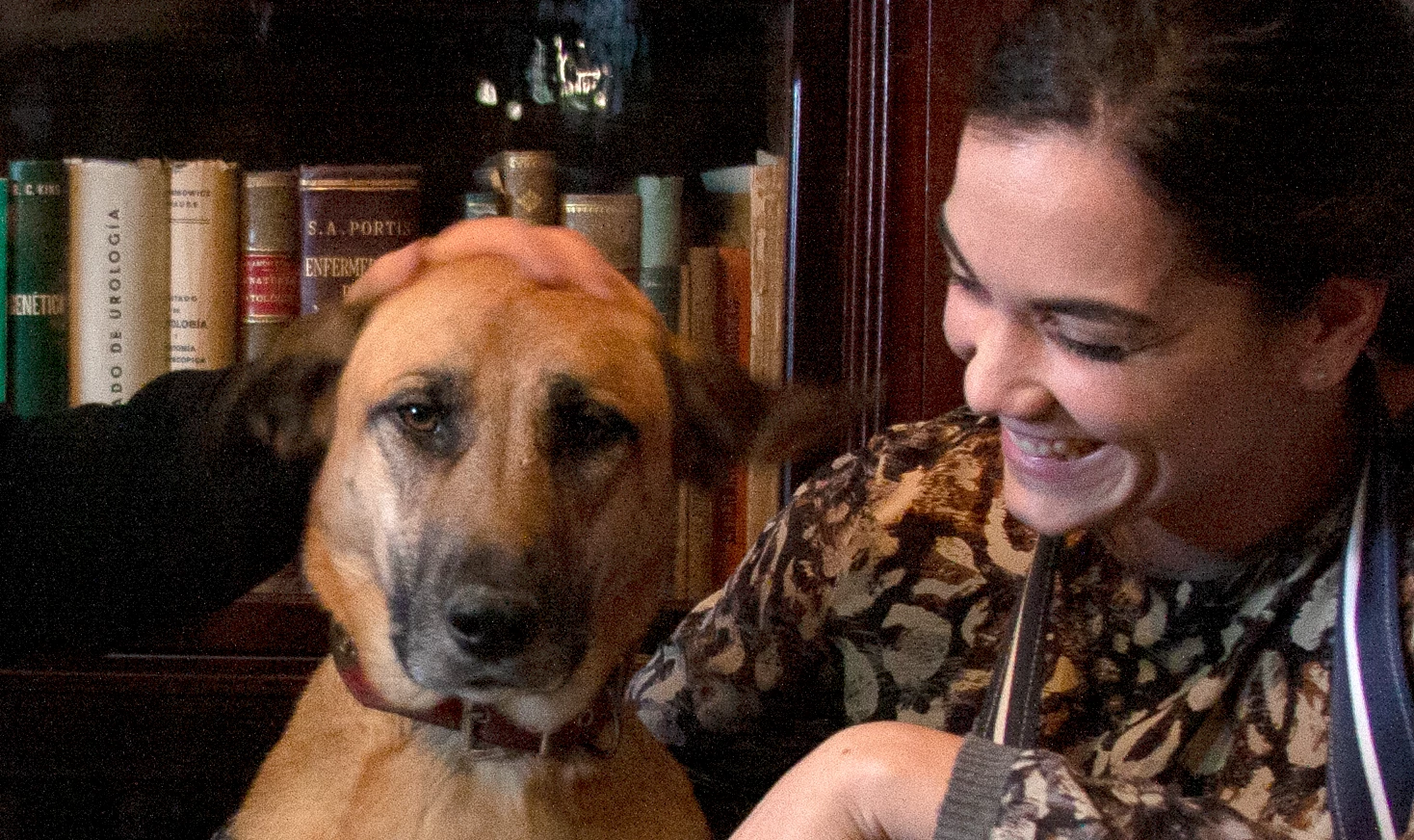
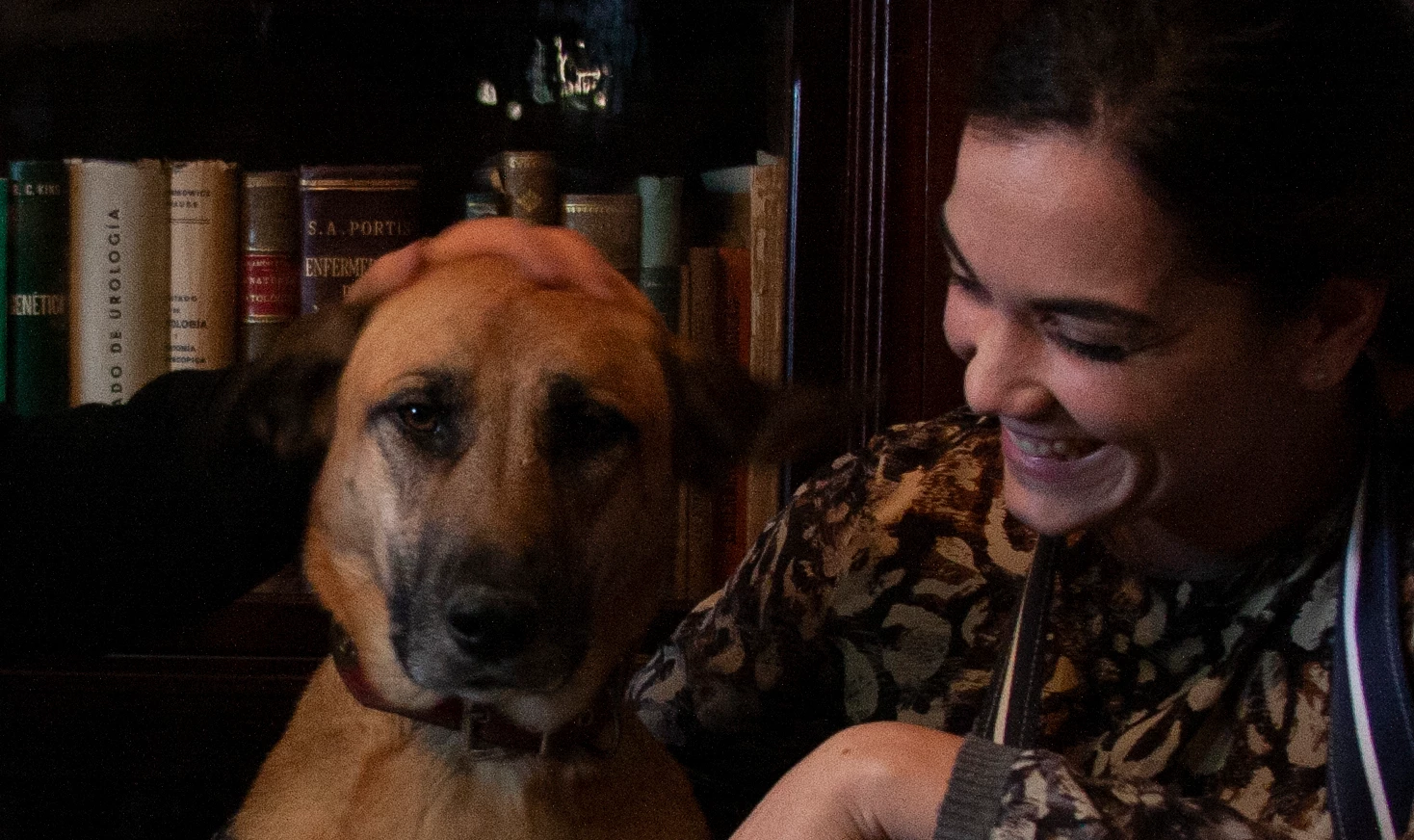
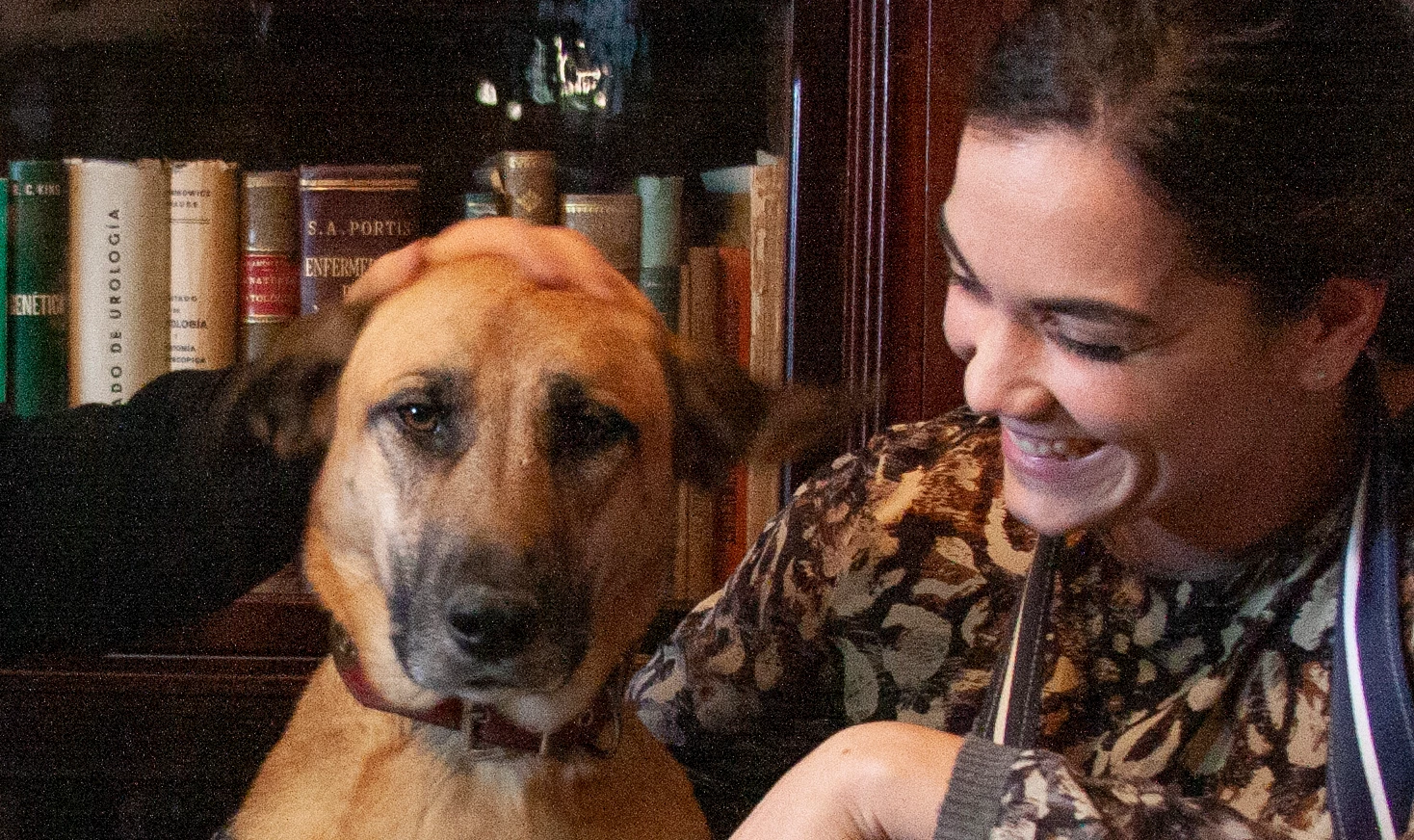
I am adding three pictures, all are 100% 

I chose one of my worst lighted pictures and did some very extreme (for me) editing so that you guys could appreciate what I mean. 

- One is SOOC (darkest one) 

- The other is edited in raw (the worse looking one), only these three settings: 

Exposure +1,20

Shadows +45

Blacks +20

- The third one, I just opened the camera's automatically generated jpeg and played with the input levels a bit


I really don't understand, how is it possible that I get less grain and an overall better looking picture from the second method than from the first?


I would really appreciate some help and tips. 

Thank you so much!!
 

This topic has been closed for replies.

4 replies

Conrad_C
Community Expert
Community Expert
April 6, 2020

Definitely try to add more light in the studio. These look like the camera had to go up into the higher range of its ISO speed settings, and that will always result in more noise. It sounds like you're using window light; that's the best kind, but on dark days maybe you could add some light panels near the window. It seems like LED light panels are getting more affordable.


But there is one more factor working against you. Because the photos are underexposed, you had to apply large increases to the Exposure and Shadows values later. The problem is that in a digital image, there is always much more noise in the shadows than in the highlights, so the more you have to lift the shadows, the more noise is revealed by the corrections.


The noise revealed by lifting the shadows is much less noticeable at low ISO settings. So the double whammy of shooting at a high ISO setting and then lifting the shadows will reveal large amounts of noise.


From that, you can tell that the long-term solution to this is:

  • As much as you can, add more light in your studio so that the camera can shoot at a lower, less noisy ISO setting. On a lot of cameras today, that's below ISO 800, or maybe below ISO 1600 on a better camera.
  • Avoid underexposure so that you don't have to increase it so much when editing. Watch the histogram in the camera to make sure there are tones in the right half, and that the highlights aren't empty.
irenejgpAuthor
Participant
April 11, 2020

Yes, that was the case... super high ISO, and it's an old camera too (it's my old reflex that I keep in my studio).

I usally have nice light and shoot closer to the windows, but on rainy days and as it gets later sometimes I have bad light.

I teach jewelry workshops for couples that are getting married, and make their wedding bands with me. I'm just an amatueur photographer but I like to take some complimentary pictures of them as a reminder of our day together. 

I try to get as good a light as I can but sometimes when I download them they're not so great, so I'm trying to learn how to edit them best as posssible in these cases, and also to prevent this from happening of course! 


Thank you for taking the time to explain! I understand why this is happening, what makes me confused is why less noise comes up when I lighten the jpeg photo in photoshop, than when I do it on the raw file in camera.raw. 

I thought it was supposed to be the other way around! 


PECourtejoie
Community Expert
Community Expert
April 11, 2020

Hello, remember that you do not control the noise reduction in the JPEGs, while you can target it on a raw file, therefore, you will be able to retain details in some areas, while more agressively fighting noise in others.

Chuck Uebele
Community Expert
Community Expert
April 5, 2020

There are lots of tutorials online, here's just one

https://www.slrlounge.com/how-to-fix-extreme-noise-with-adobe-camera-raw/

irenejgpAuthor
Participant
April 6, 2020

Thank you so much!! 💚💚💚

D Fosse
Community Expert
Community Expert
April 5, 2020

A raw file is unprocessed. All the parameters are up to you, including noise reduction.


The jpeg is processed in camera, by the camera firmware, and it includes a generous amount of noise reduction.


The difference between jpeg and raw is that the jpeg is already automatically processed, but you have no input in the process. With a raw file you're expected to set all the parameters yourself, fine-tuned to suit the image and your own preferences.

irenejgpAuthor
Participant
April 5, 2020

Thank you for your replies. 

Do you knoe of any online tutorials where I can learn how to optimise a dark raw file, making it lighter with minimal noise?

I'm really struggling with this. 

I always try to take the best pictures possible, but indoors on dark days it's not always possible, and these are photos that I take of my clients for them to remember their day at my studio 😞

Chuck Uebele
Community Expert
Community Expert
April 5, 2020

This is a guess, as I would really need the full sized images to tell, but the jpgs have compression that might actually smooth out the extreme noise from the shadows and give it a better look. Of course it will also compress the better areas, which isn't so good.