Known Participant
December 7, 2017
Answered

Embedding an Edited 360 Image

  • December 7, 2017
  • 2 replies
  • 2959 views

Hi,

I edited a 360 image from a Theta camera.

Then, I added text images in the 360 photo in Photoshop.

I'm trying to embed a movable 360 image.

I tried using Momento360, but it did not embed the entire image. The size was not right either.

I know that I can upload a functional 360 image(s) from the Google Street View app, but I'd like to use an Photoshopped version of a 360 image.

Thanks very much


Matt
    This topic has been closed for replies.
    Correct answer Dramenon

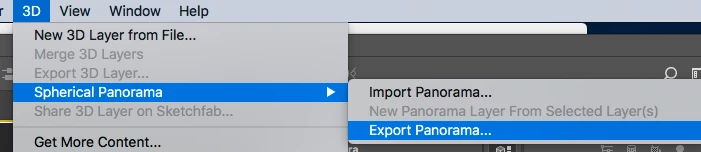
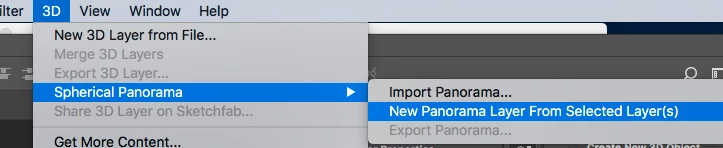
    Yes, for  the latest version 2018 released on OCT 18 2017 there is an update to the 360 panorama workflow. You may Edit and Export 360 panoramas. Photoshop will maintain important metadata to work with third-party viewers.

    You would import/open the Theta image in Photoshop.

    1. Works as you normally would > add a layer or text etc to this image.
      Save your work (as a PSD.)
    2. Make a duplicate of your work and flatten the layers
    3. Then in the menu 3D  > New Panorama from selected layer.

    Then menu 3D  > Export Panorama

    The difference now is when you have finished Photoshop will maintain important metadata to work with third-party viewers.

    Hope this helps!

    2 replies

    Known Participant
    December 8, 2017

    Whoops...I see now 'Export Panorama'.

    Got it now.

    Sorry about that.

    Thanks so much Daniel.

    JJMack
    Community Expert
    Community Expert
    December 7, 2017

    Without an example panorams file what can we say. You seem to be using some none Adobe software to create some kind of Panarama image file from a Theta camera.  Can Photoshop open that file into a editable Photoshop document?

    Usage Best Practices

    • Choose the best location for your discussion
      • Please post in the forum that's most closely related to your concern, even though posting in the first forum you see may be tempting. This is your best chance to get a quick and correct answer. Many communities have highly targeted sub-forums.
    • Supply pertinent information for quicker answers
      • The more information you supply about your situation, the better equipped other community members will be to answer. Consider including the following in your question:
      • Adobe product and version number
      • Operating system and version number
      • The full text of any error message(s)
      • What you were doing when the problem occurred
      • Screenshots of the problem
      • Computer hardware, such as CPU; GPU; amount of RAM; etc.
    JJMack
    Known Participant
    December 7, 2017

    Great

    Thank you

    Here is more information and context.

    I took the image with a Theta camera, then I used Photoshop CC 2017 to edit the image by adding text (see attached image below).

    I'm trying to embed a functional 360 image with textual additions in a webpage (e.g. in an iframe).

    Dramenon
    DramenonCorrect answer
    Inspiring
    December 7, 2017

    Yes, for  the latest version 2018 released on OCT 18 2017 there is an update to the 360 panorama workflow. You may Edit and Export 360 panoramas. Photoshop will maintain important metadata to work with third-party viewers.

    You would import/open the Theta image in Photoshop.

    1. Works as you normally would > add a layer or text etc to this image.
      Save your work (as a PSD.)
    2. Make a duplicate of your work and flatten the layers
    3. Then in the menu 3D  > New Panorama from selected layer.

    Then menu 3D  > Export Panorama

    The difference now is when you have finished Photoshop will maintain important metadata to work with third-party viewers.

    Hope this helps!

    /end of line/