

Benkitesurfs
Participant
December 11, 2019
Answered

Emoji's aren't working in Photoshop 2020 21.0.1/ Mac OS 10.15.1

  • December 11, 2019
  • 4 replies
  • 3773 views

Version: 21.0.1 

Mac OS 10.15.1


Trying to insert an Emoji via the glyphs panel, into a text box, and all I get are "Wingdings" in the text box.

The result is the same whether I use the "EmojiOne" pallette, or the "Apple Color Emoji" pallette.

Is anyone else experiencing this?
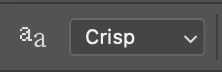
Correct answer justjalen12

 I was having the same issue and then changed this setting right next to the text size at the top of the window when the type tool is seleected

4 replies

justjalen12Correct answer
Inspiring
June 15, 2021

 I was having the same issue and then changed this setting right next to the text size at the top of the window when the type tool is seleected

Participant
August 24, 2021

OMG THANK YOU!

jane-e
Community Expert
Community Expert
January 28, 2021

"Is anyone else experiencing this?"


Yes, three folks have reported it here: 
https://community.adobe.com/t5/photoshop/apple-emoji-font-no-longer-working-after-update/td-p/11253938?page=1

Participant
January 28, 2021

I am also having this issue and have tried everything. The emoji shows up in the layer panel and everything but will not display on the actual design/image.

Akash Sharma
Legend
December 11, 2019

Hi there,


Sorry that Emojis in the Glyphs panel are not working as expected in Photoshop 21.0.1 on Mac OS 10.15.1.


Could you try resetting Photoshop's preferences & see if it helps? 
https://t.co/ulJI7cGn1G

You may want to backup your settings beforehand: 
https://t.co/4dX7gkr36D


Also, please update Photoshop to the latest version 21.0.2 from the Creative Cloud dekstop app. See https://helpx.adobe.com/in/photoshop/kb/uptodate.html


Thanks,

Akash


Benkitesurfs
Participant
December 11, 2019

I have updated the software to 21.0.2 and reset the preferences, nothing has changed.

Akash Sharma
Legend
December 17, 2019

Sorry that the issue still persists. 

Just to be on the right track, are you using the same process of adding Glyphs as mentioned in this article? Link: https://helpx.adobe.com/in/indesign/using/glyphs-special-characters.html


Thanks,

Akash