


Participant
February 12, 2019
Answered

Enhancements affecting previous selection, not current. What am I doing wrong?

  • February 12, 2019
  • 3 replies
  • 659 views

Hi! New to PS here so learning the basic skills.

When I select a section of an image and say, enhance the color, then deselect (using Ctrl+D), select another section of the image and try to do the same, the color enhancements are affecting the previous section of the image I selected, not the current selection.

I've tried reinstalling the application. Funny thing is that when I'm in the "Select part of an image" tutorial (the one with the mountain and pound), deselection works just as expected.

What am I missing?
This topic has been closed for replies.
Correct answer andrewg60725272

andrewg60725272  wrote

No, I do not mean to have two Hue/Sat layers on my SO. It's creating the second Hue/Sat layer because I selected Hue/Sat after I selected my second selection. I didn't mean to create a SO,

  1. If you can Revert or use your back up copy without the SO, do that. Otherwise, to make this into a regular layer if it's too late for that, right-click the layer and choose Rasterize. A SO is good for filters, but is not necessary for Adjustment layers.
  2. Make your selection.
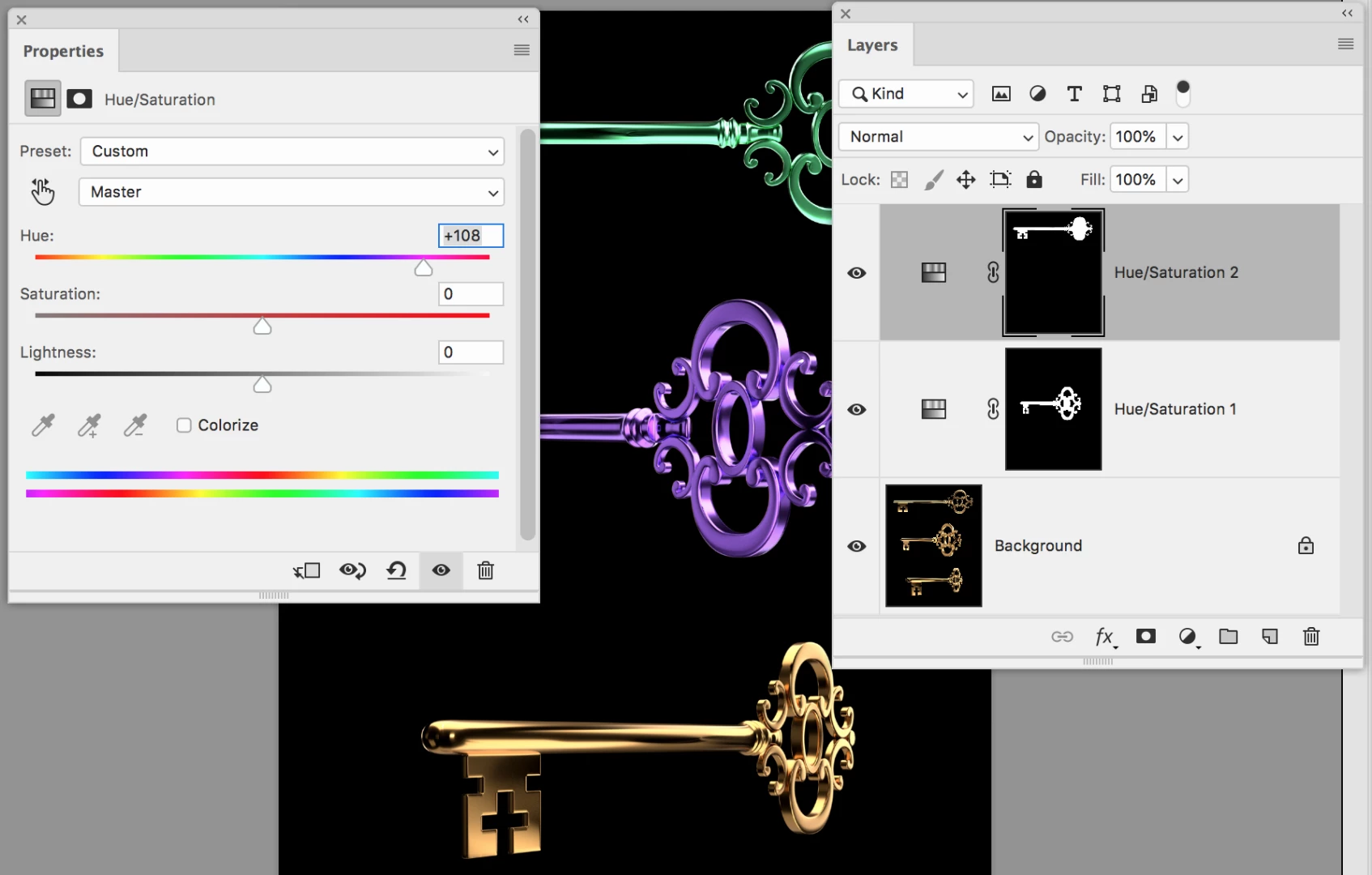
  3. Open the Adjustments panel and choose Hue / Saturation. This will not create a SO (as you thought it might), but it will put a mask on your selection and only apply the adjustment to what you have selected. You can see here that I have a bottom layer (not a SO) and created a Hue/Sat Adjustment layer for two of the three keys. This is what I think you are trying to do.

Does that help?

Jane

Photo credit: davescm​ in the Photoshop Challenge #19: Something for the weekend - Part 19 - The key is in the image!


That worked! Thank you so much! Now to figure out why it's automatically creating a smart filter when I go to make the first adjustment...

3 replies

Chuck Uebele
Community Expert
Community Expert
February 12, 2019

If you have a smart object and make a selection, then try and add an adjustment, like hue/saturation, it will create the mask for the smart object. Use an adjustment layer instead. That way you can control each adjustment with it's own mask. A smart object just has one mask for all the filters and adjustments.

Participant
February 13, 2019

Thanks. How do you go about making an adjustment layer?

Chuck Uebele
Community Expert
Community Expert
February 13, 2019

By clicking on the adjustment layer icon in the layer panel, then selecting the type of adjustment layer that you want.

Chuck Uebele
Community Expert
Community Expert
February 12, 2019

Your first example is using smart filters, so you have a mask on the filters, limiting where they are applied.

jane-e
Community Expert
Community Expert
February 12, 2019

Hi Andrew,

Can you post a screen shot including your selection so we can clarify your issue?

What version of Photoshop? What operating system and version?

Which tutorial with a mountain and a pound are you working through?

Jane

Participant
February 12, 2019

Hi Jane,

Thanks for your help Version 20.0.2. Windows 10. In the first image, I've clearly adjusted the color of the upper right corner of the wall. Then, I deselected that portion, then selected the woman's face and chest. When I then go to adjust the hue/saturation, it changes the first selection (the upper right corner of the wall, instead of what I have currently selected. When I perform the same steps in the in mountain/pond tutorial...it works just fine. As you can see in the second image, I adjusted both the sky and pond without having the same issue.

jane-e
Community Expert
Community Expert
February 12, 2019

Hi Andrew,

The first thing that jumps out is that you are using a Smart Object (SO) in image #1 and not in image #2. That's what makes the difference in how the two files behave.

In your layers panel, you can also see there is a mask on the layer so that only part inside the white part of the mask is being affected by any filters you apply. That's why the wall is still being targeted even though you have selected something else.

You have two Hue/Sat layers on your SO. Is there a reason for that?

Did you make the SO on purpose?

Jane