


cmext73998110
Participant
October 28, 2025
Question

Ensuring consistent PDF opening behavior

  • October 28, 2025
  • 2 replies
  • 143 views

Hi all,

On the left, there is a document-opening function. If a PDF was saved in Photoshop, it will open without any additional parameters. However, if the file was created in Illustrator or InDesign, the specified parameters will be applied when opening it.


Now imagine a situation where layouts from a client come in different formats: some files were saved via Photoshop, others via Illustrator. Let’s say there are ten layouts in total, and five of them have different color modes, resolutions, and layer structures. In this case, during batch processing, you can’t be completely sure that each document will open with the desired settings — some may be opened while ignoring them.
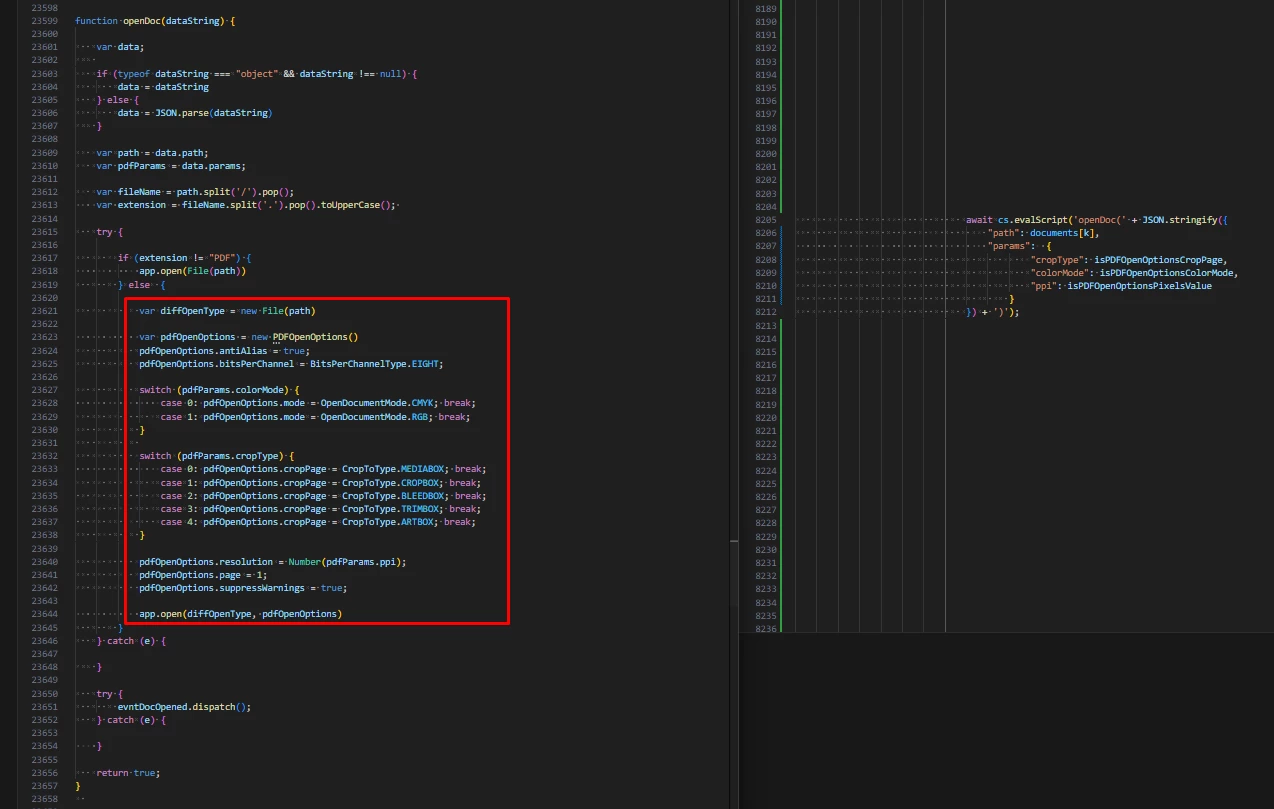
 

In my opinion, it’s not possible to change this behavior directly through JSX. However, this isn’t a major problem if you know exactly where the relevant data is stored. It’s possible to use a Node.js library to modify or remove the necessary entries before opening the document — most likely in the XMP metadata. I haven’t worked with this before, so I’d appreciate it if you could recommend which Node.js library to use and how to delete or modify a specific line, if that’s possible in the context of this task.


Thank you in advance!

2 replies

Participant
October 29, 2025
quote

Hi all,

On the left, there is a document-opening function. If a PDF was saved in Photoshop, it will open without any additional parameters. However, if the file was created in Illustrator or InDesign, the specified parameters will be applied when opening it.


Now imagine a situation where layouts from a client come in different formats: some files were saved via Photoshop, others via Illustrator. Let’s say there are ten layouts in total, and five of them have different color modes, resolutions, and layer structures. In this case, during batch processing, you can’t be completely sure that each document will open with the desired settings — some may be opened while ignoring them.


In my opinion, it’s not possible to change this behavior directly through JSX. However, this isn’t a major problem if you know exactly where the relevant data is stored. It’s possible to use a Node.js library to modify or remove the necessary entries before opening the document — most likely in the XMP metadata. I haven’t worked with this before, so I’d appreciate it if you could recommend which Node.js library to use and how to delete or modify a specific line, if that’s possible in the context of this task.


Thank you in advance! hha exchange


By @cmext73998110

You are correct that the issue lies in the **XMP metadata** embedded by Illustrator or InDesign, which overrides your Photoshop open parameters via JSX. To solve this during batch processing, the recommended approach is to use a Node.js wrapper for **ExifTool** (the industry-standard metadata utility). Before opening the PDF in Photoshop, your Node.js script should execute an ExifTool command—such as `exiftool -XMP-xmpMM:History= -XMP-xmp:CreatorTool="" -overwrite_original file.pdf`—to **delete the specific application-identifying metadata tags**. Removing these tags makes the PDF appear as a generic file, forcing Photoshop's `app.open()` function to apply the color mode, resolution, and layer settings you explicitly define in your JSX script.

cmext73998110
Participant
October 29, 2025

I tried using the following set of commands to clean XMP and PDF Info.
I’m attaching a screenshot of the commands and the verification file:


The XMP metadata does change, but Photoshop still behaves the same — no desired result. Any ideas?


The test file, command list, and verification file are also attached.
Based on indirect evidence, the issue is probably not in the XMP data, but in the internal PDF structures such as /PieceInfo, /Private, /Photoshop, /XObject, /Resources, and other service objects that ExifTool does not modify.


# 1. Clean main XMP and PDF fields
npx -p exiftool-vendored exiftool `
 -overwrite_original `
 -XMP-xmpMM:History= `
 -XMP-xmp:CreatorTool= `
 -PDF:Creator= `
 -PDF:Producer= `
 -XMP:DocumentID= `
 -XMP:InstanceID= `
 -XMP:DerivedFrom= `
 "$env:USERPROFILE\Desktop\photoshop file.pdf"

# 2. Full cleanup of all XMP and PDF Info fields
npx -p exiftool-vendored exiftool `
 -overwrite_original `
 -XMP:all= `
 -PDF:All= `
 "$env:USERPROFILE\Desktop\photoshop file.pdf"

# 3. Check cleaned fields
npx -p exiftool-vendored exiftool `
 -a -G1 -s `
 -XMP-xmpMM:History `
 -XMP-xmp:CreatorTool `
 -PDF:Creator `
 -PDF:Producer `
 "$env:USERPROFILE\Desktop\photoshop file.pdf"

# 4. Verify via Node.js script
node .\check-xmp.mjs "$env:USERPROFILE\Desktop\photoshop file.pdf"


// check-xmp.mjs
import { exiftool } from 'exiftool-vendored';

const data = await exiftool.read(process.argv[2]);

const pick = (obj, keys) =>
  Object.fromEntries(keys.map(k => [k, obj[k]]).filter(([_, v]) => v !== undefined));

const important = pick(data, [
  'Creator',            // PDF:Creator
  'Producer',           // PDF:Producer
  'CreatorTool',        // XMP xmp:CreatorTool
  'History',            // XMP xmpMM:History
  'DocumentID',         // XMP:DocumentID
  'InstanceID',         // XMP:InstanceID
  'DerivedFromDocumentID',
  'DerivedFromInstanceID'
]);

console.log('Key tags:');
console.log(important);

await exiftool.end();


Stephen Marsh
Community Expert
Community Expert
October 29, 2025

When you save a PDF from Photoshop, it's noted as being a "Photoshop PDF" and not a "generic PDF".


Photoshop opens the "Photoshop PDF" as it would do so with a PSD.


A "generic PDF" isn't as simple, requiring rasterisation and different source colour modes are converted to the destination mode and space. 

So the key would appear to be for a script or other software recognising that not all PDF files are created equal and that "Photoshop PDF" are an exception.