Participant
August 4, 2020
Answered

ERASE ALT LABEL WHEN CLICKING

  • August 4, 2020
  • 6 replies
  • 584 views

Hi,


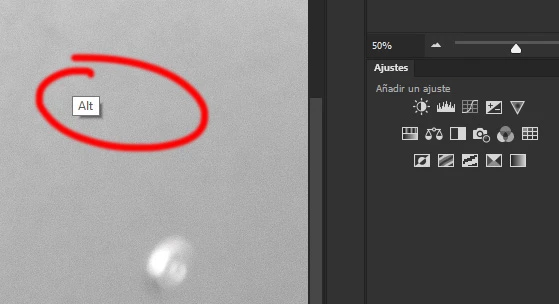
I would like to know how to desactivate the ALT LABEL that appears everytime that I use it. I don't need to know it, I've got my finger on iiiit !!!!! 

Pleeeeaaassseeee 
This topic has been closed for replies.
Correct answer JJMack

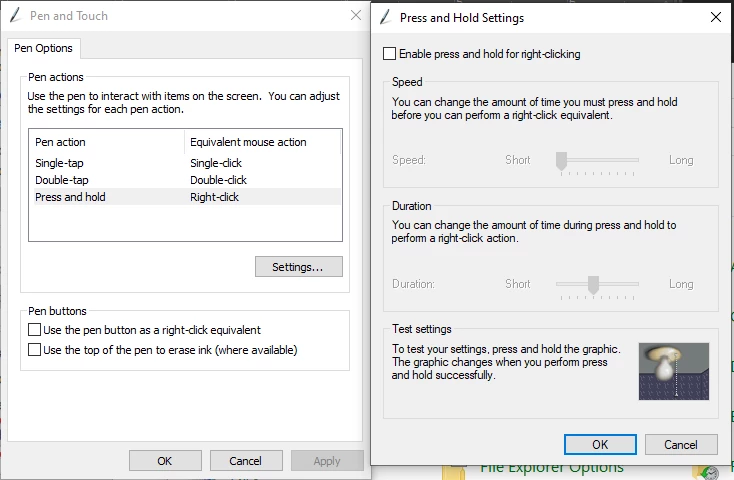
Have you disabled windows Pen and Touch Press and hold Right-click by un-checking setting enable
6 replies

Nancy OShea
Community Expert
Community Expert
August 4, 2020

Which version of Photoshop are you using?

I'm on Win10 and have NEVER seen that!


Nancy O'Shea— Product User & Community Expert
godnb1Author
Participant
August 4, 2020

It's so easy when you know where to seaaarch !!! I though it was a Photoshop problem.
thank to you I searched for Windows issues ... annnnd
I just had to uncheck the Windows option in the Wacom Configuration software !!!

Thankkkkssss !!!! 

JJMack
Community Expert
Community Expert
August 4, 2020

With 21.2.1 you need to use windows INK in the wacom preferences. you need to disable windows press and hold right click 

JJMack
JJMack
Community Expert
JJMackCommunity ExpertCorrect answer
Community Expert
August 4, 2020

Have you disabled windows Pen and Touch Press and hold Right-click by un-checking setting enable

JJMack
godnb1Author
Participant
August 4, 2020

I'using windows 2020, I can't see so many options as in the previous versions (or yes, but It's well hidden). BUT I guess you put me on the way... I have to try to desinstall it but it should be the new Windows Pen Software annoying me ... 

godnb1Author
Participant
August 4, 2020

ok ... it's a nightmare ahah.
I can't find where to disable it or desinstall ... -_- 

Legend
August 4, 2020

I suspect Windows is doing that.

godnb1Author
Participant
August 4, 2020

Only clicking alt using the cloning/correction tools.
I'm using Windows... 

melissapiccone
Community Expert
Community Expert
August 4, 2020

I've never seen that before. What are you doing to make it pop up - what tool? What's your operating system? I'm on a Mac. It might be some sort of system setting?

Melissa Piccone | Adobe Trainer | Online Courses Author | Fine Artist
