Participating Frequently
January 6, 2023
質問

Erro - Photpshop alterando a resolução para 72 dpi ao salvar em jpg

Pessoal, boa noite

Preciso de uma ajuda.
Seguinte:
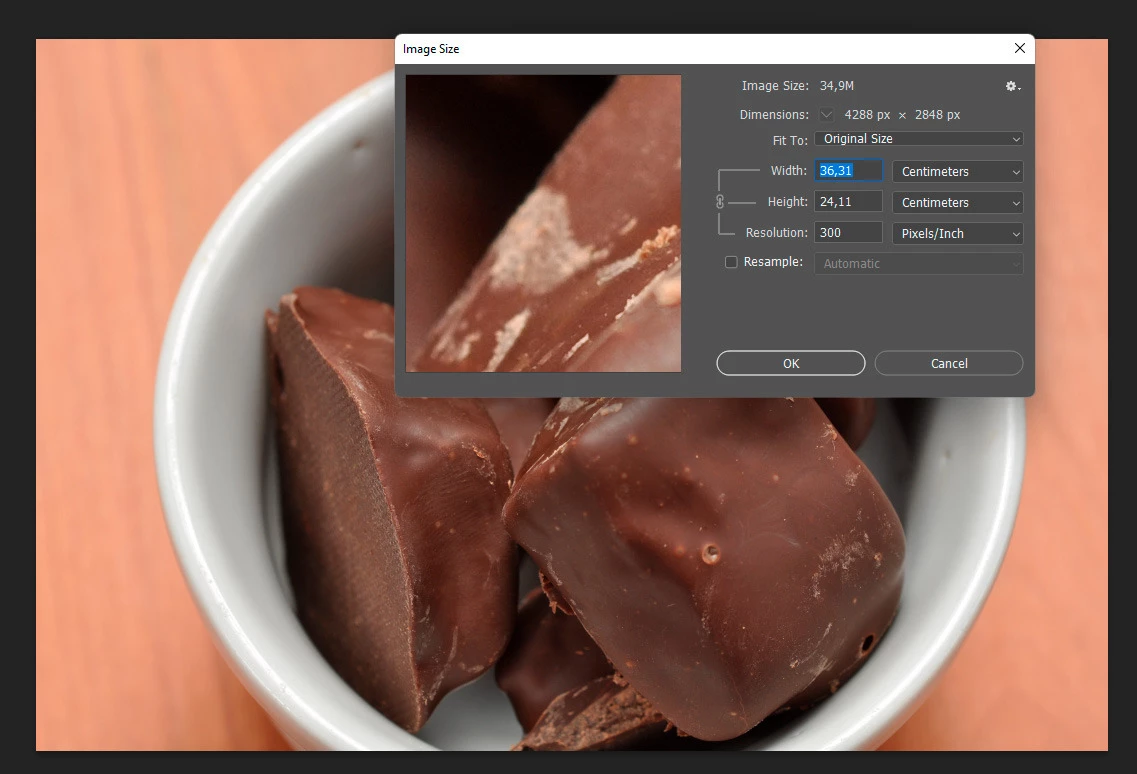
1- tenho um arquivo jpg de 300 dpi (um raw que tratei) salvo na minha maquina
2- abri este arquivo e salvei com outro nome, sem alterar nada.
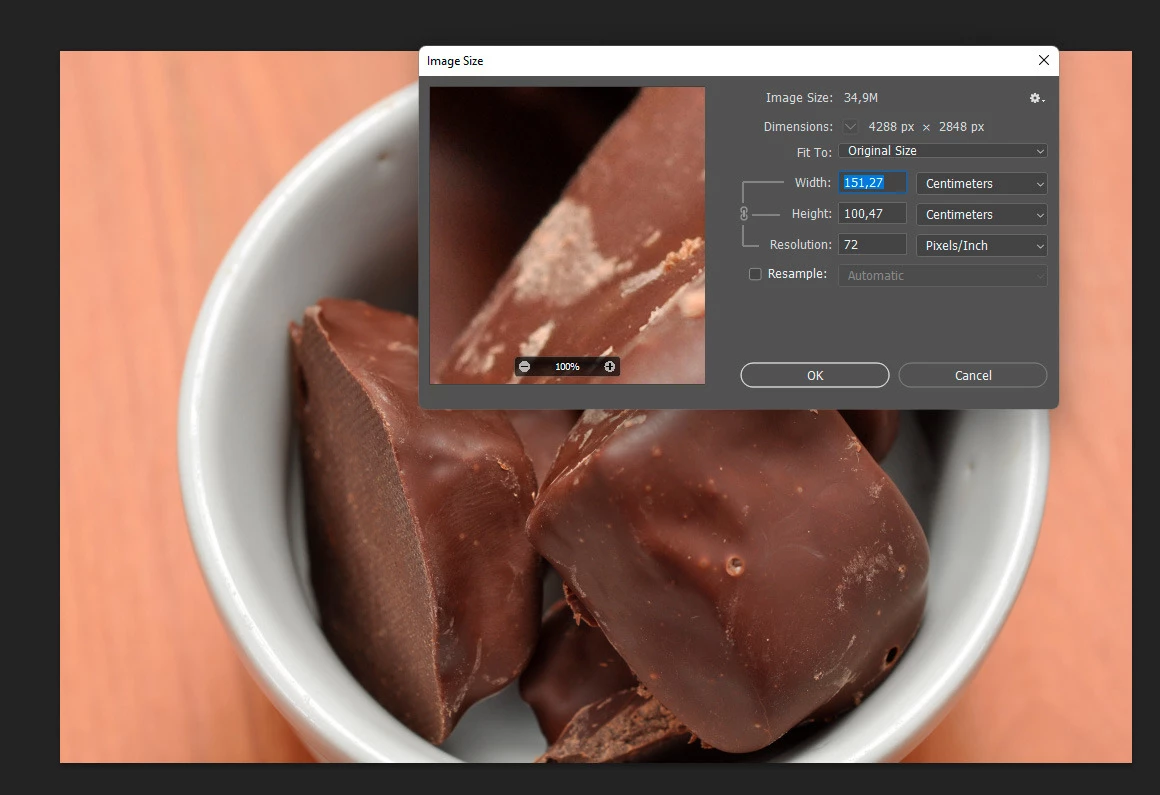
3- o Photoshop alterou o tamanho e mudou a resolução para 72dpi

4- este erro se mantém, já tentei várias alternativas e nada

5- imagens abaixo

Agradeço a atenção.
このトピックへの返信は締め切られました。

返信数 10

Participating Frequently
January 6, 2023
OK.
I understand now.
It is likely that I have some misunderstanding.
I am very grateful for the kindness of the collaboration of the friends. 
Everyone helped me a lot.
Have a happy new year everyone
 
Bojan Živković11378569
Community Expert
Community Expert
January 6, 2023

We are claiming that Resolution Pixel Per Inch does not affect quality when resizing, upsampling image.

Just turn off or uncheck Resample and you won't see any difference when upscaling two images identical in pixel dimensions with different Resolution (Pixel Per Inch).

Can you show us or explain to use steps to increase dimensions. 

By the way, if you uncheck Resample in Image Size then changing PPI will not affect image at all, you will just change information that printing company needs.

Participating Frequently
January 6, 2023
Note well, all my reasoning is based on documents for printing. 
I need 300dpi to send the job to the printer
TheDigitalDog
Inspiring
January 6, 2023
quote
'm claiming that an image with 300dpi can be increased in size without losing quality.
A 72dpi image cannot be resized without loss of quality.
This is a fact.

By @Geraldo27822983dw63

Not a fact. If the two documents, as you've shown us, have the same number of pixels, there is NO difference in this case; none. 1000x1000 at 72DPI sized to 2000x2000 at 72DPI is IDENTICAL to 1000x1000 at 300DPI sized to 2000x2000 300DPI. 

As for printing, there is no magic 300DPI number. Depends on the printer and its technology. 

https://www.digitalphotopro.com/technique/photography-workflow/the-right-resolution/

Author “Color Management for Photographers" & "Photoshop CC Color Management/pluralsight"
Participating Frequently
January 6, 2023

If you say so I believe it, but I'm not questioning that point.
I think you misunderstood my reasoning.
I'm claiming that an image with 300dpi can be increased in size without losing quality.
A 72dpi image cannot be resized without loss of quality.
This is a fact.

Bojan Živković11378569
Community Expert
Community Expert
January 6, 2023

"Hello, friends. I understand and thank you very much for your attention, but the higher resolution (eg 300dpi)
allows you to resize the image (increase the size) without loss of quality/information."


Not exactly, can you point to source of that statement? When increasing dimensions you are changing (increasing) number of pixels regardless of PPI or pixels per inch value. The only true statement can be that more pixels means more data to work with when changing dimensions or increasing number of pixels. If you scale 200x200px to 2000x2000 it will look blurry. If you scale 1000x1000px to 2000x2000px that will look much better. Note that I haven't mentioned PPI (72 nor 300) because that information is irrelevant. 

If you are creating new document in inches or centimeters then PPI plays significant role because 20in x72 PPI is less then 20in x300 PPI.

TheDigitalDog
Inspiring
January 6, 2023

No, the 300 and 72 DPI images have the identical number of pixels. The same “quality”. Only the tag differs. It is not an indication of quality. 

Author “Color Management for Photographers" & "Photoshop CC Color Management/pluralsight"
Participating Frequently
January 6, 2023
Hello, friends. I understand and thank you very much for your attention, but the higher resolution (eg 300dpi) allows you to resize the image (increase the size) without loss of quality/information.

Another detail is that this fact that I am reporting did not happen before. It's new.

I believe that if I have not determined, Photishop cannot change anything, not the metadata, nothing.
Stephen Marsh
Community Expert
Community Expert
January 6, 2023

@Geraldo27822983dw63 - Not a bug...


Save, Save As and Save As a Copy retain the resolution metadata and print size. 

Export As, Quick Export and Export Save for Web (Legacy) remove this metadata.


As @Bojan Živković11378569 mentioned, if you don't wish to re-save the original or open and re-save a JPEG a second time, then a script or 3rd party software such as ExifTool can update the metadata.


Bojan Živković11378569
Community Expert
Community Expert
January 6, 2023

So you have problem with Resolution number? As already explained, image is the same or almost the same because minor changes of compression which we can not see at first without detailed examination. Image is not degraded because Resolution number has changed. If you want to change to 300 without resaving one more time I think this can be done using some tools which can be recommended by @Stephen Marsh 

TheDigitalDog
Inspiring
January 6, 2023

The resolution tag doesn't matter, it is the total number of pixels that does. That is the same in both (4288x2848). 

There is no difference in a document that is 1000x1000 pixels (as an example) at 72 dpi (PPI) or 720 dpi (PPI) or any such value. All are 1000x1000 pixels and the dpi/ppi is simply a metadata tag. 
This very, very old primer on resolution still seems necessary to post; this may help in understanding that the two examples above are the same.
http://digitaldog.net/files/Resolution.pdf

Author “Color Management for Photographers" & "Photoshop CC Color Management/pluralsight"