Participating Frequently
December 12, 2020
Question

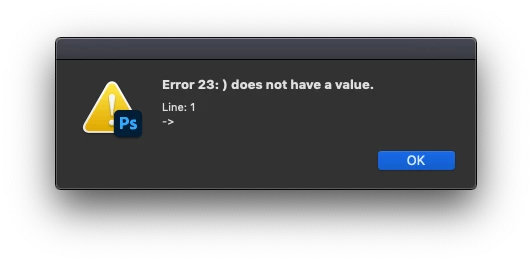
Error 23: ) does not have a value. Line 1

  • December 12, 2020
  • 3 replies
  • 2283 views

I have written two scripts which were working totally fine until 10th of December. Even though I didn't change my JSX code, it stopped working and the attached error window is displayed when I my scripts. Does any one know what might be causing the issue? There was a version update. Perhaps there update wasn't done properly??

On the first line of my code I'm importing json2.js. The file is placed in the directory.

#include json2.js

Best,

Kaan


This topic has been closed for replies.

3 replies

Inspiring
April 4, 2024

I have an After Effects script with the same problem. Uninstalling and Installing again didn't work, but I chose to keep my preferences. I guess I'll have to try again, and kill them off. 😞

Community Expert
December 12, 2020

I tested it again in InDesign and PS(22.0) and by placing the source file and the json2 in the same folder as well as in another folder in all the cases it worked fine for me.

Can you just test with only a single line i.e. the include statement in your source file and see if it works

-Manan 

-Manan
KaanKorkAuthor
Participating Frequently
December 12, 2020

Uninstalling and installing PS again solved the issue. Thanks for your help!

Community Expert
December 12, 2020

Should work, can you share json2.js file that you are using. I am currently using this file in one of my projects and it's working fine. What is the version of your PS, did you try executing the script against the Extendscript engine rather than the PS engine.

-Manan

-Manan
KaanKorkAuthor
Participating Frequently
December 12, 2020

Sure, here's the link to repo https://github.com/douglascrockford/JSON-js/blob/master/json2.js 

No I haven't executed it against the Extendscript engine as I wasn't aware of that. How can I do it?