Answered
Error when opening File>Automate>Photomerge in PS CS6
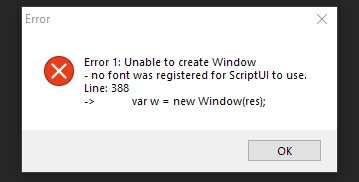
Hi all, Above is the error I get when trying to do a photomerge. It also appears when trying to merge to hdr.
Many functions operate normally. Does anyone have a clue?
Thanks.
Hi all, Above is the error I get when trying to do a photomerge. It also appears when trying to merge to hdr.
Many functions operate normally. Does anyone have a clue?
Thanks.
Simple Solution! Tahoma font was missing from installed Font directory. Installed it and all is fine.
Already have an account? Login
Enter your E-mail address. We'll send you an e-mail with instructions to reset your password.
 AdChoices