Evertime I save a image in photoshop it's turns out more red than the original PSD
Hi,
Everytime I save a image to Jpeg, Tiff, PDF, PNG..... in photoshop it's turns out more red in Windows than the original PSD. Save as, export always the same end result.
The problem with this is that te customer also get's this more redish picture, and as they use it in there webshop, print.... it's also redish.
When I'm opening the saved Tiff, PDF, PNG..... file in Adobe Ps, Ai or Id... it opens in the correct colors
original fille is
- S-RGB
- 8 bit
- while saving, cheqbox Color profile is on
so I think I'm taking all the right steps? That it shows the wrong color on my computer in windows, I don't care I always use Bridge and there the color in correct.
But that the customer get's the wrong color is the main problem.
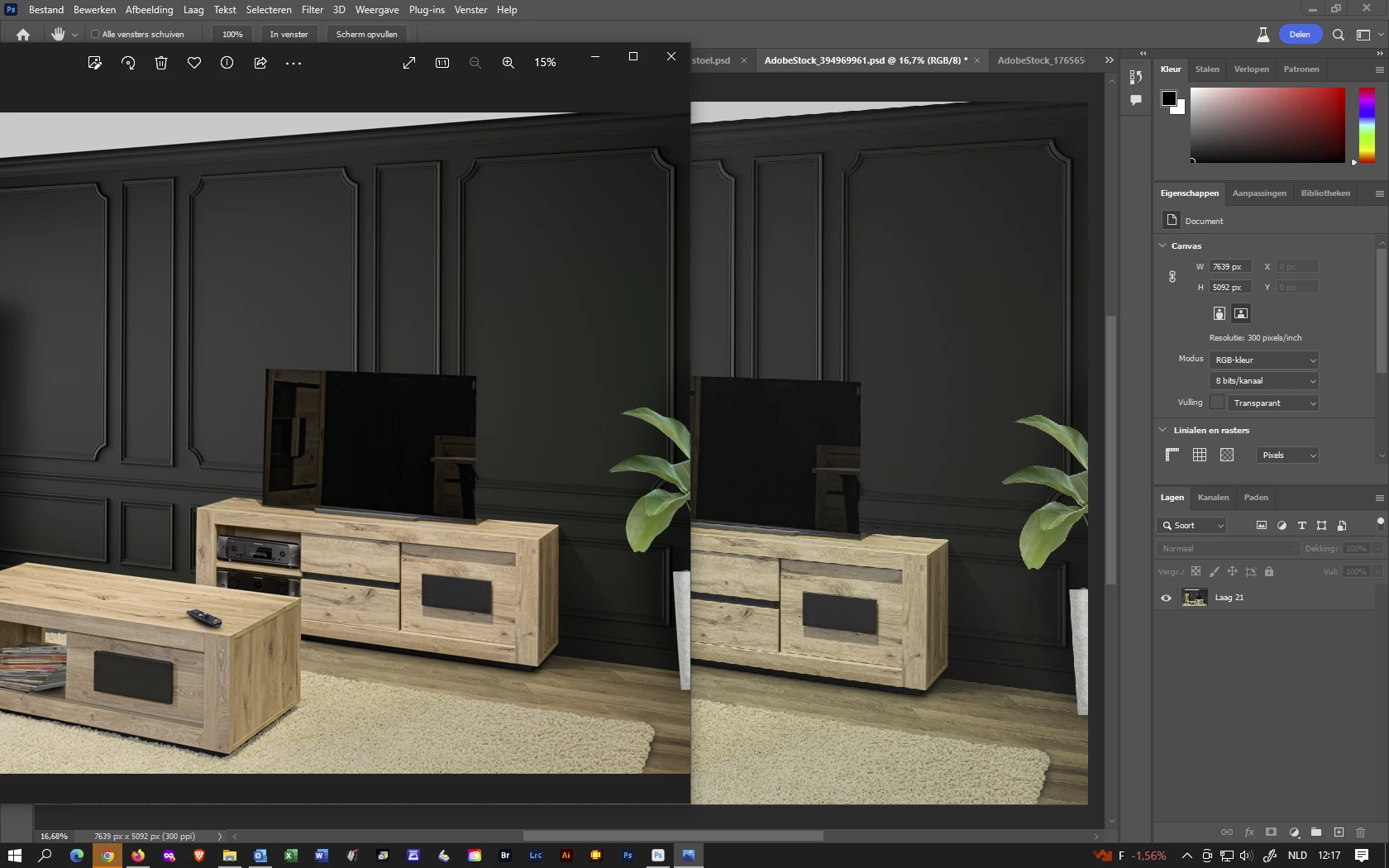
see color furniture
Can someone gif Me some usefull tips?
Koen
See printscreen under
left windows (to red) vs right Ps (color correct)
 AdChoices