Participant
January 2, 2018
Answered

Everything looks weird

  • January 2, 2018
  • 2 replies
  • 788 views

So I recently got Photoshop CC 2017, everything looked normal from when I used it in school. I got back on it after shutting my computer off and everything looks totally different. When I try to open an image it opens in a completely new tab inside Ps and everything is in grey with black buttons. How do I fix this?
    This topic has been closed for replies.
    Correct answer gener7

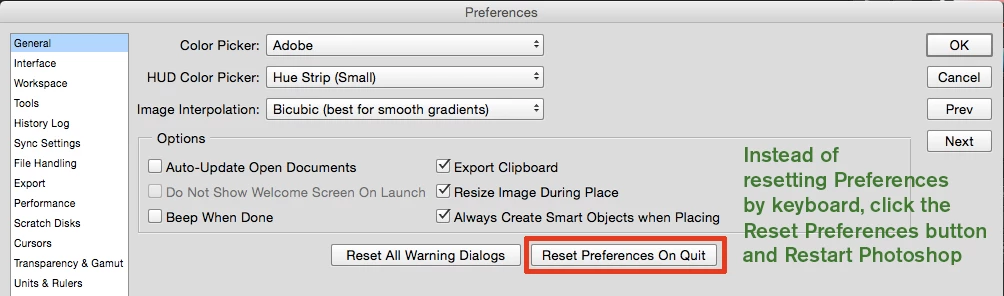
    Try a Preference Reset: Ctrl k to open Preferences,

    Then reset and reopen Ps.

    2 replies

    Participant
    June 1, 2021

    Same problem do you have any solution please because my photoshop loos so weird and i watched all videos on youtube i can't find any solution 

    Participant
    January 2, 2018

    I have a Windows 10 64 bit computer also

    gener7
    Community Expert
    gener7Community ExpertCorrect answer
    Community Expert
    January 2, 2018

    Try a Preference Reset: Ctrl k to open Preferences,

    Then reset and reopen Ps.

    Participant
    June 1, 2021

    It didn't work, tell me how can i fix it please