
Participant
February 19, 2022
Answered

"Export as" preview not the same as me editing the project in photoshop

  • February 19, 2022
  • 11 replies
  • 1140 views

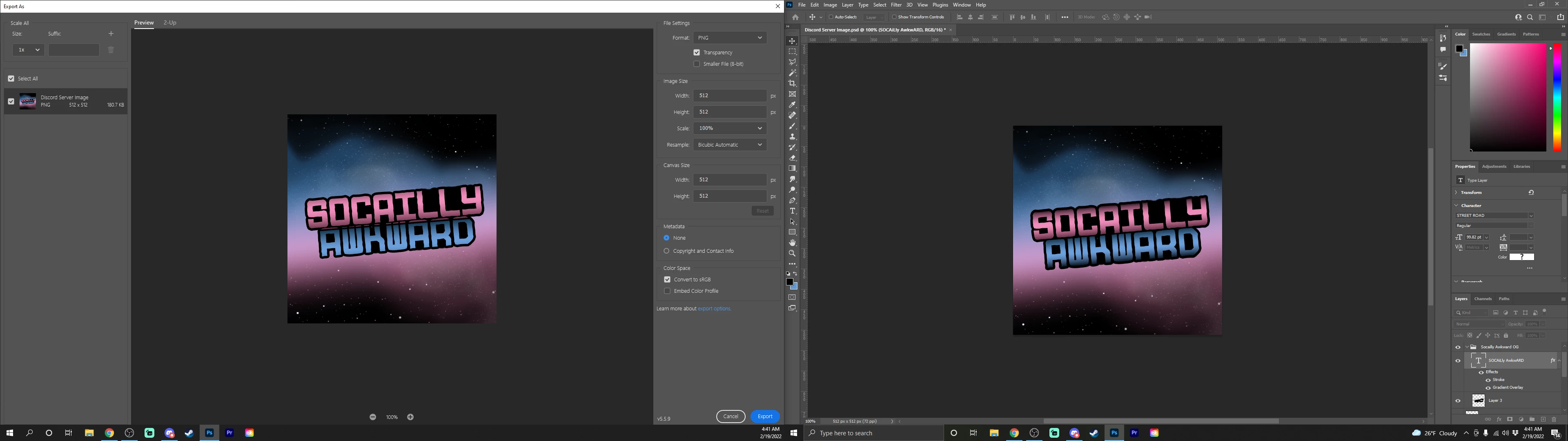
I've been running into a problem where I'm editing a design and it looks good so I go to "export as" and it shows me somthing diffrent than what im working on anyone have a solution I would apprieciate it! "Export as" Preview (left) Editing in Photoshop (right)
This topic has been closed for replies.
Correct answer SoicallyAwkward

So non of those solutions were it fot me I did however fix the problem! So for the black background I used was a black rectangle that I just fit over the whole canves but by resizing the size of the rectangle to match the canves size which was 512px by 512px fixed my problem. Thank you to everyone that's helped me and I hope if anyone else has this problem this can help. Also sorry for being stupid lol probably should've just made the background color black instead of using a rectangle. Thanks again!

11 replies

Participant
February 21, 2022

Nope the problem does not occur anymore.


Kukurykus
Legend
February 21, 2022

You mean you found the workaround as the problem still occurs for you?

SoicallyAwkwardAuthorCorrect answer
Participant
February 21, 2022

So non of those solutions were it fot me I did however fix the problem! So for the black background I used was a black rectangle that I just fit over the whole canves but by resizing the size of the rectangle to match the canves size which was 512px by 512px fixed my problem. Thank you to everyone that's helped me and I hope if anyone else has this problem this can help. Also sorry for being stupid lol probably should've just made the background color black instead of using a rectangle. Thanks again!

Legend
February 20, 2022

I cannot reproduce with Photoshop 23.2. Looks like you're running an older version (note the version # in the bottom of the Export As window)


Kukurykus
Legend
February 20, 2022

I tried Export As in Legacy mode and it didn't open dialog. I have so from some previous update but did not report it as personally I use Quick Export that still works. The result of Quick Export was with no change to the original image. After I disabled Legacy mode I was able to use also Export As and the result was again good.


btw, before I exported your file I had to put all layers into one layer set, as some were outside.

Participant
February 20, 2022

Sorry for being away been busy with work and such! https://www.dropbox.com/s/az3cky7bl8dq6ql/SociallyAwkward%20Logo.psd?dl=0 Here you go I think that's how I share it sorry never done that before.

TheDigitalDog
Inspiring
February 19, 2022

I just tested this on the latest release, on Mac.

There can be a visual disconnect here depending on the original color space. I opened a document in ProPhoto RGB and used QE which of course first shows me a preview that matches the underlying image in ProPhoto RGB. The issue is now, when I select sRGB, while I see a progress indicator, the image preview IN QE doesn't update to show sRGB. It should. Then if I save this through QE as sRGB, then open that JPEG, it doesn't match the original in the wider gamut color space OR the QE dialog. So something isn't right here Jeffery in how QE is showing a non sRGB document in QE when I've asked for sRGB.

And as bad, the check box for Embed profile isn't sticky.

I'm doing this on a wide gamut display where I absolutely can see a difference between a ProPhoto RGB test image with very saturated colors versus an sRGB conversion of the same.

Test document used: http://www.digitaldog.net/files/Gamut_Test_File_Flat.tif

Author “Color Management for Photographers" & "Photoshop CC Color Management/pluralsight"
Legend
February 19, 2022

The layer styles aren't drawing the same. You can see a pink slice under the word "SOCIALLY"

Per Berntsen
Community Expert
Community Expert
February 19, 2022

They look the same to me too.

But you should always check Embed profile, which might also make the image display like the original.


Kukurykus
Legend
February 19, 2022

I don't see difference.