I just create a text and shape layer Photoshop document and exported it as an SVG and in the SVG file I see this:
<svg xmlns="http://www.w3.org/2000/svg" width="700" height="500" viewBox="0 0 700 500">
  <defs>
    <style>
      .cls-1 {
        font-size: 138.889px;
        font-family: Tahoma;
        font-weight: 700;
      }

      .cls-2 {
        stroke: red;
        stroke-width: 4.01px;
        fill-rule: evenodd;
      }
    </style>
  </defs>
  <text id="Text" class="cls-1" x="106" y="267">Text</text>
  <path id="Rounded_Rectangle_1" data-name="Rounded Rectangle 1" class="cls-2" d="M148,318H371a40,40,0,0,1,40,40v57a40,40,0,0,1-40,40H148a40,40,0,0,1-40-40V358A40,40,0,0,1,148,318Z"/>
</svg>
When I have Chrome open it chrome displayed this:
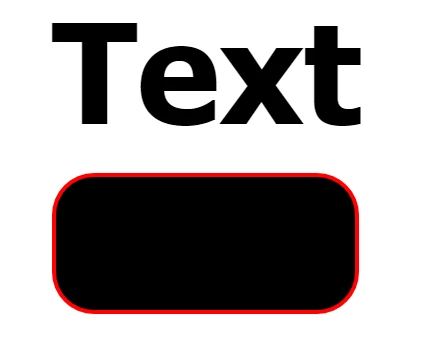
IMO Photoshop exported a vector file an there is not Raster layer in that the vector file. Are you expecting Path and fills for text? Photoshop can not edit vector files it can only import these as a single raster layer or they can be place is as vector smart object layer. So vector files in photoshop are single Photoshop layers. The SVG File exported by Photoshop its a text file that describe text layers, vectors layers and I'm sure will also describe raster image information. I would not expect them to match a SVG file that Illustrator may create. Illustrator is a vector editor. Photoshop is not it only has some basic vector support.
Here is Photoshop display there] are no Paths for text:
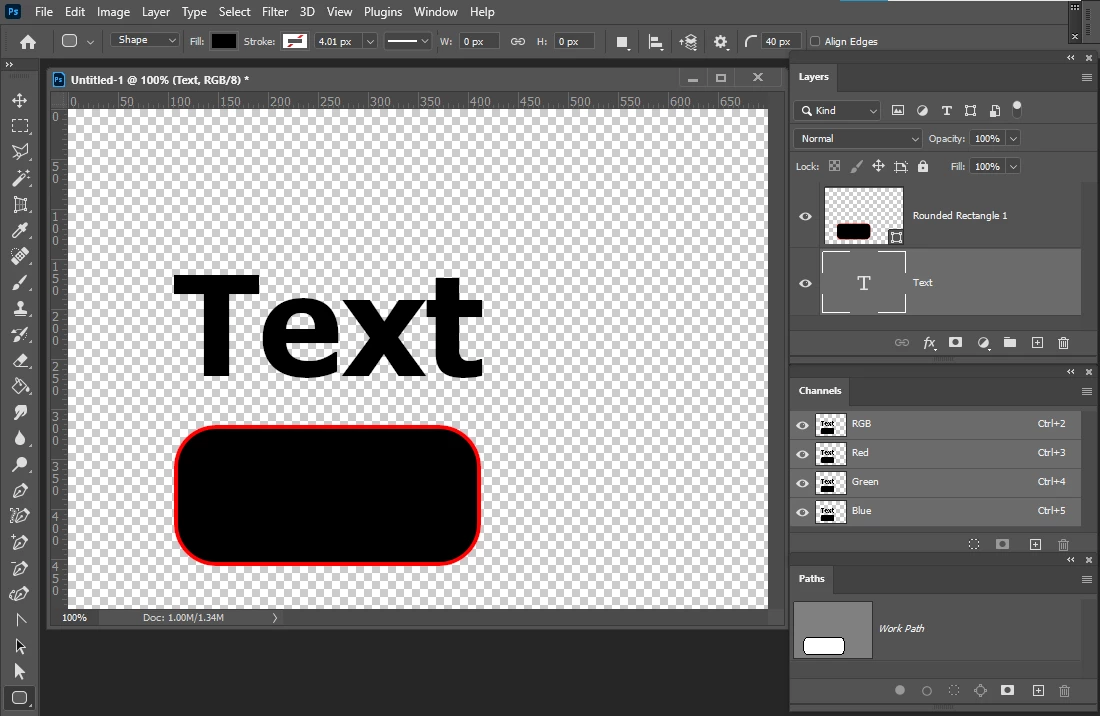
Photopea does have a raster layer to simplified vector layer that Photoshop not. Adobe knows you can not vectorize a Photo. Perhaps when Photoshop get ported to a quantum computer.

 AdChoices