Participant
August 15, 2021
Question

Exporting pixel art

  • August 15, 2021
  • 3 replies
  • 431 views

When i export ym pixel art asset, It has noticeable changes to it which i belive is a result of compression maybe. Heres what i have created within photoshop:
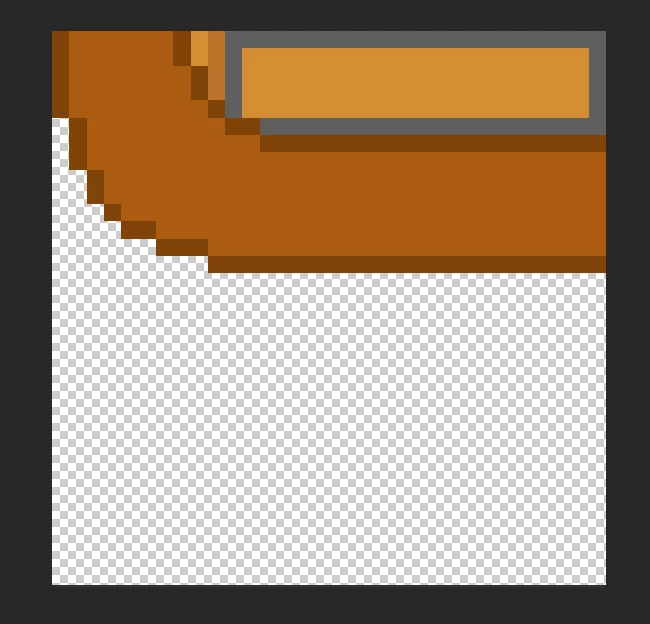


and when export it into a PNG (it needs to have transparency around it so i cant use JPG) and import it into Unity, it has visably altered and i dont understand how to stop this from occuring.
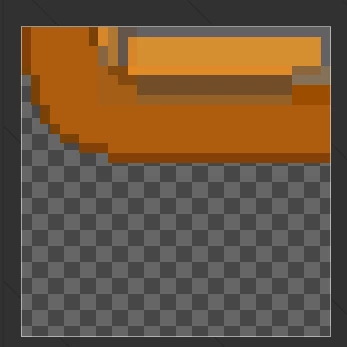


Any help would be incredibly useful as i am very new to photoshop:)

This topic has been closed for replies.

3 replies

didiermazier
Community Expert
Community Expert
August 16, 2021

I suppose you have checked that shapes are aligned to pixel grid. If not things may move a little bit when saving.

Also be sure in the export pref that smaller file size is not checked…

Nancy OShea
Community Expert
Community Expert
August 15, 2021

Is the original artwork 8-bits/channel?


Nancy O'Shea— Product User & Community Expert
Michael Bullo
Community Expert
Community Expert
August 15, 2021

What does the image look like if you view it in another program like a web browser? Could the PNG actually be fine but Unity is the issue?


Could you please explain in detail how you are exporting the PNG out from Photoshop.