
Participant
December 11, 2016
Answered

Extensions can not be removed

  • December 11, 2016
  • 4 replies
  • 575 views

Hello everyone,

I'm really tired by my worries. I deleted multiple Photoshop, deleted the entire creative cloud. I have no solutions.
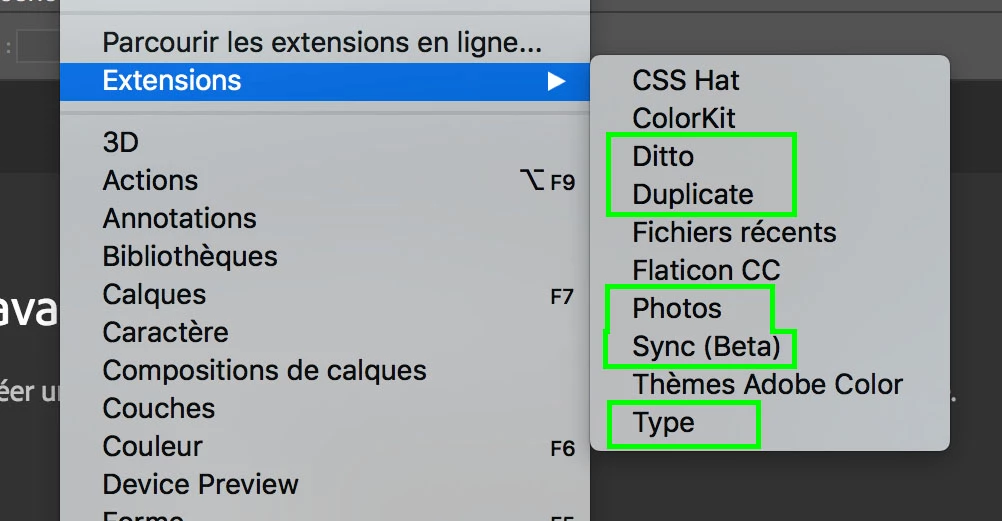
I installed extentions a few months ago that today make me slow down photoshop. The worry is that can not remove them. Nowhere in Extension Manager do I see them. Nowhere in my mac.

These minis extensions are a real poison.

Thank you

-------

Bonjour à tous,

Je suis vraiment fatiguée par mon soucis. J'ai supprimé plusieurs fois Photoshop, supprimé la totalité du Creative cloud. Je n'ai plus de solutions.

J'ai installé des extentions il y a quelques mois qui aujourd'hui me font beaucoup ralentir photoshop. Le soucis c'est que ne peux pas les supprimer. Nulle-part dans Extension Manager je ne les vois. Nulle-part dans mon mac.

Ces minis extensions sont un vrai poison.

Merci

This topic has been closed for replies.
Correct answer Jeff Arola

In photoshop go to Help>System Info and at the bottom of the list under Extensions there should be the location on your drive of each extension.

4 replies

Participant
December 11, 2016

It's fantastic.

Thanks thanks thanks

Participant
December 11, 2016

I used Extension Manager and Adobe Add-ons and unsuccessfully.

I have no trace of these extensions.

Jeff Arola
Community Expert
Jeff ArolaCommunity ExpertCorrect answer
Community Expert
December 11, 2016

In photoshop go to Help>System Info and at the bottom of the list under Extensions there should be the location on your drive of each extension.

Trevor.Dennis
Community Expert
Community Expert
December 11, 2016

Extension Manager is not a lot of use with CC 2017.  There is an option to Remove your add-ons from the following link

https://creative.adobe.com/addons/my_addons

Jeff Arola
Community Expert
Community Expert
December 11, 2016

Rather than going to the folders for the extensions to delete, you might just use a third party extension manager like this:

Anastasiy's Extension Manager for Adobe platform


Trevor.Dennis
Community Expert
Community Expert
December 11, 2016

R_Kelly wrote:

Rather than going to the folders for the extensions to delete, you might just use a third party extension manager like this:

Anastasiy's Extension Manager for Adobe platform

That's interesting RK.  How well does it work with HTML5 extensions?  I still have some supposedly compatible plugins that I can't get to work since CC2014 (like GuideGuide)

Jeff Arola
Community Expert
Community Expert
December 11, 2016

It seems to work fine.

Sometimes rather than go online i just copy the extension over to another machine and use Anastasiy’s Extension Manager

and also some third party extensions aren't available at the adobe exchange.