Inspiring
January 30, 2019
Frage

Extruding the image on a layer down the sides of an extrusion

  • January 30, 2019
  • 1 Antwort
  • 704 Ansichten

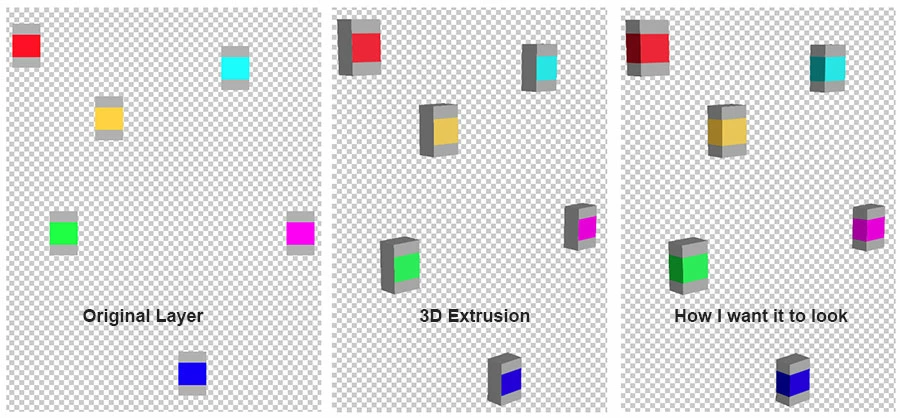
I have dozens of layers that each have hundreds of small shapes on them, each with various colors or patterns. I need to extrude these layers in 3D. But I need the colors around the edges of the shapes to be the color that goes down the extruded sides. Is there any way to do this? I can not edit the texture for each shape. There are hundreds of shapes on each layer, all different sizes and colors. This needs to be some automated thing. Basically I want the row of pixels that is around the edge of the shape to be continued down the sides of the shape when it is extruded.

(I'm using Photoshop CC  v 20.0.2)

Here's a simplified example of what I want.
    Dieses Thema wurde für Antworten geschlossen.

    1 Antwort

    Chuck Uebele
    Community Expert
    Community Expert
    January 30, 2019

    Not sure how to do it easily, but you can zoom in and make a marquee the size of height of the stripe on the front face, then paint in along the edge the color you want. This will show you where to paint/fill on the extrusion texture diffuse layer:

    The red I've done. You can see a small blue patch where I painted in the color, so you need to make a marquee on the diffuse layer and fill it. Not real convenient.

    DaverjAutor
    Inspiring
    January 30, 2019

    As I said, there are hundreds of these shapes on each layer, and dozens of layers. They are not individual shapes on individual layers.

    Chuck Uebele
    Community Expert
    Community Expert
    January 30, 2019

    Yes, I understand that, and this is the only way that I can think of to do that. And yes, it would be horribly time consuming!