

Trevor.Dennis
Community Expert
Community Expert
April 21, 2023
Answered

Eye Candy 7 — Windows 11

  • April 21, 2023
  • 2 replies
  • 6427 views

Does anyone have Eye Candy 7 running on Windows 11?  My first issue is that I only have the option of Photoshop (Beta) as the host app. 
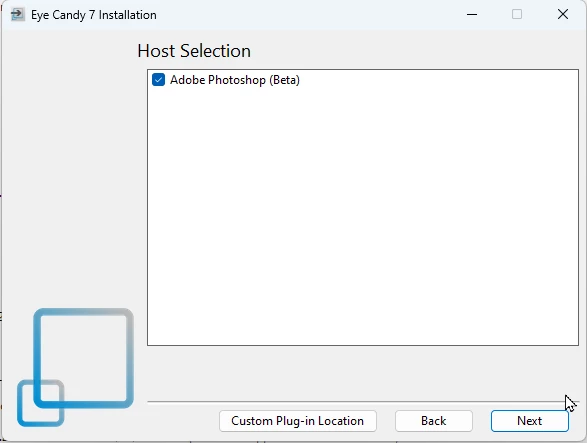


Unchecking Photoshop beta still allows the installation to complete.  I have installed the app with and without Photoshop (Beta) checked, but neither way has Eye Candy showing in Photoshop 24.3 or Photoshop beta.


The installation does appear to have worked, but there are no .8bf  files I can move.  There's nothing under appdata\Roaming.
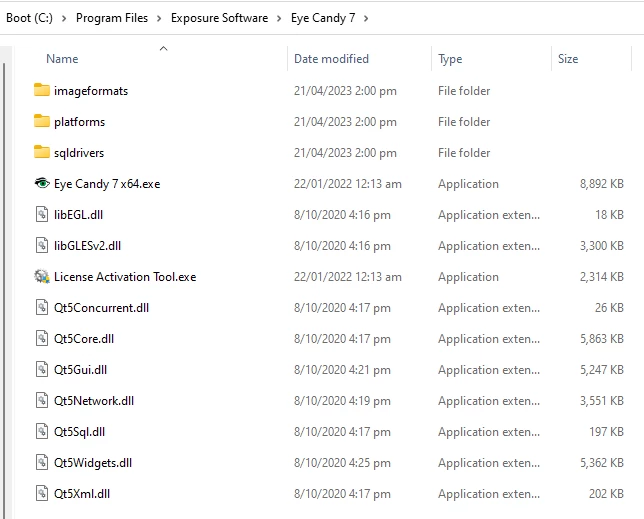


If it was a Windows 11 issue you'd think I'd have found a bunch of hits when searching with Google, but I found nothing.  I have put in a help request with Exposure Software Support (I hate the new name).  


Correct answer Ged_Traynor

Hi Trevor

When I had Windows 11 on my PC, Eye Candy 7 was working fine, I did the upgrade from Windows 10 to 11 and not a clean install, I think that was Photoshop version 24.2.1 at the time, reverted back to Windows 10 cause I don't really like Windows 11, Eye Candy 7 still works fine with Photoshop version 24.4.1 on Windows 10, so it should work on Windows 11, might be something to do with the Beta insall that you had, maybe try the Adobe cleaner tool

https://helpx.adobe.com/ie/creative-cloud/kb/cc-cleaner-tool-installation-problems.html

2 replies

Ged_Traynor
Community Expert
Ged_TraynorCommunity ExpertCorrect answer
Community Expert
April 21, 2023

Hi Trevor

When I had Windows 11 on my PC, Eye Candy 7 was working fine, I did the upgrade from Windows 10 to 11 and not a clean install, I think that was Photoshop version 24.2.1 at the time, reverted back to Windows 10 cause I don't really like Windows 11, Eye Candy 7 still works fine with Photoshop version 24.4.1 on Windows 10, so it should work on Windows 11, might be something to do with the Beta insall that you had, maybe try the Adobe cleaner tool

https://helpx.adobe.com/ie/creative-cloud/kb/cc-cleaner-tool-installation-problems.html

Trevor.Dennis
Community Expert
Community Expert
April 22, 2023

A good idea with the Cleaner Tool Ged.  I am currently in an exchange with Exposure Software support, but they have not had any constructive ideas so far.  I also think it is to do with having the Beta version installed. It might be as simple as it appearing above V23 — When I first ran the Eye Candy 7 installer it did show Photoshop Beta in the Host Selection window, but only the Beta version.  I ran it anyway, but Eye Candy did not appear in the Beta Filters list.

I think I'll pause the exchange with Exposure support.  Uninstall Photoshop and run the Cleaner Tool. Reinstall Photoshop 23.4 (but not the Beta version) and try the Eye Candy 7 installer again.


You know that thing when stuff annoys you, so you do something for the hell of it to sort of give the finger to the thing that was annoying you? (or is it just me?)  Anyway, I treated myself to Particleshop last night.  They had an offer that gave you a bunch of Brush Packs along with the plugin, so I gave myself some retail therapy.  Initial thoughts are that the affects are amazing, and way beyond what we can do with the Photoshop brush engine, but they only work inside the plugin's pop-up window, so AFAICT you don't have brush blend modes, you can't force straight lines with the shift key or constrain them to vertical and horizontal, and you can't stroke a path.  If you paint on a new layer you can't see what is behind it (just the transparency grid) but there is an option to commit just the brush strokes, so if you make a copy merged layer to paint on, you can save the new content and the layer contents disappears.  Early days, but I am noit regretting the purchase.


I'll let you (and Exposure Software) know if the cleaner tool trick works.


[EDIT]  It has just ocuurred to me that using the cleaner tool will mean I have to reinstall and activate my plugins.  The Filter Forge installer had the same issue as Eye Candy, so I wonder if your idea fixes that as well?

Trevor.Dennis
Community Expert
Community Expert
April 21, 2023

I have now tried uninstalling Photoshop (Beta), restarting the computer, and reinstalling Eye Candy 7 but it still doesn't show.


The latest Eye Candy 7 install file is eye-candy-7-7.2.3.189.exe, but I also have and have tried eye-candy-7-7.2.3.143.exe but no change.