Jackie_b123
Participating Frequently
November 3, 2020
Question

Eye Dropper/Colour Sampler Tool-Not showing correct

  • November 3, 2020
  • 3 replies
  • 1316 views

Hello, 

I am having an issue with the Eye Dropper and Colour Sampler tool not showing correctly when making selections on an image, See below: 
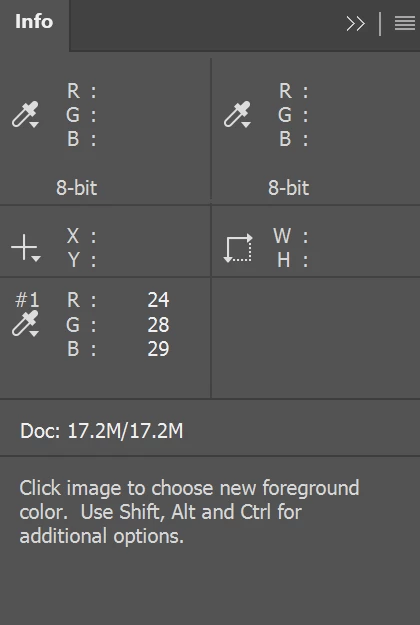
The #1 and #2 samples that I selected are meant to show two sets of numbers in each RGB section allowing me to make adjustments s to one side. I am only getting one. 

I have tried resetting preferences, reinstalling Photoshop, doing a system restore. I am using a surface book 2 (not using the touchscreen section, just using as a regular laptop) 


Does anyone have any suggestions?


Thank you for your help 


Jackie

3 replies

Michael Bullo
Community Expert
Community Expert
November 4, 2020

Hi Jackie. I'm not 100% clear on your issue. If I understand correctly it seems that you are expecting two Colour Samples to be displayed within the Info panel yet are only seeing one. Can you please confirm that you have placed two Colour Samples on your document. Can you do this in a new document? Cheers.

Jackie_b123
Participating Frequently
November 4, 2020

HI Micheal, 


I have placed one colour sample. It should be showing two sets of numbers under RGB allowing me to adjust. I am only getting one. 

Should look like 


R: 24/ 29

G: 28/31

B: 29/32


Thank you 


Jackie

Michael Bullo
Community Expert
Community Expert
November 4, 2020

Got it. Thanks.

JJMack
Community Expert
Community Expert
November 3, 2020

What can you tell us about your software.  On Windows 10 withe Photoshop 2021 version 22 with an RGB mode document this is what I see. 

JJMack
Jackie_b123
Participating Frequently
November 3, 2020
Hello,

I have just updated to Windows 10, using Photoshop 2021, RGB colour mode.

Thanks

Jackie
davescm
Community Expert
Community Expert
November 3, 2020

Click at the top right of the info panel and choose Panel options. It looks like you may have "Always show composite color values" checked. If so, uncheck it.


Dave

Jackie_b123
Participating Frequently
November 3, 2020
Hi Dave,

Thank you for your message. I don't have this checked, I was looking into
that yesterday.

[image: image.png]

Can you think of any other things it could be?

Thank you

Jackie