Participant
May 15, 2018
Question

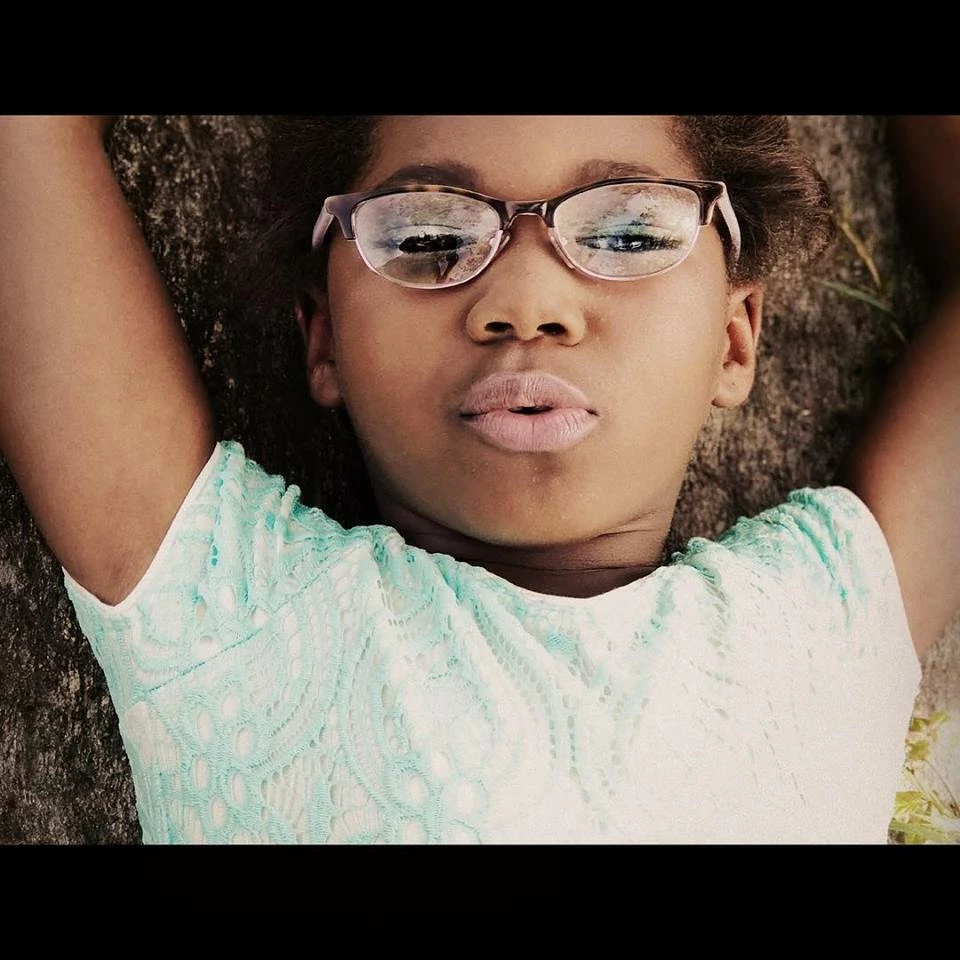
Eye Glass Glare

  • May 15, 2018
  • 2 replies
  • 790 views

Is there an easy way to remove the glare from this photo?  I'm using Photoshop 15 still learning.  Thanks!

    This topic has been closed for replies.

    2 replies

    davescm
    Community Expert
    Community Expert
    May 15, 2018

    Hi

    If you don't have another image without eyeglasses or reflections, you can attempt o this with the clone stamp tool.
    Clone from areas around the face and use a mask so that the cloning only goes inside the eye glass area.
    You will need to clone the left eye to the right
    I used two layers - one with darken blend mode - which took out teh light reflections
    The second with normal blend mode just to bring in some skin texture

    Dave

    Theresa J
    Community Expert
    Community Expert
    May 15, 2018

    There is no easy way to remove glare like this, unless you have another image without glare to work from. For example, you could take another photo exactly like this one except without the glasses. Then you could place the image of the eyes into this image using a layer mask. Even that process isn't easy if you are a beginner.