
Participant
October 30, 2023
Answered

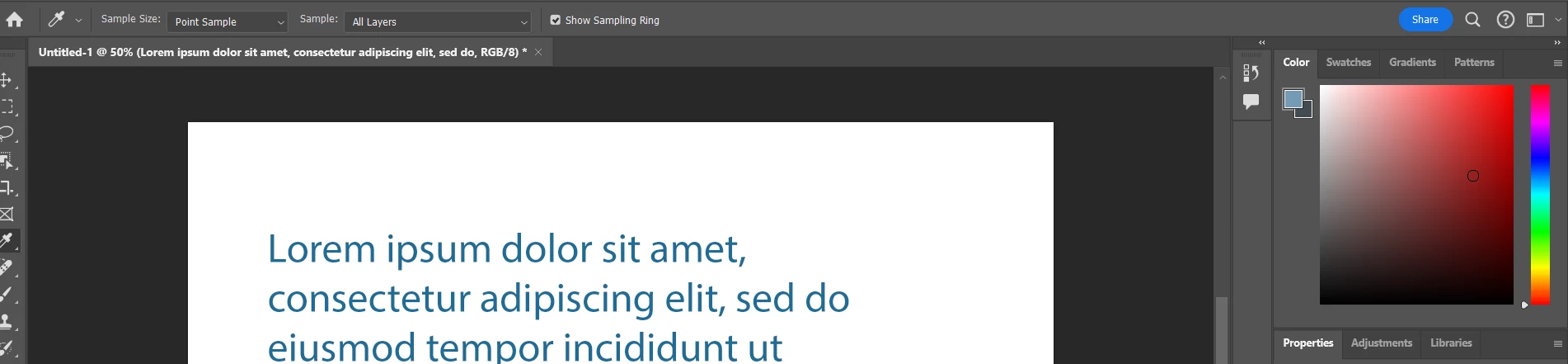
Eyedropper not changing color picker

  • October 30, 2023
  • 2 replies
  • 294 views

When selecting a color via the eyedropper tool, it correctly changes the selected color, but the color picker swatch in the upper right no longer changes.  This started with the beta and I uninstalled and started using the release build, and now it's doing it in the release build as well. I've done a full preferences reset and a full reinstall and it still no longer updates the color picker pallete correctly.


Windows 10 - version 25.1 Release
 

This topic has been closed for replies.
Correct answer Ged_Traynor

@Michael32134320k5vo not sure why Adobe decided to release version 25.1 without fixing that bug, you can revert to version 25.0 until Adobe address the issue

2 replies

Participant
October 30, 2023

Rolling back to 25.0 immediately fixed it.  Appreciate it!

Ged_Traynor
Community Expert
Ged_TraynorCommunity ExpertCorrect answer
Community Expert
October 30, 2023

@Michael32134320k5vo not sure why Adobe decided to release version 25.1 without fixing that bug, you can revert to version 25.0 until Adobe address the issue