Participant
August 4, 2016
Answered

face detection? photoshop script

  • August 4, 2016
  • 3 replies
  • 5126 views

Hello,

I'm exploring possibility of auto face detection and selection using photoshop script. Has anyone tried something similar? Please guide me in right direction.

I need to find and select face(with head) automatically and move in different layer.

http://facedetection.jaysalvat.com/  This website has Jquery. But wanted to do this with photoshop script.

This topic has been closed for replies.
Correct answer JJMack

mahendrak15024337 wrote:

Thanks JJMack!

Let's say if we take out face selection. But is there any photoshop script command/method that detect whether the layer/image has face(s) on it or not?

Thanks again!

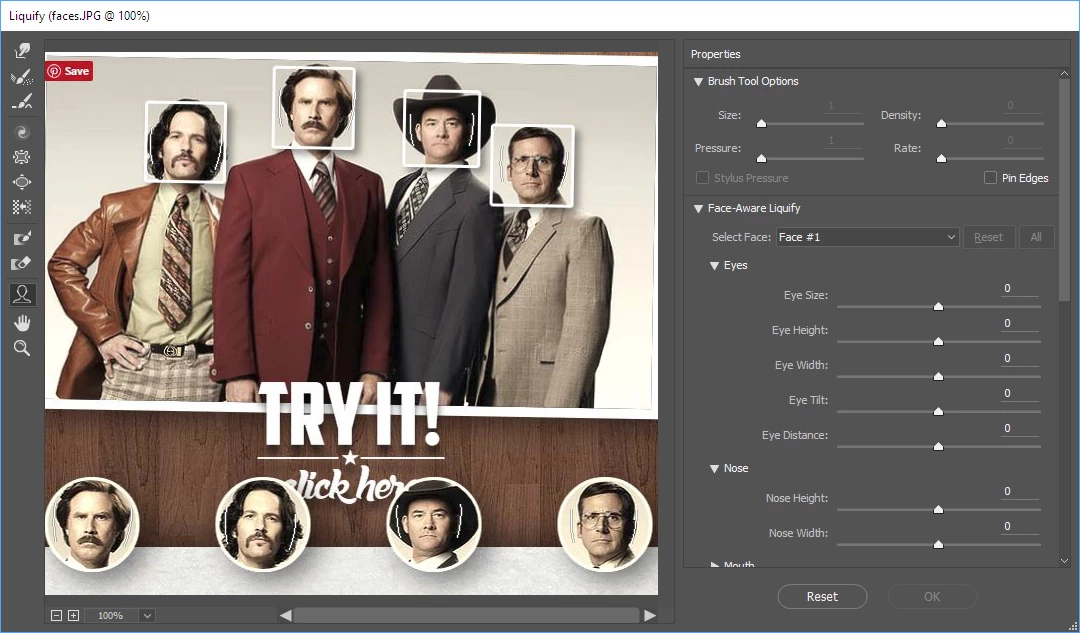
If you leave out face detection how would one know if there is a face or not in a layer.  Even Adobe Face detection does not detect all faces in images.  The new Face Detection in CC 2015.5 liquify had no problem finding all 8 faces in your example.  Yet I have seen portrait images it has failed to identify a face in.  CC 2015.5 has so many issues I do not use it.   Older versions of Photoshop starting with CS6  have face detection in color range to help select skin.

3 replies

DBarranca
Legend
August 10, 2016

Hi,

you can definitely build such a tool – a PS face detection HTML panel – but due to technology constraints the steps are a little bit convoluted.

You'd need to:

1. Write an Adobe Generator plugin to extract the Active Document composite as PNG/JPG (or alternative make your Panel save it programmatically)

2. Load the JPG/PNG into an HTML Panel in PS

3. Use the jQuery plugin in there

The result is an array of coordinates in your Javascript – from that point onwards, you can do whatever you want via scripting, like make a selection duplicate each face in its own layer, etc.

Hope this helps,

Davide Barranca

---

http://htmlpanelsbook.com

Александр23114930h3vg
Participating Frequently
July 25, 2022

Hello dear Davide Barranca
I took your advice
Everything works fine in the browser for me, but when I create a plugin in UXP DevTools
I get an error jQuery    r.getClientRects is not a function


<!DOCTYPE html>
<html>
<head>
  <script src="jquery-3.2.1.min.js"></script>
  <script src="jquery.facedetection.min.js"></script>
  <script src="index.js"></script>      
</head>
<style>
  body {
    color: white;
    padding: 0 16px;
  }
  li:before {
    content: '• ';
    width: 3em;
  }

</style>
<body>
  <img id="picture" src="face.png">
</body>
<script>
  $('#picture').faceDetection({
      complete: function (faces) {
          console.log(faces);
      }
  });   
</script>
</html>
Stephen Marsh
Community Expert
Community Expert
August 8, 2016

Forgetting Photoshop detecting faces for this example, however if this metadata was in the image from another product (Apple Photos, Google Picasa etc) then one could potentially do something with the face metadata from Bridge or Photoshop.

Here is some metadata exported from Apple Photos, the image is width is 2448 and the height is 3264:

<mwg-rs:Type>Face</mwg-rs:Type>
<mwg-rs:Area rdf:parseType="Resource">
<stArea:y>0.493500</stArea:y>
<stArea:w>0.178000</stArea:w>
<stArea:x>0.454000</stArea:x>
<stArea:h>0.237000</stArea:h>
<stArea:unit>normalized</stArea:unit>

Off hand I am not sure how one would translate the normalized X/Y/W/H coordinates back into pixels.

JJMack
Community Expert
Community Expert
August 5, 2016

A couple of Photoshop features use face detection.  However there is no select faces feature that I know of.

JJMack
Participant
August 5, 2016

Thanks JJMack!

Let's say if we take out face selection. But is there any photoshop script command/method that detect whether the layer/image has face(s) on it or not?

Thanks again!

JJMack
Community Expert
JJMackCommunity ExpertCorrect answer
Community Expert
August 5, 2016

mahendrak15024337 wrote:

Thanks JJMack!

Let's say if we take out face selection. But is there any photoshop script command/method that detect whether the layer/image has face(s) on it or not?

Thanks again!

If you leave out face detection how would one know if there is a face or not in a layer.  Even Adobe Face detection does not detect all faces in images.  The new Face Detection in CC 2015.5 liquify had no problem finding all 8 faces in your example.  Yet I have seen portrait images it has failed to identify a face in.  CC 2015.5 has so many issues I do not use it.   Older versions of Photoshop starting with CS6  have face detection in color range to help select skin.

JJMack