
Participating Frequently
December 11, 2012
Question

Fail to install 13.0.2 update (HiDPI) for Photoshop CS6

  • December 11, 2012
  • 7 replies
  • 21367 views

Hello everyone,

I have been experiencing problems installing the update 13.0.2 for Photoshop CS6 on my Macbook pro retina. I was waiting for this update for quite a long time, since photoshop looked all blurry and pixelated on the retina display (At retina scaling). First of all I would like to thank adobe for making this update, I really believe it's taking the whole experience to a next level. So, Thank you Adobe .

Here's my problem :

First, When trying to update with Adobe Application Manager, it says that everything is up to date. I keep refreshing but nothing comes up ...

So i downloaded the update from here :

http://www.adobe.com/support/downloads/detail.jsp?ftpID=5448

And when I try to install it I get this :
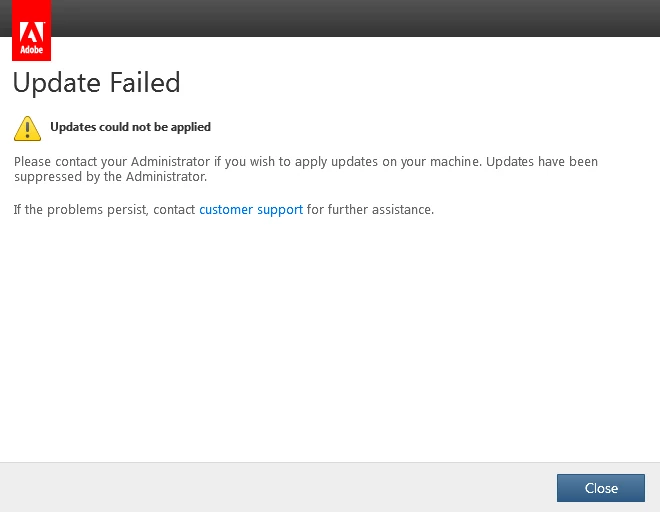
PS : I did the 13.0.1 update and i worked fine.

Can anyone help please ?

Thank you !

This topic has been closed for replies.

7 replies

February 28, 2013

Not sure if this was solved for you, but this is what I did...

In terminal...

cd /Library/Application Support/Adobe/AAMUpdaterInventory/1.0/

In there you'll see a file called: "AdobeUpdaterAdminPrefs.dat"

You may need to change the permissions...

sudo chmod 666 AdobeUpdaterAdminPrefs.dat

[ENTER YOUR PASSWORD WHEN PROMTED]

then ...

vim AdobeUpdaterAdminPrefs.dat and change the 1 to 0 between the word suppressed, like this...

<?xml version="1.0" encoding="UTF-8" standalone="yes"?>

<Preferences>

    <Suppressed>0</Suppressed>

Then kill all adobe software, relaunch photoshop and go to Help>Update. Shouldn't greyed about anymore.

Does this help?

Participant
December 12, 2012

I contacted Adobe Support Chat, and after troubleshooting for 20 min, a re-installation of Photoshop CS6 did the trick. On MBP Retina.

Participant
December 11, 2012

I had success by uninstalling Application Manager and uninstalling Illustrator. Then installing the latest Java Runtime for Mac OS X, reinstalling Applicaation Manager, then reinstalling Illustrator from Application Manager. Not sure what the exact culprit was, but I didn't want to have to do one at a time to narrow it down. Rather just do it all then retry. Worked out for me.

Participating Frequently
December 12, 2012

Reinstalling everything did not work for me ... :/

Participant
December 12, 2012

Eric, before that she had me rename my Adobe Extension manager CS6 folder to Old Adobe Ext Manager.. then installed the new versions (which was not needed). Then i reinstalled Photoshop.

Participant
December 11, 2012

I really can't believe Adobe hasn't yet shed some light on these installation issues. This is a brand new MacBook Retina, OS X is up-to-date, Photoshop is updated, everything functions except for that bloody update, which I've really been looking forward to these past couple of months! Photoshop has been unbearable to work with due to that resolution change.

It should probably be noted that I've tried everything from re-installing the program to downloading it with the App Manager to manual update.

By the way, Photoshop doesn't seem to be able to check for updates if I click the Help-button and bring down the drop-down menu. It just says "Update..." in gray lettering as if that option isn't available.

Participant
December 11, 2012

"Updates have been suppressed by administrator"

This message appears when administrator has disabled updates on your machine in enterprise scenario.  Reinstalling Adobe application manager would not fix this issue.

Refer this page for more details:

http://helpx.adobe.com/creative-suite/kb/disable-auto-updates-application-manager.html

JJMack
Community Expert
Community Expert
December 11, 2012

IS your OS up to date


SYSTEM REQUIREMENTS

This update is applicable to all language versions of Photoshop CS6.
Mac OS X v10.6 64-bit - 10.8 64-bit

JJMack
Was DYP
Inspiring
December 11, 2012

Is your Adobe Application Manager up to date?

Participating Frequently
December 11, 2012

My Adobe application manager is Version 6.0.335.0

I guess it's the last one. (redownloading it now anyways)

Was DYP
Inspiring
December 11, 2012
Participating Frequently
December 11, 2012

Something interesting came up ...

I wanted to try reinstalling photoshop cs6. But after UNinstalling, i ran the update again out of curiosity.. And i showed the exact same error.

Same with the 13.0.1 ! So basically, i get the same error even photoshop is not installed on my computer !

What does that mean ? Does it mean that the updater can't find photoshop ? If so, why would the 13.0.1 update work (When photoshop installed) ?

Very confusing.

Participating Frequently
December 11, 2012

Same problem here.