
Participant
April 14, 2023
Answered

failed to load images to photoshop for editing.

  • April 14, 2023
  • 3 replies
  • 1645 views

Hi,

while tring to load images (jpg, tiff, any ) to photoshop for editing on Win10 PC, the application stuck and screen become flashing full white and full black alternately.

Any idea what the main cause this problem ??

This topic has been closed for replies.
Correct answer Ged_Traynor

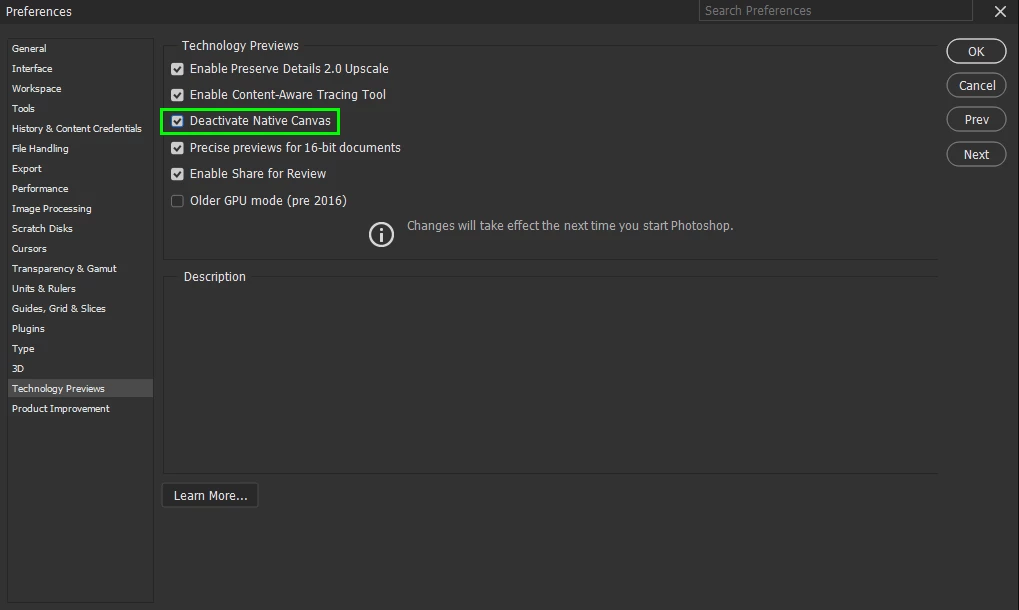
@Yossi Dror @Elaine29409265zbfx go to Edit > Preferences > Technology Previews and enable this option, then restart Photoshop
3 replies

Participant
April 14, 2023

I am experiencing the same issue. Because of this problem, I can no longer use Photoshop.

Ged_Traynor
Community Expert
Community Expert
April 15, 2023

@Sandra294100715tlc did you do what I suggested, enable Deactivate Native Canvas and restart Photoshop

Ged_Traynor
Community Expert
Ged_TraynorCommunity ExpertCorrect answer
Community Expert
April 14, 2023

@Yossi Dror @Elaine29409265zbfx go to Edit > Preferences > Technology Previews and enable this option, then restart Photoshop

Participant
April 14, 2023

Thank you! It fixed the problem. 🙂

Ged_Traynor
Community Expert
Community Expert
April 14, 2023

You're welcome 😀

Participant
April 14, 2023

I am having the same problem. I can't use Photoshop anymore because of this issue.