
Participating Frequently
August 12, 2019
Question

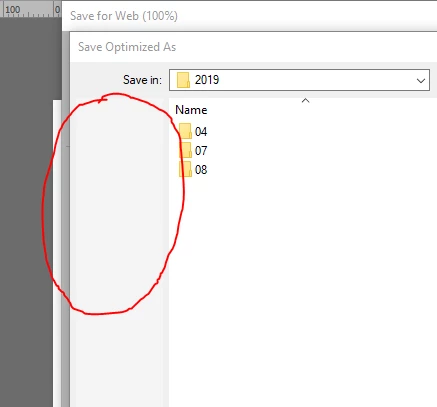
Favorites folders don't show up in "Save for Web"

  • August 12, 2019
  • 3 replies
  • 862 views

Hi,

When I do a "Save for web" (which I do often), by newly installed Phtoshop CC 2019 doesn't no show my favorites folders like it used to in the side panel (I do have them created in Windows). any thoughts on how I can get them back?

Thanks...
This topic has been closed for replies.

3 replies

Participating Frequently
August 17, 2019

Ok - first off - I'm an idiot. I kept seeing the button to call the answer the "correct answer", and thought that was the correct answer label. Lol!  It was infuriating me for some reason. My apologies...

And to be clear - If I do a regular "Save As..." - I do see the Microsoft list of favorite folders. It's only when I do a "Save for web..." that I do not. Even if that is an antiquated way of doing things - I like it. I was just hoping to get i back...

Windows 10 Pro ver. 1903 BTW.

Participant
June 26, 2020

I noticed this problem in Adobe as well as other applications. I suspected it was not an Adobe issue, it was a Mac Issue. I looked on the Mac forums and sure enough, other people were reporting this issue in the finder as well. The soultion that worked for me was going to the Library (hold down the option buttion while using the GO command in the finder menu) Open preferences, and find the com.apple.finder.plist item and drag it out to your desktop. Restart and see if the problem goes away (preferences in the finder will revert to factory settings, so you may have to reset them)  It worked to restore favorites in the sidebar of all my programs. If this does not work for you you can place the plist file back in the library and restart to restore your settings

Conrad_C
Community Expert
Community Expert
June 26, 2020

Just noting for anyone who reads the above reply that the .plist solution won't work in this case because the original poster is using Windows, not macOS.

Nancy OShea
Community Expert
Community Expert
August 12, 2019
Nancy O'Shea— Product User & Community Expert
Participating Frequently
August 16, 2019

Not sure why this keeps getting marked as the correct answer. It is an answer for sure - but it's certainly not addressing my original question.

I've encountered this same issue while while doing a "Save As" in other Adobe products (Acrobat for example), so while the above poster's opinion may be that I should save things a different way than I'm currently doing it - it's irrelevant to my question.

Nancy OShea
Community Expert
Community Expert
August 16, 2019

You're missing the forest for the trees.    Whichever folder you saved to last time is the default location for saving this time,  unless you Restore Preferences to the factory defaults.

Nancy O'Shea— Product User & Community Expert
Nancy OShea
Community Expert
Community Expert
August 12, 2019

I don't recommend using legacy Save For Web anymore except for animated GIFs.  For all other practical purposes, you should be using the latest File > Export > Export As which supports JPG, PNG, GIF and SVG files.

I'm on Windows 10 and the default location is Desktop or the last folder to which you saved an image.

Nancy O'Shea— Product User & Community Expert