Participant
May 27, 2022
Answered

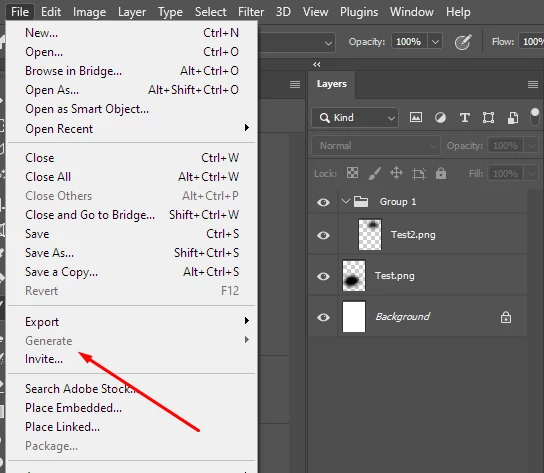
File>Generate> greyed out

  • May 27, 2022
  • 1 reply
  • 4481 views

The  File>Generate option is greyed out - I'm trying to access Generate>Image Assets.


  • I'm using the latest version of Photoshop with Windows 10 Pro.
  • I've created a new document with a few layers using the suffix '.png'.
  • I'm using RGB / 8-bits and I've tried swithcing to 16 bits.
  • I've also restarted my computer etc.


It seems no matter what I try, the Generate option remains greyed out.


Any thoughts on what's causing it? Thanks!
 

Correct answer Stephen Marsh

It must be enabled under Preferences > Plugins > Enable Generator checkbox ticked.

1 reply

Stephen Marsh
Community Expert
Stephen MarshCommunity ExpertCorrect answer
Community Expert
May 27, 2022

It must be enabled under Preferences > Plugins > Enable Generator checkbox ticked.

Participant
May 27, 2022

That was it! Thanks so much. I have no idea why it apparently turned itself off...