Participant
June 22, 2022
Answered

File sizes change

  • June 22, 2022
  • 2 replies
  • 188 views

Before the recent updates, if you copied all or part of a photo (either in photoshop or from a pdf or elsewhere) then picked new file. The first choice would be the option that would match that file size (pixel width and height). But now it does not do that like it used to do.


So now I have to manually input those sizes, even though there is a choice to pick my size. But when I click on that, it opens up a generic size that is not it.


Please fix this.
 

This topic has been closed for replies.
Correct answer J E L

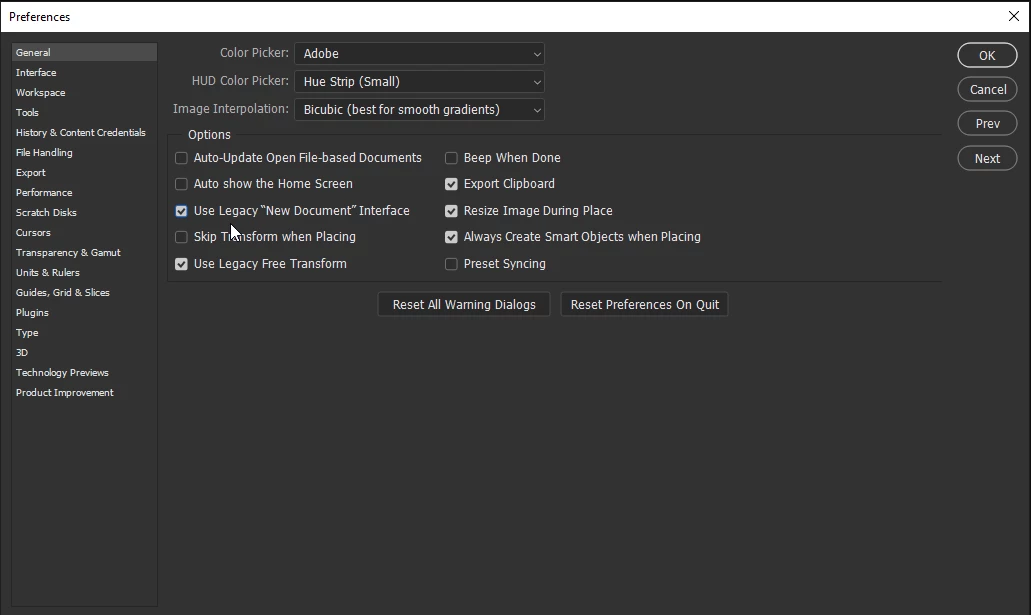
Hi @MarkAEades, Please try checking Use Legacy "New Document" Interface in Preferences on the General tab. Is it working now? Let us know.


2 replies

Participant
June 22, 2022

Yes, that worked. Thanks.

J E L
Community Expert
Community Expert
June 22, 2022

Terrific! Thanks for letting us know. 

J E L
Community Expert
J E LCommunity ExpertCorrect answer
Community Expert
June 22, 2022

Hi @MarkAEades, Please try checking Use Legacy "New Document" Interface in Preferences on the General tab. Is it working now? Let us know.