
Participant
August 9, 2013
Respondido

Fill not working in Photoshop CC - Windows 7

  • August 9, 2013
  • 4 respostas
  • 30117 Visualizações

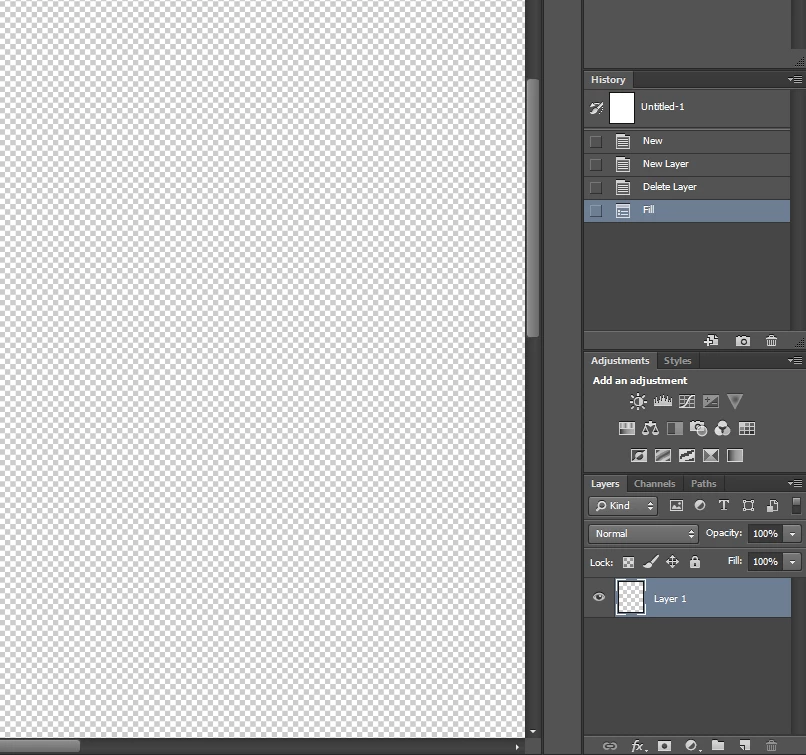
Suddenly having an issue where the "Fill" command is not working. It doesn't matter if I use Shift+Backspace or Shift+F5 or by going to Edit>Fill. It goes through the motions and the Fill action is recorded in the history panel, but the layer is not filled. The only way I've successfully filled is with the Paint Bucket, and that's just not as convenient.

Screenshot:
System details:

Windows 7 Professional x64 Service Pack 1

Photoshop CC 14.0 x64

Any help is greatly appreciated!

Thanks.

Este tópico foi fechado para respostas.
Melhor resposta por Ronald Keller

Make sure Preserve Transparency is not ticked.

4 Respostas

Known Participant
August 21, 2020

Same problem for me with Mac OS

Participant
February 9, 2023

Same problem I've just encountered ! I was using it successfully on some images when it suddenly stopped on the next one I opened. Went through the same exact steps but poof, now it's just drawing black blotches on my photo. Meh

Participant
April 28, 2020

The same here, with Mac OS... no answer.


davidgaylord
Participant
January 20, 2017

where is preserve transparency located?

davescm
Community Expert
Community Expert
January 20, 2017

davidgaylord wrote:

where is preserve transparency located?

In the fill dialogue

Dave

Participant
May 20, 2021

My fill dialogue is not opening, as i've masked an image and now trying to fill, 

Legend
August 9, 2013

Make sure Preserve Transparency is not ticked.

Participant
August 9, 2013

That did it! Thanks so much! I thought I had tried that already, but it's definitely working now.

Legend
August 9, 2013

You are welcome!