Answered
Fill Tool
I don't have a fill tool is this normal? But I don't know how to fill certain objects in
@
I don't have a fill tool is this normal? But I don't know how to fill certain objects in
@
Hi Craig
If you are trying to fill a selection then you can use Edit > Fill (or key Shift F5)
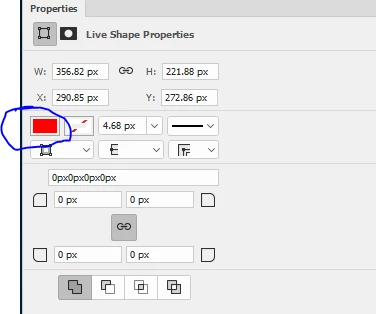
If you are trying to fill a shape (created with the shape tools) go to the properties panel and click on the fill square
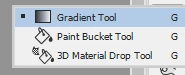
If you are looking for the paint bucket tool then in the toolbar go to the gradient tool and click and hold. The other options that share the same space should appear
Dave
Already have an account? Login
Enter your E-mail address. We'll send you an e-mail with instructions to reset your password.
 AdChoices