Participant
February 23, 2017
Answered

Filling Selected Area on a Layer Problem

  • February 23, 2017
  • 1 reply
  • 444 views

Hello

I am working with Photoshop CS6.
Since a few days I have the problem to fill a selected area properly.
For example I have a square on Layer 1.
I then create Layer 2 above Layer 1.
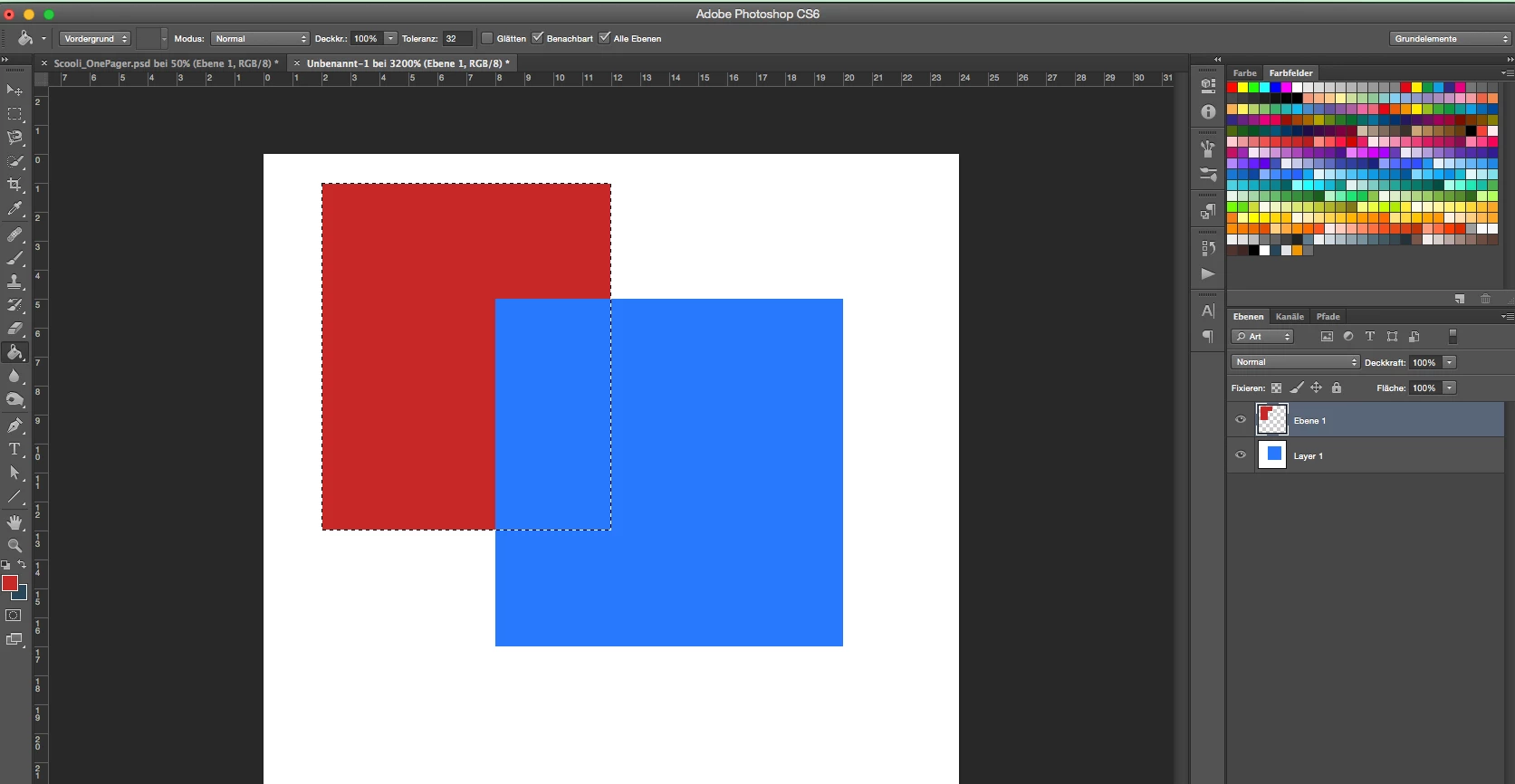
While I am on Layer 2 I select an area which overlaps the square on Layer 1 and I try to fill it.
But it doesn't work properly and only fills the part which doesn't overlap the square on Layer 1.

I am definitely on Layer 2.

Is there something I might have changed in the settings?

Here is screenshot of the problem:
Thanks!

This topic has been closed for replies.
Correct answer davescm

You have used the paint bucket to fill, and you have it set to all layers

Uncheck all layers, or better still use Shift+F5 to fill

Dave

1 reply

davescm
Community Expert
davescmCommunity ExpertCorrect answer
Community Expert
February 23, 2017

You have used the paint bucket to fill, and you have it set to all layers

Uncheck all layers, or better still use Shift+F5 to fill

Dave

Participant
February 23, 2017

Thanks a lot! Learned something new and the problem is solved!

davescm
Community Expert
Community Expert
February 23, 2017

You're welcome

Dave