
Participant
May 17, 2020
Answered

filter gallery

  • May 17, 2020
  • 4 replies
  • 1521 views

Photoshop 20 and photo rgb 8 bit.

I can't use any filter in filter gallery, though I can open filter gallery and all filter seems active when I try to use one moving all setting sliders nothing change on the preview and if I give ok nothing is applied to the photo. Neither in history nor in smart object the filter is displayed. Exactly as if I hadn't done anything.

thanks for your help.

Luca
This topic has been closed for replies.
Correct answer Jeff Arola

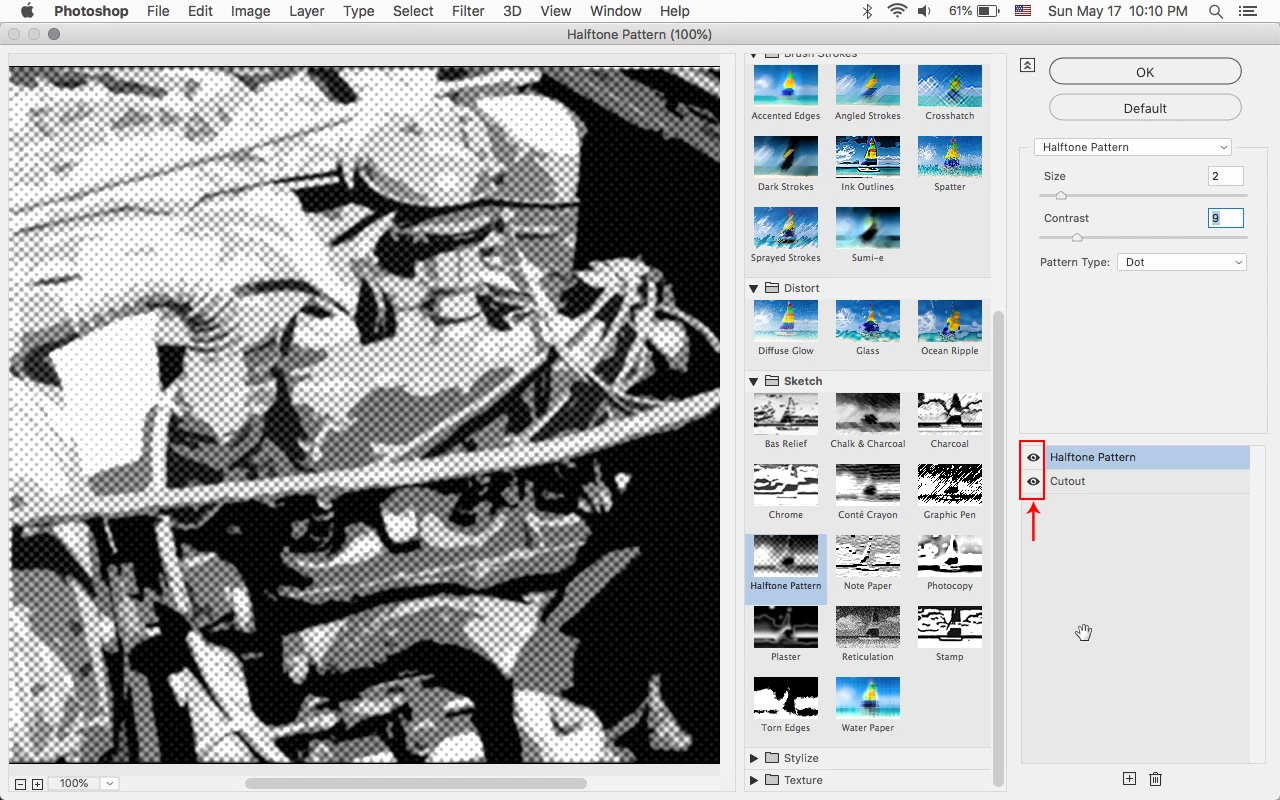
Make sure the Eye is displayed next to the filter so you can see a preview.


4 replies

Participant
November 17, 2020

thanks man, that did the trick for me. 

Stitch762Author
Participant
May 18, 2020

Thanks so much Jeff


this was the problem, I was not aware of this possibility and it was actually completely off. I thought it was a small problem but I didn't really know where to look.
Thanks to all for yours replies


Participating Frequently
August 3, 2020

OMG thank you!!! I've been tearing my hair out!  Why would they make the default eye off?! I have never seen it like that before and before CC 2020 I don't think that was a thing? Phew!  thanks 😄

c.pfaffenbichler
Community Expert
Community Expert
May 18, 2020

Could you please post a screenshot with the pertinent Panels (Toolbar, Layers, Channels, Options Bar, …) visible? 

Jeff Arola
Community Expert
Jeff ArolaCommunity ExpertCorrect answer
Community Expert
May 18, 2020

Make sure the Eye is displayed next to the filter so you can see a preview.


Participating Frequently
August 3, 2020

Thanks Jeff - spot on!!!!