
Participant
May 22, 2019
Answered

Filter Gallery white

  • May 22, 2019
  • 1 reply
  • 16394 views

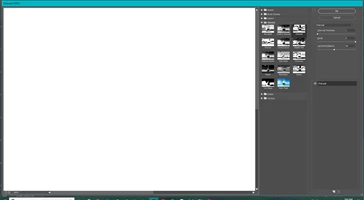
When I select filter gallery, then choose a filter, the preview screen is white. I have the filter enabled. When I toggle the eye off, I can see the original picture. When I toggle the eye on, I just see a white screen. All of the answers that I have read on this forum say to enable that eye, but it is enabled. I have included a screen shot.
    This topic has been closed for replies.
    Correct answer davescm

    Hi

    A couple of things to check.

    1. Make sure, before going into filter gallery, that in the layers panel you have a layer selected with the image on it that you want to filter

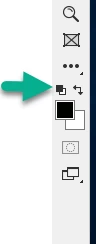
    2. Make sure , before going into filter gallery that, in the toolbar, your foreground and background colours are not both set to white. Set them to black and white by clicking on the small squares arrowed below.

    Dave

    1 reply

    John T Smith
    Community Expert
    Community Expert
    May 22, 2019

    Please post the name of the program you use so a Moderator may move this message to that forum

    -A program would be Photoshop or Dreamweaver or Muse or Premiere Pro or ???

    Participant
    May 22, 2019

    Photoshop CC

    [Moved... Here is the list of all Adobe forums... https://forums.adobe.com/welcome]

    davescm
    Community Expert
    davescmCommunity ExpertCorrect answer
    Community Expert
    May 22, 2019

    Hi

    A couple of things to check.

    1. Make sure, before going into filter gallery, that in the layers panel you have a layer selected with the image on it that you want to filter

    2. Make sure , before going into filter gallery that, in the toolbar, your foreground and background colours are not both set to white. Set them to black and white by clicking on the small squares arrowed below.

    Dave