Inspiring
June 2, 2022
Answered

Find crop aspect ratio from selection or image? [SOLVED]

  • June 2, 2022
  • 3 replies
  • 2160 views

Is there a way (maybe a workaround?) to find the aspect ratio of a selection or an image?

Let's say I have a document and inside that document I have a photo. I would like to select that photo and using that selection, being able to automatically know what the aspect ratio is so I can then create a crop preset based on that.


Sure, I could use the size of the image as my W and H, but I was thinking if it was possible to have it done (kinda) automatically and also, instead of having an aspect ratio of 1489 by 933, I would have something a bit simpler (lower numbers the same way we have 16:9, 4:5, etc).

This topic has been closed for replies.
Correct answer Stephen Marsh

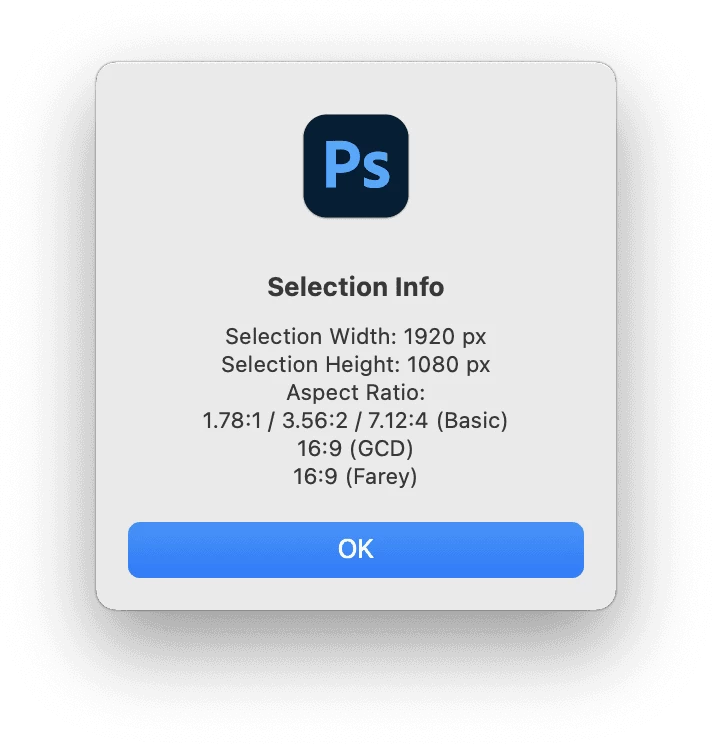
@TiagoRocha – Further to my previous reply, I have created an "offshoot" of the previously mentioned script to report on the active selection ratio:
 

/*
Photoshop Selection Info - Aspect Ratio.jsx
Stephen Marsh - v1.0, 3rd June 2022
*/

#target photoshop

var savedRuler = app.preferences.rulerUnits;
app.preferences.rulerUnits = Units.PIXELS;
var selectionBounds = activeDocument.selection.bounds;
/*
var selectionLeft = selectionBounds[0].value;
var selectionTop = selectionBounds[1].value;
var selectionRight = selectionBounds[2].value;
var selectionBottom = selectionBounds[3].value;
var selectionXCenter = (selectionBounds[0].value + selectionWidth) / 2;
var selectionYCenter = (selectionBounds[1].value + selectionHeight) / 2;
*/
var selectionWidth = selectionBounds[2].value - selectionBounds[0].value;
var selectionHeight = selectionBounds[3].value - selectionBounds[1].value;
var r = gcd(selectionWidth, selectionHeight);
var ratio = selectionWidth / selectionHeight;
alert(
    'Selection Info' + '\n' +
    'Selection Width: ' + selectionWidth + ' px' + '\n' +
    'Selection Height: ' + selectionHeight + ' px' + '\n' +
    'Aspect Ratio:' + '\n' + ratio.toFixed(2) + ':1' + ' / ' + ratio.toFixed(2) * 2 + ':2 / ' + ratio.toFixed(2) * 4 + ':4' + ' (Basic)' + '\n' +
    selectionWidth / r + ':' + selectionHeight / r + ' (GCD)' + '\n' +
    aspect_ratio(selectionWidth / selectionHeight, 50).toString().replace(',', ':') + ' (Farey)'
);
app.preferences.rulerUnits = savedRuler;


function gcd(a, b) {
    /* https://stackoverflow.com/questions/1186414/whats-the-algorithm-to-calculate-aspect-ratio-i-need-an-output-like-43-169 */
    return (b == 0) ? a : gcd(b, a % b);
}

function aspect_ratio(val, lim) {
    var lower = [0, 1];
    var upper = [1, 0];
    while (true) {
        var mediant = [lower[0] + upper[0], lower[1] + upper[1]];

        if (val * mediant[1] > mediant[0]) {
            if (lim < mediant[1]) {
                return upper;
            }
            lower = mediant;
        } else if (val * mediant[1] == mediant[0]) {
            if (lim >= mediant[1]) {
                return mediant;
            }
            if (lower[1] < upper[1]) {
                return lower;
            }
            return upper;
        } else {
            if (lim < mediant[1]) {
                return lower;
            }
            upper = mediant;
        }
    }
}


  1. Copy the code text to the clipboard
  2. Open a new blank file in a plain-text editor (not in a word processor)
  3. Paste the code in
  4. Save the text file as .txt
  5. Rename the file extension from .txt to .jsx
  6. Install or browse to the .jsx file to run:

https://prepression.blogspot.com/2017/11/downloading-and-installing-adobe-scripts.html#Photoshop

 

3 replies

c.pfaffenbichler
Community Expert
Community Expert
June 3, 2022

Could you elaborate and give examples/screenshots? 

Why do you need to create a Preset, wouldn’t Image > Crop work just as well when you have a Selection anyway? 

Inspiring
June 3, 2022

For example, let's say I just created my official website using WordPress and installed a particular theme. Each theme has different sizes when it comes to post thumbnails/featured images. So if I'm creating new posts on a regular basis and I use stock images, for example, I want to be able to create a crop preset so I can always crop those images to fit the ratio of my Wordpress theme.


So I would just take a screenshot of my website's front page with all the post thumbnails, and then paste it into Photoshop, create a selection around one of the thumbnails and create the crop preset.


Hope it makes sense...

Stephen Marsh
Community Expert
Community Expert
June 3, 2022

The following script that I created is for a document, not a selection, however it is simple enough to modify. Three different aspect ratio formulas are used, they don't always agree!


https://github.com/MarshySwamp/Photoshop-Document-Dimensions---MP-Value---Aspect-Ratio/blob/main/Photoshop%20Document%20Dimensions%20-%20MP%20Value%20-%20Aspect%20Ratio.jsx


Stephen Marsh
Community Expert
Stephen MarshCommunity ExpertCorrect answer
Community Expert
June 3, 2022

@TiagoRocha – Further to my previous reply, I have created an "offshoot" of the previously mentioned script to report on the active selection ratio:


/*
Photoshop Selection Info - Aspect Ratio.jsx
Stephen Marsh - v1.0, 3rd June 2022
*/

#target photoshop

var savedRuler = app.preferences.rulerUnits;
app.preferences.rulerUnits = Units.PIXELS;
var selectionBounds = activeDocument.selection.bounds;
/*
var selectionLeft = selectionBounds[0].value;
var selectionTop = selectionBounds[1].value;
var selectionRight = selectionBounds[2].value;
var selectionBottom = selectionBounds[3].value;
var selectionXCenter = (selectionBounds[0].value + selectionWidth) / 2;
var selectionYCenter = (selectionBounds[1].value + selectionHeight) / 2;
*/
var selectionWidth = selectionBounds[2].value - selectionBounds[0].value;
var selectionHeight = selectionBounds[3].value - selectionBounds[1].value;
var r = gcd(selectionWidth, selectionHeight);
var ratio = selectionWidth / selectionHeight;
alert(
    'Selection Info' + '\n' +
    'Selection Width: ' + selectionWidth + ' px' + '\n' +
    'Selection Height: ' + selectionHeight + ' px' + '\n' +
    'Aspect Ratio:' + '\n' + ratio.toFixed(2) + ':1' + ' / ' + ratio.toFixed(2) * 2 + ':2 / ' + ratio.toFixed(2) * 4 + ':4' + ' (Basic)' + '\n' +
    selectionWidth / r + ':' + selectionHeight / r + ' (GCD)' + '\n' +
    aspect_ratio(selectionWidth / selectionHeight, 50).toString().replace(',', ':') + ' (Farey)'
);
app.preferences.rulerUnits = savedRuler;


function gcd(a, b) {
    /* https://stackoverflow.com/questions/1186414/whats-the-algorithm-to-calculate-aspect-ratio-i-need-an-output-like-43-169 */
    return (b == 0) ? a : gcd(b, a % b);
}

function aspect_ratio(val, lim) {
    var lower = [0, 1];
    var upper = [1, 0];
    while (true) {
        var mediant = [lower[0] + upper[0], lower[1] + upper[1]];

        if (val * mediant[1] > mediant[0]) {
            if (lim < mediant[1]) {
                return upper;
            }
            lower = mediant;
        } else if (val * mediant[1] == mediant[0]) {
            if (lim >= mediant[1]) {
                return mediant;
            }
            if (lower[1] < upper[1]) {
                return lower;
            }
            return upper;
        } else {
            if (lim < mediant[1]) {
                return lower;
            }
            upper = mediant;
        }
    }
}


  1. Copy the code text to the clipboard
  2. Open a new blank file in a plain-text editor (not in a word processor)
  3. Paste the code in
  4. Save the text file as .txt
  5. Rename the file extension from .txt to .jsx
  6. Install or browse to the .jsx file to run:

https://prepression.blogspot.com/2017/11/downloading-and-installing-adobe-scripts.html#Photoshop


Inspiring
June 3, 2022

Amazing @Stephen Marsh ! Thank you so much for those scripts. I just saved both of them 🙂


I have a few questions:

1 - Since this section below is just a comment, I can go ahead and just delete it, right?


/*
var selectionLeft = selectionBounds[0].value;
var selectionTop = selectionBounds[1].value;
var selectionRight = selectionBounds[2].value;
var selectionBottom = selectionBounds[3].value;
var selectionXCenter = (selectionBounds[0].value + selectionWidth) / 2;
var selectionYCenter = (selectionBounds[1].value + selectionHeight) / 2;
*/


2 - From what I saw, the scripts are only showing the information about the ratios available, correct? It's not supposed to perform any action once we hit the OK button, right?


3 - An improvement to the scripts (if that's not much work and you see it as an improvement, of course) would be to have 3 buttons instead of just the OK button. So:

- The OK button would become a Close button instead

- One button could be something like Apply Crop. This would activate the Crop Tool and automatically add that ratio to the W and H fields so the user could automatically see what the numbers are and apply the crop right away

- One button like New Crop Preset. This would activate the Crop Tool, add the numbers to the W and H fields, then would automatically select the New Crop Preset... option from the menu. Then the user would be able to just type a custom name and hit Ok.


Anyway, these scripts alone are already a great help, so I truly appreciate you sharing them and spending the time adapting the original one to my request 🙂

If you believe adding those extra functions would be a good improvement, let me know.


Thanks again for your precious contribution!!!

Bojan Živković11378569
Community Expert
Community Expert
June 3, 2022

There isn't such built in function. The only way I can think of is using script. I am not scripter nor sure it can be done. Wait for @c.pfaffenbichler @Stephen Marsh @Kukurykus @r-bin 

Inspiring
June 3, 2022

Yes, that's what I thought. A script would probably be the best option. It would be great if Photoshop had that implemented with a right click over a selection.

Anyway, Stephen came to the rescue and shared some valuable scripts 🙂

Thanks for tagging those people on your reply!