alicem64450917
Participant
March 8, 2018
Answered

Fond Brouillé et images Transparentes

  • March 8, 2018
  • 1 reply
  • 344 views

Bonjour à tous,

Depuis hier, les documents que j'ouvre sur Photoshop apparaissent avec un fond coloré et brouillé comme ci-dessous (normalement le fond est blanc).

Les photos que j'importe apparaissent également avec des transparences et des fonds colorés.

Savez vous d'où peut venir le problème et comment y remédier ?

Merci d'avance pour votre aide,

Alice

    This topic has been closed for replies.
    Correct answer

    Hi

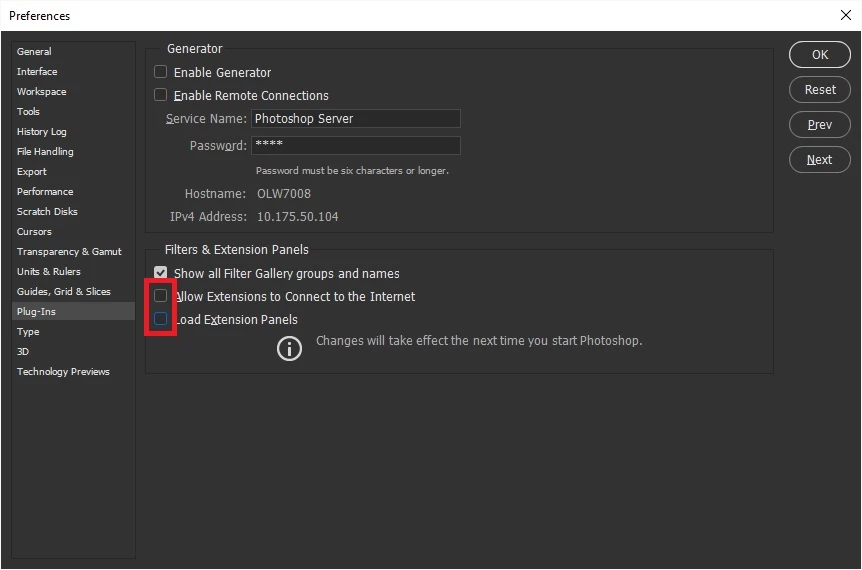
    Are these PNG images and are you using Photoshop CC2018 on a MAC, if so go to Preferences > Plug-ins and deselect these options, restart Photoshop

    1 reply

    Correct answer
    March 8, 2018

    Hi

    Are these PNG images and are you using Photoshop CC2018 on a MAC, if so go to Preferences > Plug-ins and deselect these options, restart Photoshop

    alicem64450917
    Participant
    March 8, 2018

    Thank you very much for your help. I had a call from Adobe at the same time and it is now working.

    Alice

    March 8, 2018

    No worries Alice

    Hopefully there will be a fix for it in the next update