Participant
March 25, 2021
Question

Font adjustments in Photoshop

  • March 25, 2021
  • 2 replies
  • 180 views

Hi, I recently upgraded my version of all the Adobe software I use and I noticed that Photoshop is still lacking something that the others have. As I was waiting for the software to upgrade, I was praying that you would've made this addition.
Please can you tell me whether you will add the same functions for font/character adjustments that we get in Illustrator and InDesign?
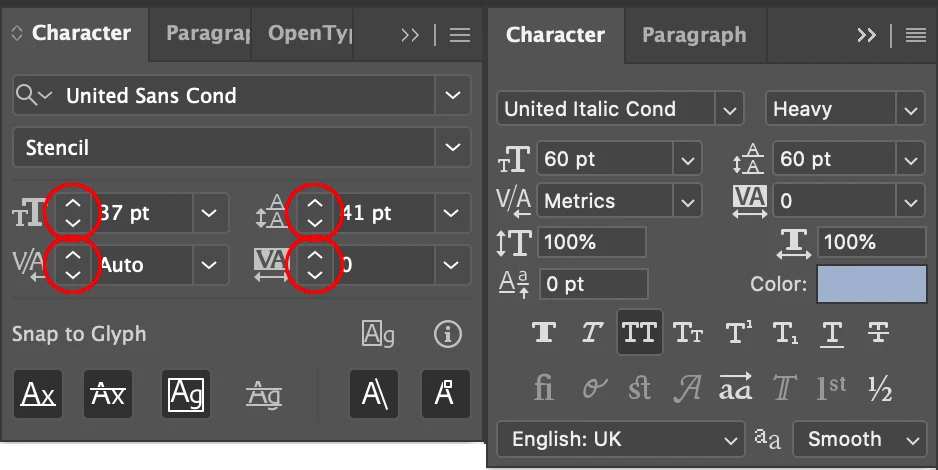
I love the Adobe products, but I hate using text in Photoshop because I have to type in the exact size, leading, kerning etc. instead of being able to click on an arrow to either increase or decrease the amount you want for that font.
See the screenshot I've attached with the two panels.
I've indicated on the Illustrator panel the size adjustment arrows I would love you to include in the next version of Photoshop please.
Many thanks and fingers crossed.
Ian
This topic has been closed for replies.

2 replies

c.pfaffenbichler
Community Expert
Community Expert
March 25, 2021

This is a user Forum, so you are not really addressing Adobe here, even though some Adobe employees thankfully have been dropping by.


Not the same but one can click the entry-field and use the Arrow-keys (with shift pressed for larger jumps). 


jane-e
Community Expert
Community Expert
March 25, 2021

Hi @rox147 


At its core, Photoshop is an image editor with limited text functions. If you want good text control, use Illustrator. If you want amazing text control, use InDesign. Photoshop is not intended for text-heavy documents. There's lots more that is missing.


That being said, click an insertion point in the type-size field and use the up/down arrow keys on your keyboard. Use Shift to go faster.


Feature requests go to the developers here: https://feedback.photoshop.com/. We are users and do not work for Adobe, so we can't change anything.


~ Jane